Three Intuit products regularly appear on the same shortlist, and they are built for three different jobs. QuickBooks Desktop Enterprise is a mature on-premise system with deep inventory capability. QuickBooks Online Advanced is cloud accounting for a growing single company. Intuit Enterprise Suite is a cloud platform with ERP-level multi-entity and dimensional financial management.
The difficulty in an Intuit Enterprise Suite vs QuickBooks comparison is that all three share an interface family and a brand, so the differences look smaller on a screen than they are in practice. What separates them is how much complexity each one can carry before your team starts building workarounds.
The Short Answer
Stay on QuickBooks Online Advanced if you run one company, need one reporting dimension, and close without heavy spreadsheet work. Stay on QuickBooks Desktop Enterprise if serialized or assembly inventory sits at the center of your operation. Move to Intuit Enterprise Suite when you need multiple entities, multiple reporting dimensions, or consolidated visibility that does not depend on a monthly spreadsheet.
That framing holds for most businesses. The complication is that companies rarely sit cleanly in one box, and the cost of staying in the wrong one accumulates quietly rather than announcing itself.
The rest of this piece covers how to tell which of those describes you.
Intuit Enterprise Suite vs QuickBooks: The Comparison Table
|
QuickBooks Desktop Enterprise
|
QuickBooks Online Advanced
|
Intuit Enterprise Suite
|
Deployment
|
On-premise or hosted |
Cloud |
Cloud |
Entities
|
One company file per entity |
More than 200 entities, one login |
Users
|
Up to 40 simultaneous |
Up to 25 |
Scales into the hundreds |
Reporting dimensions
|
Classes and locations |
One dimension |
Up to 20, five levels of hierarchy |
Consolidation
|
Manual, outside the system |
Real time, in the system |
Intercompany eliminations
|
Manual worksheet |
Manual worksheet |
Automatic at transaction level |
Inventory
|
Deepest of the three, Advanced Inventory on Platinum |
Basic |
Standard, no warehouse management |
AI capability
|
None |
Rule-based automation and assistive tools |
Finance, Accounting, Payments and Project Management agents |
Approval workflows
|
Predefined approval rules |
Basic |
Up to five parallel approvers, dimension-triggered |
Payroll and HR
|
Add-on, per-employee fees on Gold and Platinum |
Add-on |
Included in the platform |
Product direction
|
Supported, no new non-Enterprise Desktop versions |
Actively developed |
Where Intuit ships new capability first |
Where QuickBooks Desktop Enterprise Still Wins
Desktop Enterprise remains the strongest inventory product Intuit sells. Advanced Inventory on the Platinum tier handles serialized tracking, bin locations, and assemblies at a depth neither cloud product matches. It supports up to 40 simultaneous users. Role-based permissions are detailed, built from a long list of individual work activities that can be assigned per user. For a manufacturer or distributor whose core constraint is stock, that capability is difficult to replace anywhere in the cloud.
The ground underneath it has been shifting, though. Intuit stopped selling new Pro Plus, Premier Plus, and Mac Plus subscriptions to United States customers after September 2024. Enterprise is now the only Desktop product open to new buyers. Desktop versions also follow a three-year support lifecycle, and support for the 2023 versions ended on 31 May 2026. When support ends the software still opens, but payroll updates, bank feeds, and payment processing stop working.
Pricing has moved as well. Enterprise tiers rose at the start of 2026, and Gold and Platinum customers now carry a per-employee payroll fee charged monthly. That fee applies per company file. For a group running several Desktop files, the structure compounds quickly.
Where QuickBooks Online Advanced Still Wins
Advanced is the right answer for a large number of businesses, and the comparison should say so plainly. It is cloud native, quick to deploy, and familiar to almost any bookkeeper you hire. It supports up to 25 users, automated workflows, and custom role permissions. For a single company with clean reporting requirements, nothing here needs replacing, and moving would add cost without adding capability you would use.
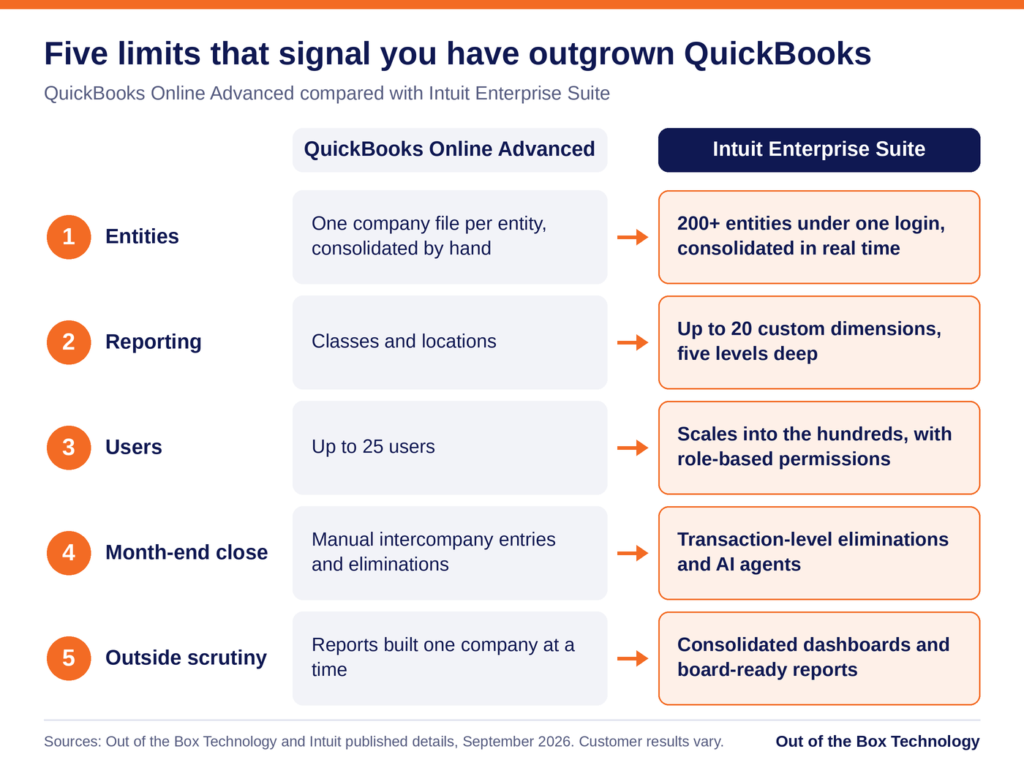
The ceiling is structural rather than a matter of features. Advanced supports one company file per entity and one reporting dimension. A business that needs to see the same revenue by region, by service line, and by customer segment has run out of room. The usual response is an export to a spreadsheet, and that spreadsheet tends to become permanent.
Cost has become part of this conversation too. Intuit has raised QuickBooks Online pricing several times in the past two years, and the Advanced tier absorbed the steepest of those increases in 2026. The price applies per company file. A group running three entities pays it three times over and still consolidates by hand.
What You Are Actually Buying With Intuit Enterprise Suite
Intuit Enterprise Suite is a different category of product rather than a larger version of the other two. A single login covers more than 200 entities with a standardized chart of accounts. Intercompany entries post to both sides and import in bulk, eliminations run automatically at the transaction level, and consolidated financial statements assemble in real time.
Reporting is the other half of the difference. The platform supports up to 20 custom dimensions, each with unlimited values and five levels of hierarchy. Dimensions apply at the transaction line level, including accounts payable and receivable. They also work across entities, so a group can report by region or program across every company at once. Forecasting runs down to the dimension, projecting as far as three years out.
The platform also carries four AI agents covering finance, accounting, payments, and project management, along with approval workflows that can be triggered by dimension. Payroll, HR, payments, bill pay, and project profitability sit inside the same system rather than alongside it.
Why Intuit Enterprise Suite Usually Wins This Comparison
Both QuickBooks products raise a ceiling. They give you more users, more features, and more reporting depth inside the same basic model, where your team still assembles the answers by hand at the end of every month. Intuit Enterprise Suite changes what the system produces on its own, and that difference compounds with every close.
The adoption risk is also lower than the capability level suggests. Moving to NetSuite or Sage Intacct asks your controller to learn an unfamiliar system while still closing the books each month. Moving to Intuit Enterprise Suite asks that same person to learn new capability inside an interface they already know. That is the main reason these implementations run in weeks while traditional ERP projects run in quarters.
Product direction matters more than most comparisons allow for. Intuit now ships new capability into Intuit Enterprise Suite first, including agentic AI, dimensional reporting, consolidated dashboards, and the industry editions. The distance between this platform and the other two widens with each release whether or not you do anything. Payroll, HR, payments, bill pay, and project profitability also sit inside the platform, which usually reduces the number of finance vendors your team manages and the number of integrations somebody has to maintain.
What the Return Data Suggests
There is supporting evidence, with a caveat attached. Forrester Consulting, in a study commissioned by Intuit, projected a 299% three-year return for a composite ten-entity organization, with a range of 128% to 467% across scenarios. Vendor-commissioned research deserves scrutiny, and the width of that range is the useful part. It shows that the return tracks how much manual work your current setup requires rather than how impressive the software is.
The asymmetry is worth naming before you decide. Moving a year early costs you capability you will not fully use yet. Moving a year late usually means re-platforming during an acquisition, an audit, or a support deadline, at the point when your team has the least capacity to absorb it.
The Triggers That Decide It
Most businesses do not choose a new system because of a feature comparison. They choose one because something specific broke.
The most common trigger is a second entity. A company acquires one, opens one in a new state, or creates one for a new service line. The spreadsheet consolidation begins that month, and it never gets smaller.
The second trigger is a reporting request leadership cannot get answered. It usually sounds like a request for margin by region and by service line, delivered in a meeting where nobody can produce it. The third is a Desktop support date arriving, which converts a strategic decision into an urgent one and removes your ability to plan the timing.
If none of those has happened, staying put is a reasonable choice. If two of them have, the cost of waiting is already showing up in your close.
What the Move Involves
Moving from either QuickBooks product to Intuit Enterprise Suite is a design project before it is a data project. The chart of accounts and dimension architecture you build during implementation decide whether the reporting holds up for years. Get that wrong and you rebuild it within eighteen months, usually while the system is live. Migration from Desktop carries its own considerations around inventory valuation and transaction history, which our Desktop migration walkthrough covers in detail.
The adoption curve is the part that surprises people. Because the platform sits on a QuickBooks foundation, teams are learning new capability rather than a new system, which is why implementations here are usually measured in weeks rather than quarters.
How We Can Help
Not sure which of the three fits? Out of the Box works across all three products and will tell you when staying put is the right call. Our guide to choosing an Intuit Enterprise Suite implementation partner covers what happens once the decision is made.
If your team is weighing a move to Intuit Enterprise Suite or wants help putting these new features to work, reach out to the OOTB team to talk through next steps.
Related reading:
Frequently Asked Questions
What is the difference between Intuit Enterprise Suite and QuickBooks Online Advanced?
+
QuickBooks Online Advanced supports one company file per entity, up to 25 users, and one reporting dimension. Intuit Enterprise Suite supports more than 200 entities under a single login, scales into the hundreds of users, and offers up to 20 custom dimensions with five levels of hierarchy. It also adds automatic intercompany eliminations, real-time consolidated statements, four AI agents, and multi-step approval workflows. Advanced remains the better product for a single company with simple reporting requirements.
Should I move from QuickBooks Desktop Enterprise to Intuit Enterprise Suite?
+
It depends on where your complexity lives. QuickBooks Desktop Enterprise remains the deepest inventory product Intuit sells, with Advanced Inventory on the Platinum tier handling serialized tracking, bin locations, and assemblies. If stock is your core constraint, that capability is difficult to replace. If your constraint is multi-entity consolidation, dimensional reporting, or cloud access for a distributed team, Intuit Enterprise Suite is the better fit.
Is QuickBooks Desktop being discontinued?
+
Not entirely. Intuit stopped selling new Pro Plus, Premier Plus, and Mac Plus subscriptions to United States customers after September 2024, leaving Desktop Enterprise as the only Desktop product available to new buyers. Individual versions follow a three-year support lifecycle, and support for the 2023 versions ended on 31 May 2026. When support ends the software still opens, but payroll updates, bank feeds, payment processing, and security updates stop.
How many users does each product support?
+
QuickBooks Desktop Enterprise supports up to 40 simultaneous users. QuickBooks Online Advanced supports up to 25. Intuit Enterprise Suite scales into the hundreds. User count is rarely the deciding factor on its own, but it is often the first limit a growing company runs into.
Can QuickBooks handle multiple entities without Intuit Enterprise Suite?
+
Only by running a separate company file for each entity and consolidating outside the system. Both QuickBooks Desktop Enterprise and QuickBooks Online Advanced work on one entity per file, which means intercompany entries are keyed twice, eliminations live in a spreadsheet, and consolidated statements are rebuilt by hand each month. Intuit Enterprise Suite handles all three inside the system.
What usually triggers a move to Intuit Enterprise Suite?
+
Three situations account for most moves. The first is a second entity arriving through acquisition, geographic expansion, or a new legal structure, which starts the spreadsheet consolidation. The second is a reporting request leadership cannot get answered, typically margin broken out by more than one dimension at once. The third is a QuickBooks Desktop support date arriving, which converts a planned decision into an urgent one.
Does OOTB support all three QuickBooks products?
+
Yes. Out of the Box works across QuickBooks Desktop Enterprise, QuickBooks Online Advanced, and Intuit Enterprise Suite, which means the recommendation is not tied to a single product. Engagements cover product selection, chart of accounts and dimension design, data migration, workflow configuration, reporting build, training, and post go-live support. If staying on your current product is the right answer, we will say so.