You may have outgrown QuickBooks long before the software gives you any warning. The bank feeds still sync and the reports still run, so nothing looks broken. Meanwhile, your team spends more of each month working around the system than working in it. That gap widens one spreadsheet at a time.
This post covers five signs that you have outgrown QuickBooks and are ready for Intuit Enterprise Suite. Intuit built this cloud platform for multiple entities, deeper reporting, and larger teams. It sits one step above QuickBooks Online Advanced and keeps the QuickBooks look and feel your team already knows. That familiarity matters, because a traditional enterprise resource planning (ERP) system usually brings a long implementation and a retraining program.
How to Tell When You Have Outgrown QuickBooks
Complexity is the deciding factor, so start by counting the legal entities you run and the ways you need to slice your results. Then count the people who work in your books and the outside parties who expect answers from you. A company with six entities can trigger every sign below. A larger company with one entity and simple reporting may trigger none.
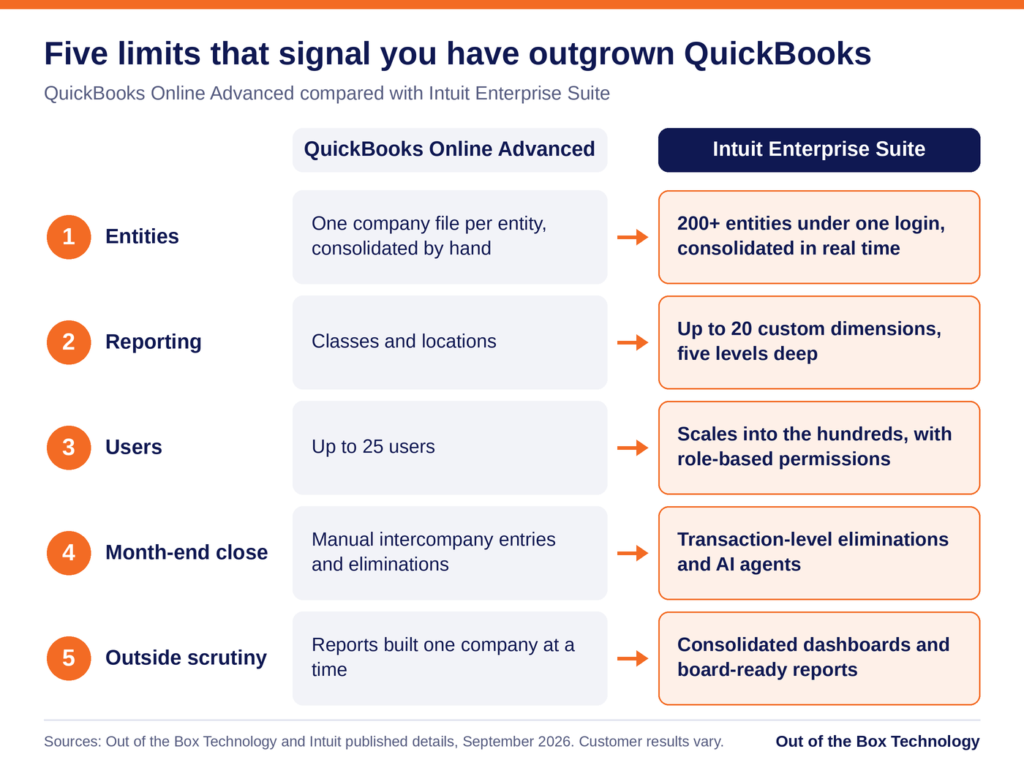
Read the five signs as a checklist against your own month-end. If you recognize two or more, the comparison below shows where each limit sits in QuickBooks Online Advanced. It also shows how Intuit Enterprise Suite raises those limits.
Sign 1: You Keep a Separate QuickBooks File for Every Entity
The clearest sign that you have outgrown QuickBooks is a collection of separate files. You keep one for each company you own or manage. Each file has its own chart of accounts and its own version of the numbers. Over time the charts drift apart, and the same expense lands in different accounts depending on who coded it. With six legal entities, you have six charts of accounts to keep aligned, and small differences add up quickly.
Month-end then becomes a manual exercise. When one entity pays a bill for another, you record the transaction twice, once in each file. Then you reconcile both sides by hand. Next, you export every file into a workbook and remove the intercompany activity. That step is called an elimination, and it keeps the group total from counting the same dollar twice. Frequently one person owns the workbook that performs it.
Intuit Enterprise Suite replaces that routine with native multi-entity accounting. A single login can manage more than 200 entities. You switch between the parent company and each subsidiary from a dropdown menu. Intercompany entries post to both sides, and eliminations run at the transaction level. Consolidated statements then assemble in real time.
Sign 2: Your Best Reporting Happens in Excel
Look at the reports your leadership team reads each month, and trace where they came from. If the numbers start in QuickBooks but end up in a spreadsheet, the system has stopped answering your questions. Common examples include profit by region and margin by service line.
QuickBooks Online Advanced gives you two ways to tag transactions, which are classes and locations. When you need a third view, you end up packing several meanings into one class name. Otherwise, you build the comparison tables by hand. Both workarounds are fragile, because one renamed class can quietly break a report.
Dimensions handle this differently. A dimension is a tag that lets you filter and group results, much like a class but far more structured. Intuit Enterprise Suite supports up to 20 custom dimensions. Each one can hold unlimited values and up to five levels of hierarchy. Dimensions also work across entities, so you can report on the whole group by region, sector, or program.
Sign 3: You Are Close to the 25-User Ceiling
QuickBooks Online Advanced is the highest QuickBooks Online tier, and it tops out at 25 users. That sounds generous until you count the bookkeeper, the controller, the project managers, and the payroll administrator. Your outside accountants need access as well. If you share logins to stay under the cap, you have reached the ceiling in practice. The same is true if you delay adding someone because every seat is taken.
Shared logins also create a control problem. When three people sign in as the same user, the audit trail cannot show who changed what. An auditor reviewing your controls is likely to ask about that. Removing someone’s access when they leave also becomes guesswork.
Once you have outgrown QuickBooks Online Advanced, Intuit Enterprise Suite gives you room. It scales into the hundreds of users and applies role-based permissions across entities. You can let a project manager see job costs in one entity and limit a bill approver to the approval queue. Payroll data stays limited to the people who need it. Approval workflows support up to five parallel approvers. The record of who approved what stays attached to the transaction.
Sign 4: The Month-End Close Takes Longer Every Quarter
A close that runs past the first week of the month often means you have outgrown QuickBooks. Much of that time goes to chasing reconciliations and waiting on the last entity to finish. Some of it goes to rebuilding the consolidation workbook and fixing errors that manual work introduces.
If your controller describes the close as a project, the process has outgrown the system underneath it. The same few people work late every month, and adding staff helps only for a while.
Intuit Enterprise Suite targets the slowest steps directly. Transaction-level eliminations remove the manual consolidation, and the Intuit Enterprise Suite Summer 2026 release added more depth to close tools across entities. Intuit’s AI agents, built-in assistants for tasks such as categorization and reconciliation, take on routine work. Intuit reports that Cornerstone Development Company cut its month-end close by 50 percent. It also reports that Lango closed 66 percent faster, although customer results vary. Your own results depend on how closely the setup follows your process. That is why implementation planning matters as much as the software.
Sign 5: Investors, Lenders, or Auditors Ask Questions Your Books Cannot Answer
When you have outgrown QuickBooks, outside parties often notice before you do. A private equity sponsor wants standardized reports across every holding. Lenders ask for results by entity to check loan requirements. During an audit, you have to explain how you eliminated intercompany balances. A buyer doing due diligence expects consolidated history that reconciles.
If the answer to each request is a week of work in Excel, your books were built for simpler questions. Growth through acquisition sharpens the problem, because every new company brings another file and another chart of accounts to reconcile. The same pressure reaches you if you run a franchise group or a construction firm with an entity per project.
Reporting that lives inside the accounting system answers many of these requests. You get consolidated dashboards and management reports built for board packages. Approval workflows and role-based permissions add a detailed audit trail, so auditors can follow each entry. You can also project profit and loss down to the dimension for up to three years. When you acquire a company, you add it as another entity instead of starting another file, and our First 100 Days support helps with the accounting integration.
Outgrown QuickBooks, or Just Due for a Cleanup?
If you feel cramped in QuickBooks, first check whether the cause is your setup. A cluttered chart of accounts, inconsistent coding, or a slow company file can make a healthy system feel undersized. A cleanup often fixes those problems, and our QuickBooks clean-up service exists for that reason. For a wider look at software limits, read our post on 5 signs you have outgrown your accounting software.
A simple test can separate the two. If your pain comes from messy data inside one entity, fix the data first. If it comes from the structure itself, cleaning alone will not remove it. Structure means multiple entities, more reporting views than classes and locations can carry, or more users than your plan allows. If you run one entity with well under 25 users and simple reporting needs, QuickBooks Online Advanced is likely still the right tool.
The same five signs apply if you use QuickBooks Desktop. Moving from Desktop follows a different path, which our QuickBooks Desktop to Intuit Enterprise Suite migration walkthrough explains.
What to Do After You Have Outgrown QuickBooks
If two or more of these signs sound familiar, a short assessment is a sensible next step. Once you have outgrown QuickBooks, the path forward is shorter than you might expect. Intuit says data from QuickBooks Online upgrades into Intuit Enterprise Suite automatically, and the interface stays familiar.
That data arrives with any clutter attached. The upgrade is therefore usually the least disruptive moment to redesign your chart of accounts and your class structure. Intuit also lets you choose how much history comes across, from a clean slate to a full data conversion. Our guide to migrating historical financial data helps you decide, and our step-by-step migration guide covers the preparation.
Cost is usually the next question, and Intuit does not publish a list price for Intuit Enterprise Suite. Quotes depend on your entity count, your user count, and the capabilities you turn on. Our guide to return on investment and total cost of ownership shows how to weigh a quote, and our comparison of Intuit Enterprise Suite with QuickBooks Enterprise and QuickBooks Online Advanced shows which product fits your situation.
Ready to See How Many of These Signs Apply to You?
Schedule a 30-minute Intuit Enterprise Suite Upgrade Assessment with our team. We will review your current setup and send a written proposal within one week.
Related reading:
- Intuit Enterprise Suite vs QuickBooks Enterprise and QuickBooks Online Advanced
- Intuit Enterprise Suite Multi-Entity Accounting: Why It Is Not Just a Single Entity Upgrade
- Migrating from QuickBooks Online Advanced to Intuit Enterprise Suite: What Changes and What Stays
- Is Intuit Enterprise Suite Worth It? ROI and Total Cost of Ownership Explained
- 5 Signs You’ve Outgrown Your Accounting Software
Outgrown QuickBooks? Frequently Asked Questions
How do I know if I have outgrown QuickBooks?
What is the difference between QuickBooks Online Advanced and Intuit Enterprise Suite?
Have I outgrown QuickBooks if I am close to the 25-user limit?
Is Intuit Enterprise Suite an ERP?
Can I move from QuickBooks Desktop straight to Intuit Enterprise Suite?
How long does it take to move from QuickBooks to Intuit Enterprise Suite?
Do I need more than one entity to justify Intuit Enterprise Suite?