Most companies planning a move to Intuit Enterprise Suite ask the wrong first question. They ask how to migrate their history, when the question that actually shapes cost, timeline, and reporting quality is how much of it to bring when thinking about historical data migration in Intuit Enterprise Suite.
For most mid-market businesses, the answer is two to three years of full transaction detail. Opening balances cover everything before that, and a read-only archive holds the legacy file for anything older still. That range supports year-over-year comparative reporting without dragging years of accumulated cleanup into a new system. It changes if a lender, an investor, or an open audit requires deeper detail. It changes again depending on which system sits on the other end of the migration. The rest of this guide covers why that default holds, when to deviate from it, and what the decision costs in either direction.
How Much History Do You Really Need?
Two to three years of detailed transaction history is the right starting point for most companies moving to Intuit Enterprise Suite. Opening balances cover everything prior to that window. Three years covers the standard comparative reporting window that most finance teams and boards use. That window includes the current year, the prior year, and one additional year of trend. Opening balances preserve the correct trial balance as of your cutover date, without carrying every invoice and bill that produced it.
That default shifts under a handful of specific conditions. A private equity sponsor or a lender covenant may require five years of detail for diligence or reporting purposes. A business under audit, or with open tax exposure from a prior period, may need detailed records to stay accessible inside the live system. Archiving alone will not do in that case. A company that reports multi-year trends as part of its sales or bonding process may need more history, simply because the reports depend on it. None of these conditions are common enough to change the default recommendation for most readers. Each is worth checking against your own situation before committing to a scope.
First, Which Migration Are You Actually Doing?
Before deciding how much history to bring, confirm which kind of move you are making, because the answer determines whether scope is even a decision you get to make.
If you are moving from QuickBooks Online or QuickBooks Online Advanced into Intuit Enterprise Suite, you are performing an in-place upgrade. Your lists, your transactions, and your full history carry over automatically as part of the platform transition. There is no scope decision to weigh here. If this is your situation, the guide to migrating from QuickBooks Online Advanced to Intuit Enterprise Suite covers what does change in the move. It can also save you time reading a scope framework that does not apply to you.
If you are moving from QuickBooks Desktop, Sage, Microsoft Dynamics, or NetSuite, you are performing a true conversion. History does not carry over by default. Every layer of it, from opening balances to full transaction detail, is something your implementation team builds intentionally. Every additional year you choose to bring adds mapping, cleanup, and reconciliation work on top of the base project. If this is your situation, the rest of this guide is written directly for you.
What “History” Actually Means
“History” is not one thing. It breaks into four layers, and a company can bring some layers forward while leaving others behind.
Opening balances are the trial balance as of your cutover date: the correct starting numbers for every account, with none of the transactions behind them. Open items are the AR and AP detail still in motion at cutover, including unapplied credits, open purchase orders, and work in progress. These typically need to migrate regardless of how far back you go, because they represent live obligations rather than closed history. Summarized period totals sit in the middle: monthly or quarterly lump-sum figures that support trend reporting without preserving individual transactions. Full transaction detail is the deepest layer. It covers the individual invoices, bills, payments, and journal entries. These are what let a user drill from a summary number down into the record that produced it.
A company that says it wants “three years of history” usually means something specific. It wants three years of full transaction detail for recent periods, plus opening balances for everything older. Name which layer you actually need before scoping the project. That step is the fastest way to avoid paying detail-level cost for information you only intended to use at the summary level. The chart of accounts migration guide covers the structural side of this same planning phase. It maps your existing accounts and classes into the dimensional model Intuit Enterprise Suite uses.
Four Questions That Decide Your Answer
Once the migration type and the layers are clear, four questions narrow the scope decision down to a specific number of years.
- The first is practical: how far back does anyone on your team actually pull a report today. Finance teams often assume they need five or seven years of history because that much exists in the old system, without ever checking how far back a report was actually run in the past twelve months. If nobody has queried anything older than two years, migrating five years of detail is solving a problem nobody has.
- The second question belongs to people outside your finance team. What do your lenders, your bonding agent, or your investors require in reporting or in a diligence data room. These requirements are usually documented in a covenant, a loan agreement, or a due diligence checklist, and they override the internal-usage answer if they demand more.
- The third is exposure. What is your audit and retention exposure right now, meaning any open tax years, pending litigation, or ongoing audit that requires the underlying detail to stay reachable rather than archived. A company with a clean, closed audit history has more flexibility here than one with an open examination.
- The fourth is the condition of the data itself. Years of duplicate vendors, inactive list items, and unreconciled entries do not become cleaner by moving into a new system. They become baked into a dimensional model that was supposed to be a fresh start. The messier the legacy file, the stronger the case for migrating less of it in raw form and archiving the rest instead of carrying the mess forward.
The Case for Bringing Less Than You Think
Cost and timeline are the most immediate reasons to bring less history than a first instinct suggests. Every additional year of detail means more accounts to map, more historical transactions to validate, and a longer reconciliation and testing cycle before go-live. Those hours make up the bulk of a migration budget. A scope built around two to three years, plus opening balances, is materially faster and less expensive than a scope built around full history. That gap widens as the source data gets messier.
There is a second reason that gets less attention: what you migrate becomes the training ground for the AI-driven features inside Intuit Enterprise Suite. Categorization suggestions, anomaly detection, and forecasting tools all learn from the transaction history sitting in the system. Importing years of miscoded, duplicated, or inconsistently classified history does not just clutter the reporting screens. It degrades the output of the tools you are paying for the platform to include. A smaller, cleaner migration scope often produces a more useful system on day one than a larger, messier one.
The Case for Bringing More
None of this argues for minimal history in every case. Companies that are private equity backed, actively acquisitive, or operating under heavy covenant reporting requirements often need deeper history. Their stakeholders expect it, even when their own team rarely uses it day to day. A five-year window supports the kind of trend analysis a board or a sponsor asks for during a portfolio review. Rebuilding that window after go-live is far more expensive than including it up front.
Trend-dependent industries carry a similar case. A construction company tracking multi-year project profitability needs that detail available inside the live system. So does a business that reports seasonal patterns across several years to a lender. Neither wants to reopen an archived file every time a report is due. Companies mid-audit, or with an open tax examination touching prior years, belong in this category too. Detail that needs to be pulled quickly during an active inquiry should not be the detail you chose to archive.
What to Archive Instead of Migrating
Anything left out of the migration should not simply be left behind. It should be archived deliberately, in a form that stays usable for as long as your retention obligation requires.
The practical version of an archive package has two parts. The first is a read-only copy of the legacy file itself. Keep it accessible in case someone needs to look up something that did not make it into the exported reports. The second is a set of exported reports: the trial balance, general ledger detail, AR and AP aging, inventory valuation, and payroll registers. Save each one in both PDF and Excel so it remains readable without the original software. Decide up front who retains access to this archive, and for how long. Weigh whether keeping the old system licensed is worth the ongoing cost compared to exporting a complete report package and letting the subscription lapse. In most cases, keeping the file is far cheaper than keeping the software active.
How Retention Rules Affect the Decision
Record retention obligations attach to the records themselves, not to the software that originally produced them. That is precisely why archiving satisfies most retention requirements without requiring a live migration. A trial balance, a general ledger export, and an AR aging report meet a retention obligation the same way the original file did, as long as they are saved as PDF or Excel. They just need to remain accessible for the required period.
Retention periods vary by document type, by industry, and by jurisdiction. IRS recordkeeping guidance is a reasonable starting point. Confirm specifics with your accountant or tax advisor before finalizing an archive plan, rather than assuming a single number applies across your entire business. This section is general information, not legal or tax advice. The right retention window for your specific records should come from a qualified professional familiar with your situation.
Cost and Timeline Impact of Each Option
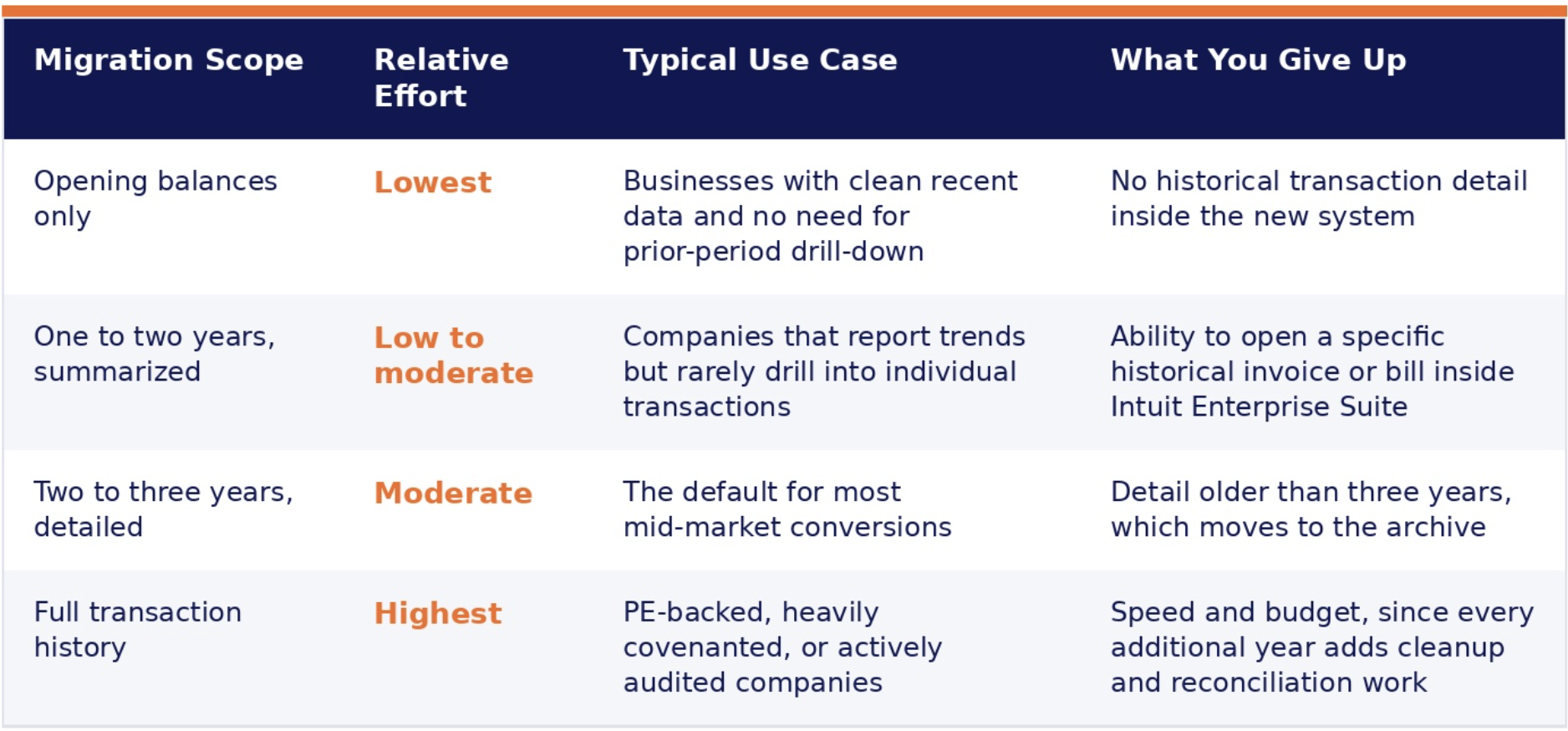
The table below outlines four common scope options, ordered from least to most extensive, along with the relative effort each one requires and what a company typically gives up by choosing it.
Choosing Your Cutover Date
The scope decision and the cutover date decision work together. A fiscal year boundary is the cheapest cutover available, and for good reason. Balances are already being closed and reconciled at year end as part of normal accounting work. A cutover timed to that boundary reuses work your team was doing anyway, rather than creating a second reconciliation cycle. A quarter-end boundary is the reasonable fallback when a full fiscal year wait is not practical, offering a similar advantage on a shorter cycle.
A mid-period cutover is possible, but it comes at a cost that is easy to underestimate. Every transaction between the last closed period and the cutover date needs to be captured and mapped. Each one gets reconciled against a partial period rather than a closed one. Payroll and sales tax calculations in particular become harder to validate across a split period. A mid-period cutover on top of an already-lean scope erodes much of the time savings that leaner scope was meant to produce. The step-by-step guide to preparing for an Intuit Enterprise Suite migration walks through cutover planning in more depth once your scope and timing are settled.
Can You Add History Later?
Yes, but plan around the honest cost of that option rather than treating it as a safety net. Once your team is transacting daily inside the live system, loading additional historical records gets harder. It means reconciling against balances that are already moving, locking periods carefully to avoid disturbing live figures, and revalidating totals that were already signed off. That additional layer of care is what makes a post-go-live history addition more expensive. The raw data volume is not the difference.
If you are still undecided between two scope options, include the extra history now. That path is usually less expensive than assuming you can add it painlessly later. The exception is data you are excluding on purpose, such as detail behind an already-closed audit or a period with no business reason to revisit. A deliberate archive remains the right call there, regardless of how easy a later addition would be.
A Practical Decision Checklist
Before finalizing your migration scope, confirm the following:
- Which type of migration you are performing: an in-place QuickBooks Online or QBO Advanced upgrade, or a true conversion from QuickBooks Desktop, Sage, Dynamics, or NetSuite.
- Which layer of history you actually need for each time period: opening balances, open items, summarized totals, or full transaction detail.
- How far back your team has actually run a report in the past twelve months.
- What your lenders, bonding agent, or investors require in writing.
- Whether you have any open audit or tax exposure that requires detail to remain reachable rather than archived.
- The condition of your legacy data, and whether cleanup should happen before migration or be avoided by narrowing scope instead.
- Where your cutover date falls relative to your fiscal year or quarter boundary.
- Who owns the archive of anything left behind, and for how long it needs to remain accessible.
Once scope is settled, the cost and timeline conversation with your implementation partner becomes concrete rather than open-ended. The data migration services page outlines how Out of the Box Technology scopes and prices migration work once these decisions are made.
How We Can Help
Scoping a historical data migration gets easier with a partner who has done it enough times to know where the decision usually goes wrong. OOTB’s data migration services cover the full range, from opening balance conversions to full transaction detail, and our Intuit Enterprise Suite implementation partner team builds the chart of accounts, dimension structure, and reporting model around whatever scope you choose, rather than treating migration as an afterthought bolted onto implementation. The companies that get this right scope the decision before the project starts, not the week before cutover when the answer costs more to change.
Talk to a data migration specialist at OOTB.
Related reading:
- Intuit Enterprise Suite Implementation Partner
- Step-by-Step Guide to Preparing for an Intuit Enterprise Suite Migration
- Chart of Accounts Migration to Intuit Enterprise Suite: A Controller’s Guide
- Migrating QuickBooks Online Advanced to Intuit Enterprise Suite
- 7 Critical Financial Reports to Run Before You Close the Fiscal Year