Inventory management is now generally available in Intuit Enterprise Suite. It runs natively from receiving through shipping, with Pick, Pack & Ship, Landed Cost, multi-location tracking, lot and serial traceability with barcode scanning, multi-level bills of materials and production orders, and new inventory aging reports, all connected directly to your financials.
For product-based businesses, that changes the shape of the month. Stock no longer has to live in a separate tool or a spreadsheet that someone reconciles back to the general ledger by hand. This post covers what is in the Intuit Enterprise Suite Fall 2026 release, who it is built for, and which capabilities are available today versus in early access.
What’s New in Intuit Enterprise Suite This Fall?
Inventory management is now generally available in Intuit Enterprise Suite and runs natively from receiving through shipping. Two more capabilities are in early access: Intuit Enterprise Suite for Construction, a separate add-on, and multi-currency updates for eligible customers. Smaller updates cover dimensions, workforce, multi-entity, projects and bill pay.
Intuit labels each release item as either generally available or early access, and we have kept that distinction on every section below. Generally available means any Intuit Enterprise Suite customer can use it now. Early access means the feature is rolling out gradually through the Early Access Program and will appear again in later release notes marked “Now GA” once it graduates.
Does Intuit Enterprise Suite Have Inventory Management?
Yes. Inventory management in Intuit Enterprise Suite is generally available, with no beta caveats.
The problem it removes is a familiar one. A growing product company buys an inventory add-on or builds a tracking spreadsheet, and from then on the warehouse and the books tell two different stories until someone sits down at month end to make them agree. Every receipt, adjustment and shipment gets keyed twice or synced through a connector that breaks at the worst time. Margins are only as accurate as the last reconciliation.
With inventory running inside Intuit Enterprise Suite, each unit is costed when it lands, traced while it sits on the shelf and relieved from stock when it ships, and the accounting entries happen in the same system. The release is aimed at three groups in particular:
- Product-based businesses running inventory in spreadsheets or a separate tool
- Light manufacturers and assemblers who build finished goods from components
- QuickBooks Enterprise Desktop users who rely on Advanced Inventory and want a cloud path forward
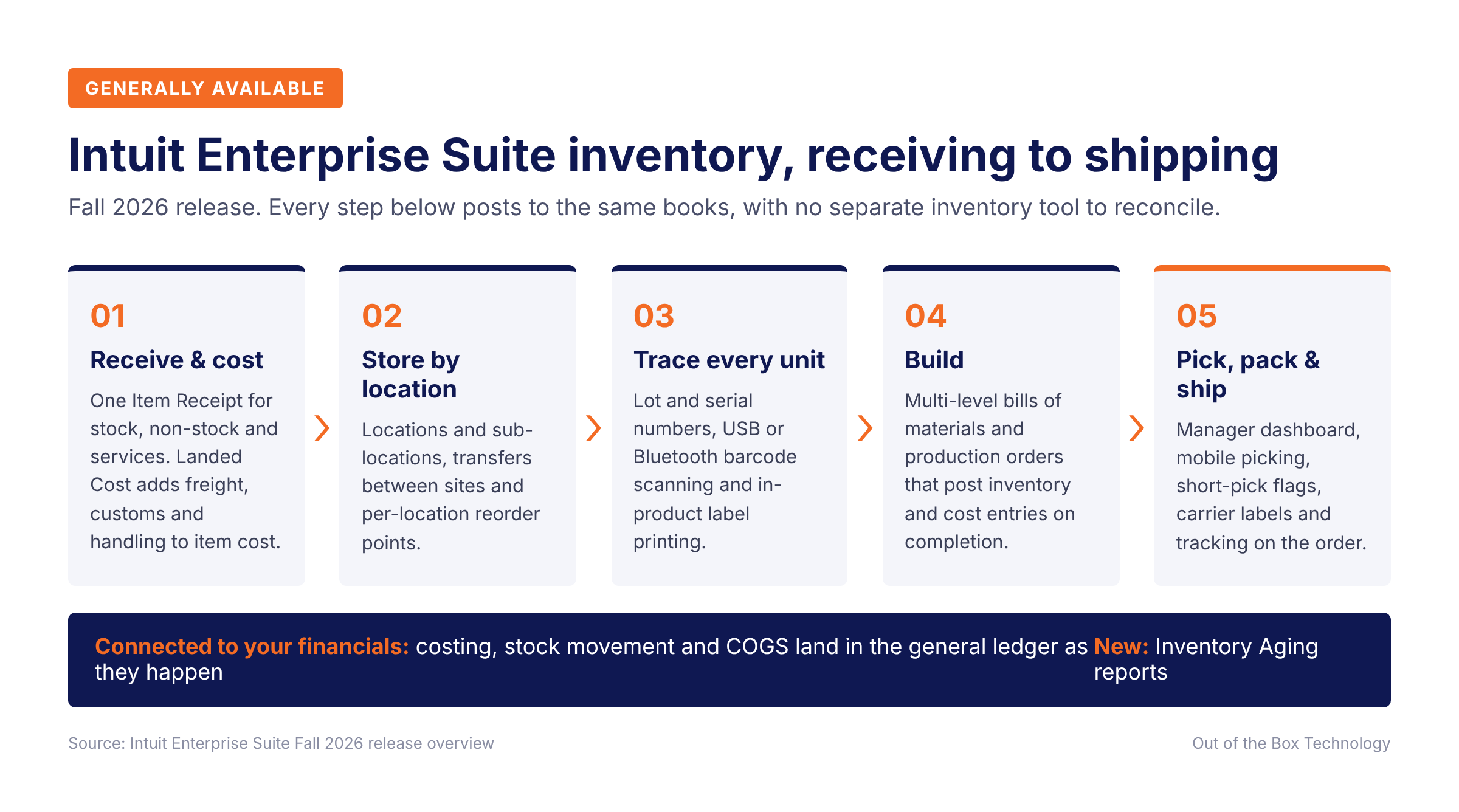
How Inventory Works From Receiving to Shipping
Receiving and Landed Cost
Receiving now reflects everything that arrived on the truck. A single Item Receipt handles inventory, non-inventory items and services together, so a shipment that includes freight or a non-stocked part can be received in full and the purchase order closes correctly.
Landed Cost takes freight, customs and handling charges that are billed separately and folds them into what each item actually cost you. Without it, those charges sit in an expense account and your product margins look better than they are. When on-hand value needs correcting after the fact, a new inventory value adjustment lets you change the dollar value directly. Intuit Enterprise Suite recalculates the average cost per unit automatically, and you can tag the adjustment to a project so it rolls into project cost reporting. Intuit’s receiving and costing demo runs through the full workflow.
Pick, Pack & Ship
The new fulfillment workflow connects Sales Orders directly to the warehouse floor. Managers get a dashboard of every open order showing whether it can be fulfilled, then assign pickers and packers and watch status update in real time, which replaces paper pick lists and verbal handoffs.
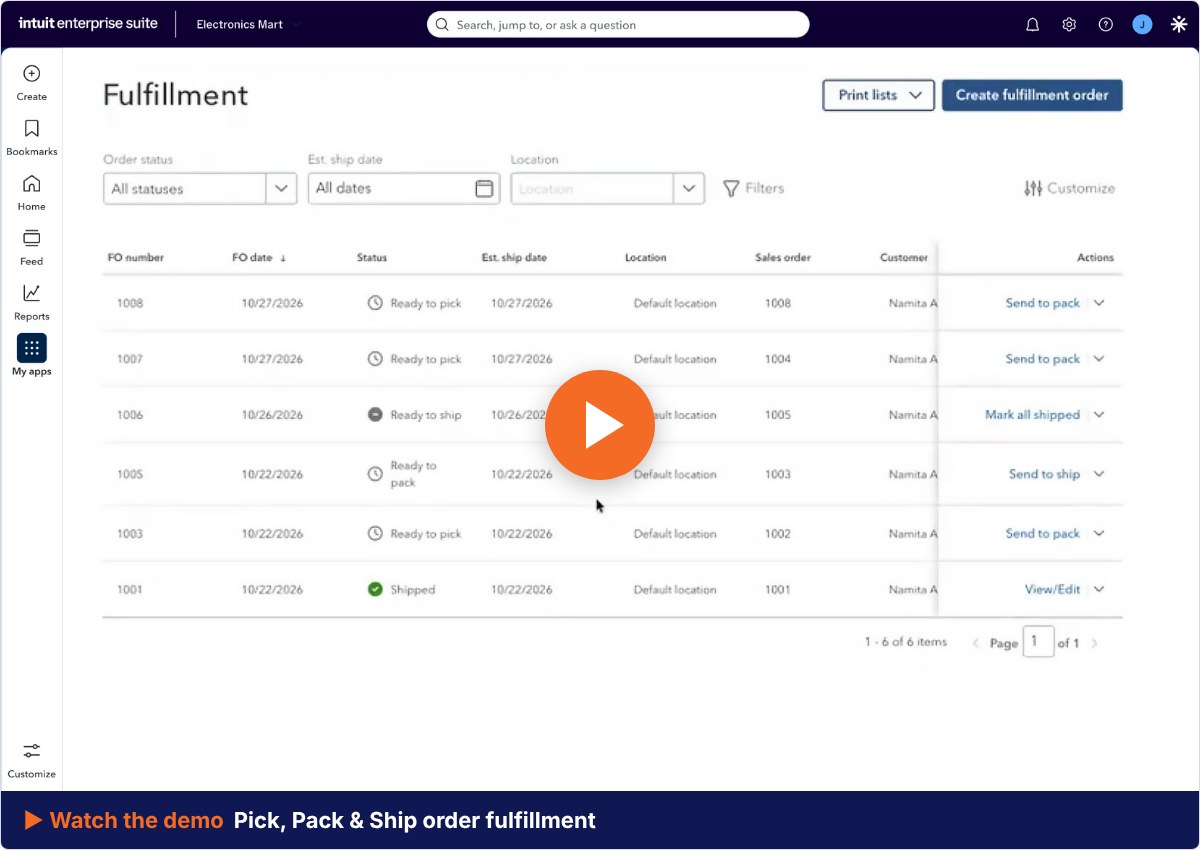
Warehouse staff work from a dedicated mobile view that shows only their assigned orders. They can flag a short pick on the spot and move the order forward without returning to a desk. When the order is ready, you buy and print a carrier shipping label inside the same workflow, and the tracking number is written back to the order automatically. Watch the order fulfillment demo for a walkthrough.
Multi-Location Inventory
Intuit Enterprise Suite now tracks how much of each item you hold at every physical site, down to two levels: a location and, optionally, sub-locations within it such as a bin or a room. Location support extends across nearly every transaction type. You can transfer inventory between locations, set reorder points per location, inactivate a site and reactivate it later, and run location-aware reports. The multi-location demo shows sub-locations and transfers in action.
Sales Order Updates
Sales Orders now accept customer deposits. Record the deposit on the order and it flows to the resulting invoice as a reduction of the balance due, with no manual credit to apply later. If a customer has several ship-to addresses on file, you can choose the right one directly on the Sales Order, the same way you already could on an invoice.
Lot and Serial Traceability With Barcode Scanning
Serial numbers now get the same tracking that lots already had. You can require a lot or serial number on every relevant transaction company-wide, which closes the gap where one rushed receipt breaks the trail for a recall or warranty claim. Your own numbering format also prints correctly on packing slips and pick lists.
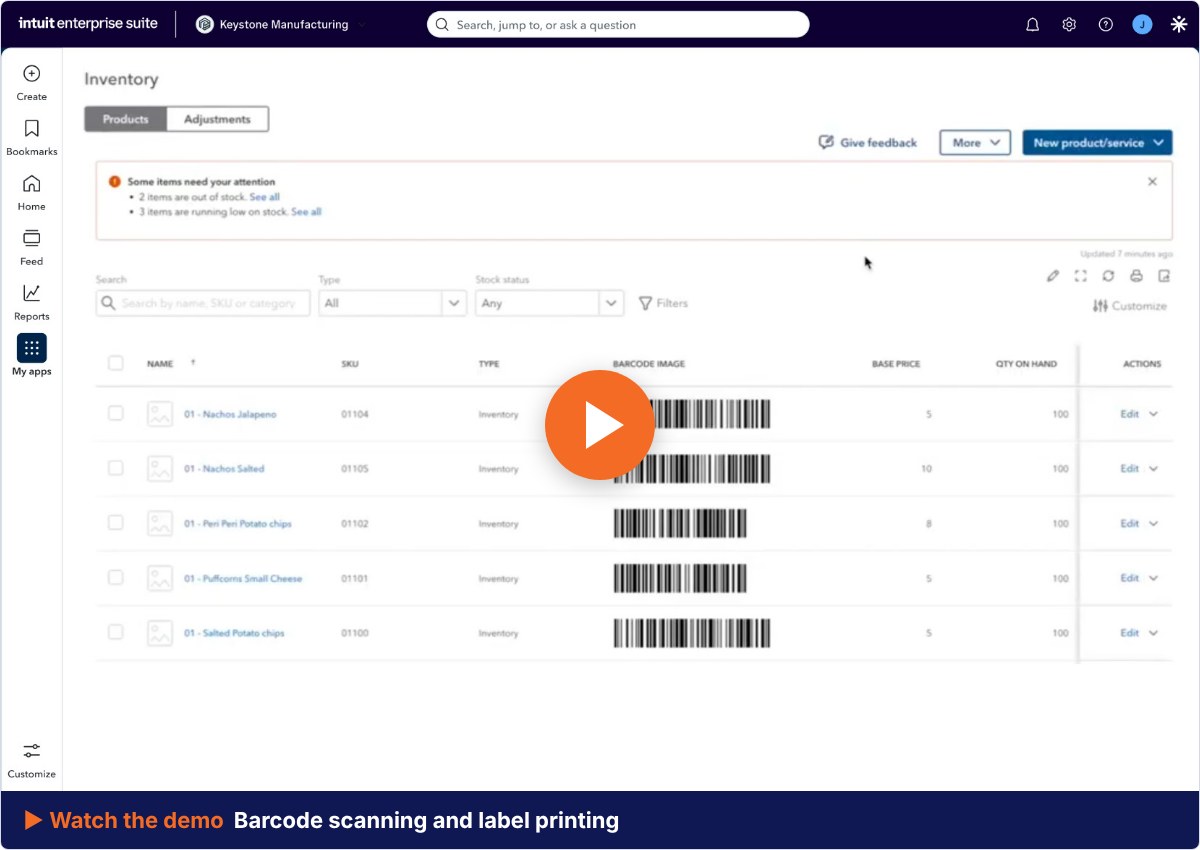
Barcode scanning ties the traceability together. Assign a barcode to each item, then scan with any USB or Bluetooth scanner to fill in the item, quantity, lot and serial details on receipts, bills, purchase orders, sales orders, counts, adjustments and picking. Barcode labels print from inside the product, so there is no third-party labeling software to buy or maintain.
Bills of Materials and Production Orders for Manufacturers
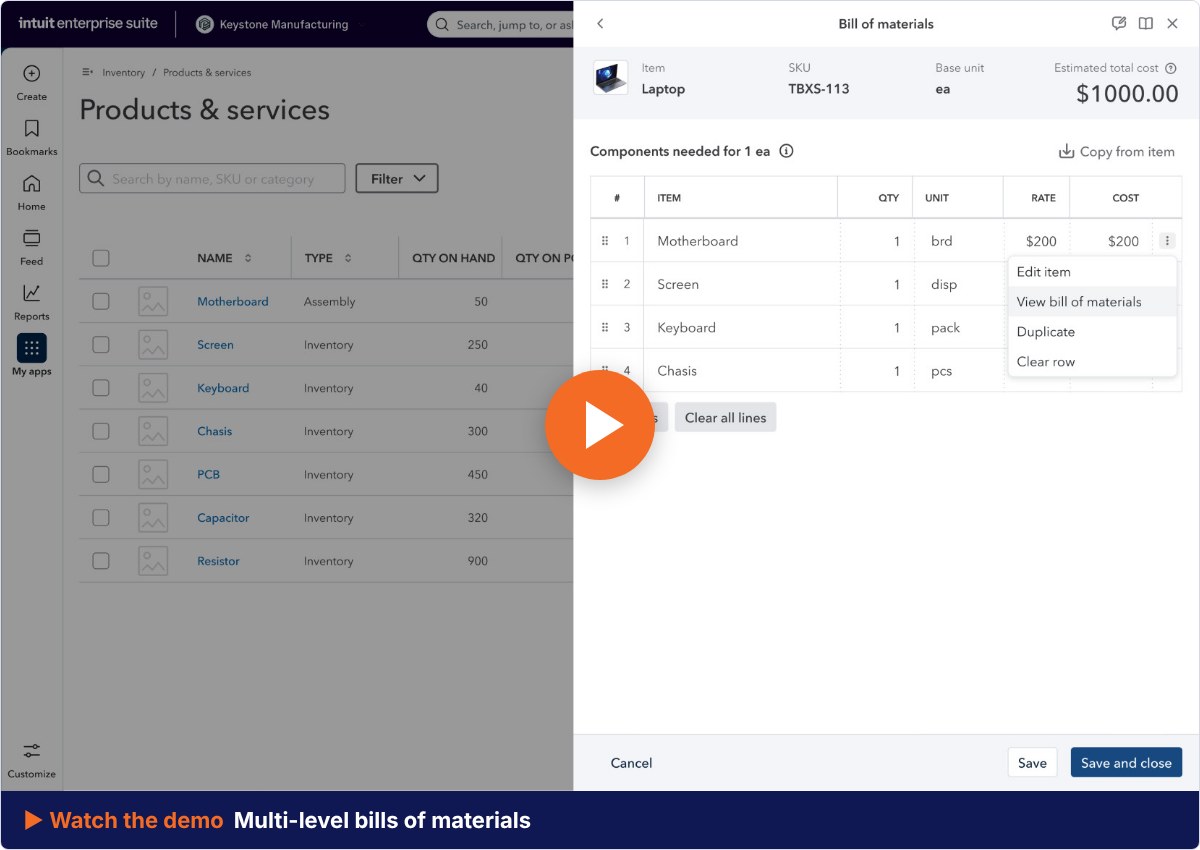
For light manufacturing and assembly, Intuit Enterprise Suite now supports multi-level bills of materials and production orders. You define the recipe for a finished product, including sub-assemblies built from other components, and production orders track the build with real-time visibility into shortages at every level.
When production finishes, the system records the materials and labor actually used and generates the final inventory and cost accounting entries automatically. Your cost of goods reflects the build that happened rather than a standard estimate entered months ago. This is built for assemblers and light manufacturers. Companies that need full material requirements planning, with capacity scheduling and shop floor control, should still evaluate a dedicated manufacturing system alongside it.
Inventory Reports and Permissions
The Inventory Status Report can now group by preferred vendor with subtotals, so the person reordering sees what to buy and from whom on one screen. Two new reports, Inventory Aging Summary and Inventory Aging Detail, show how long on-hand stock has been sitting and how much capital is tied up in aged inventory, down to the individual purchase lot. For a finance leader, that is the report that turns a slow-moving shelf into a conversation about cash.
A rebuilt Inventory Operations Manager role includes the reports the job requires and lets you grant full or view-only access feature by feature. Warehouse and purchasing staff can do their work in Intuit Enterprise Suite without seeing financial data their role never needed.
Can Intuit Enterprise Suite Replace QuickBooks Enterprise Advanced Inventory?
Many of the workflows Advanced Inventory users depend on, including multi-location tracking, lot and serial numbers, barcode scanning and assemblies, are now built into Intuit Enterprise Suite. The clearest signal so far comes from a manufacturer that has already made the move.
“For a manufacturing business, we got everything set up in Intuit Enterprise Suite the way we need it… In our experience, the new build system in Intuit Enterprise Suite works even better than the Advanced Inventory feature in the old QuickBooks Enterprise Desktop version.”
Russ Burraston, Founder and COO, Silver Fern
Every Desktop setup carries years of custom items, units of measure and reports, so the right move is to map your current inventory workflows against Intuit Enterprise Suite before you commit to a migration date. Talk with your Intuit team, or contact our team, and we can review your Advanced Inventory setup with you. Our step-by-step migration guide covers what that preparation involves.
Early Access: Intuit Enterprise Suite for Construction
Intuit Enterprise Suite for Construction is available as a separate add-on to Intuit Enterprise Suite and is currently in early access. Contact your Account Executive to ask about pricing and access. It is written for general contractors and subcontractors, and it is the first release with a solution built specifically for construction.
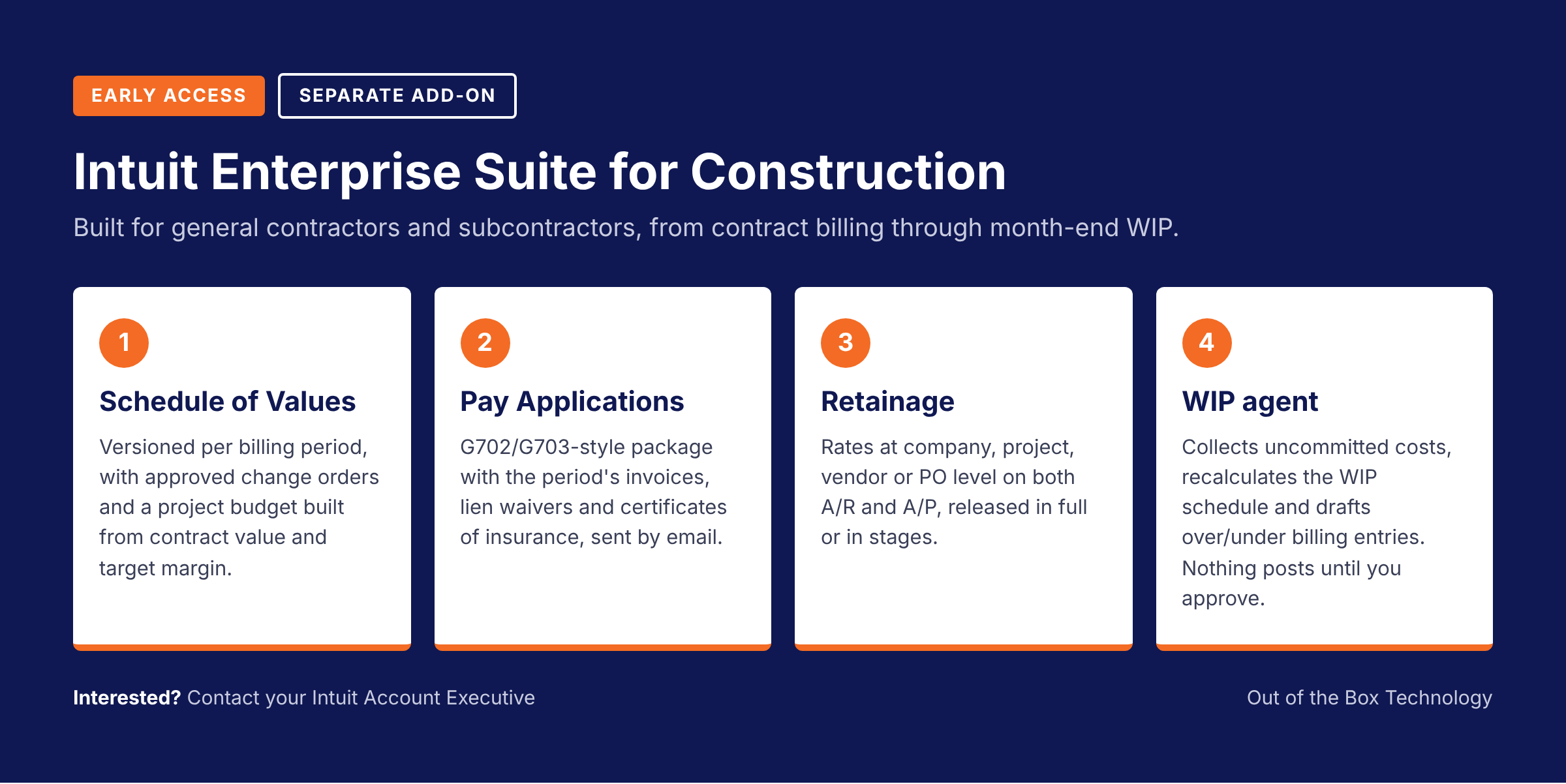
Schedule of Values. Build each contract’s scheduled work items directly on the project, bill progressively against them and flow approved change orders into the contract. Every billing period is saved as its own read-only version, and you can start a project budget from the Schedule of Values using the contract value and your target margin.
“We can build a schedule of values that immediately ties into financials forecasting and financial projections… and it’s a click of a button.”
Chad Shaules, Founder and CEO, Cornerstone Development Company
Pay Applications. General contractors can create a pay application directly from project billing progress. Intuit Enterprise Suite assembles the period’s invoices, G702/G703-style documentation and supporting documents such as lien waivers and certificates of insurance into one payment package that the owner receives by email. A read-only history records every application sent, its billing period, retainage and status.
Retainage on both sides of the job. Set retainage rates at the company, project, vendor or purchase order level and they carry through to invoices and bills. Release retainage in full or in stages as work is completed, and see what is withheld, released and still outstanding in project views and in A/R and A/P aging.
AI-assisted WIP agent. Each month, the agent prompts your admin to collect uncommitted costs from project managers, recalculates the work-in-progress (WIP) schedule as the numbers come in and drafts the over or under billing journal entry for each project. Nothing posts until you approve it. The agent also compares each project’s current margin with the original estimate and flags any job that has slipped past your threshold, so a declining project surfaces before close instead of after it.
Intuit’s construction demo shows these workflows together. To request access, contact your Account Executive or apply through the Early Access Program.
Early Access: Multi-currency Updates
Multi-currency, which Intuit introduced in the Summer 2026 release, gains new controls in early access. Access is limited, so check with your Customer Success Manager before planning around these features.
Who is eligible for the multi-currency early access?
Organizations whose entities are based in the US and consolidate in US dollars only, that rely lightly on projects, budgets or inventory alongside multi-currency, and that do not run international payroll. If that describes your business, ask your Customer Success Manager about access.
Admins now get role-based control over who can view, create or edit exchange rates, replacing all-or-nothing access with controls an auditor will recognize. You can pay down a credit card held in a foreign currency, transfer funds into a foreign bank account and record fixed assets in the currency they were bought in, with foreign exchange (FX) gains and losses calculated and recorded automatically. Intercompany transactions between entities with different functional currencies are now handled correctly, and more standard reports carry a “remeasured” tag so you can see which ones are multi-currency aware.
More Updates in the Fall Release
Beyond the headline features, the Fall 2026 release includes a set of smaller updates. Each one below is labeled with its status.
| Area | Update | Status |
|---|---|---|
| Dimensions | Multi-dimensional pivots on eligible detail reports, grouping rows and columns by several dimensions at once | Available now (Now GA) |
| Dimensions | Header-level dimensions on Sales Orders carry over automatically to the invoices created from them | Available now |
| Dimensions | Retroactive reclassification updates prior transactions to a new default dimension | Available now |
| Dimensions | Bulk default dimension assignment for vendors, customers, products and employees by spreadsheet upload | Early access |
| Invoicing | Multiple ship-to addresses on invoices, grouped expenses and new purchase order reports | Available now |
| Bill Pay | View and apply vendor credits directly in Pay Bills, with the net payment recalculated in real time | Available now |
| Workforce | Intuit Expert Workforce, where a dedicated Intuit expert runs payroll and tax filings while you approve each run | Early access |
| Workforce | Service item tagging in payroll, so labor costs land against the work performed | Early access |
| Workforce | Compliance training assigned and tracked in Workforce (service provided by Easy Llama) | Early access |
| Workforce | Team surveys with AI-generated summaries of the results | Early access |
| Multi-entity | Consolidated bills view showing every paid and unpaid bill across all entities | Early access |
| Projects | Sub-projects nested up to five levels, each with its own invoices, budgets and P&L | Early access |
How to Get Early Access
Early access features roll out gradually. Join Intuit’s Early Access Program to request them, and watch future release notes for items marked “Now GA” as they graduate. For Intuit Enterprise Suite for Construction, start with your Account Executive. For the multi-currency updates, start with your Customer Success Manager.
Out of the Box Technology implements Intuit Enterprise Suite and provides ongoing accounting services for the businesses that run on it. If inventory has been the reason you held off, or you want a second opinion on whether your Advanced Inventory setup is ready to move, book time with our team.
Related reading:
- Intuit Enterprise Suite Resource Hub
- Intuit Enterprise Suite Summer 2026 Release
- Intuit Enterprise Suite Implementation Partner
- Step-by-Step Guide to Preparing for an Intuit Enterprise Suite Migration