Last updated: November 23, 2026
Payroll teams have only a few cycles left to prepare for the 2026 W-2 changes. The new rules add separate reporting for tips and overtime.
The 2026 Form W-2 requires employers to report qualified overtime compensation in box 12 with code TT, total cash tips in box 12 with code TP, and each tipped employee’s Treasury Tipped Occupation Code in new box 14b. Unlike 2025, there is no penalty relief, and employees can deduct only the overtime shown in box 12, code TT. 2026 W-2s are due February 1, 2027.
A third new code, TA, reports employer contributions to an employee’s Trump account. Each new entry depends on numbers an employer’s payroll system has to capture during the year. This guide explains what each code means and which payroll records employers need now, while the data is still easy to fix.
What Changed on the 2026 Form W-2?
Employers must now report qualified overtime separately in box 12 using code TT, total cash tips in box 12 using code TP, and each tipped employee’s occupation code in new box 14b. Code TA covers Trump account contributions. These rules apply to 2026 Forms W-2, which are due February 1, 2027, with no penalty relief.
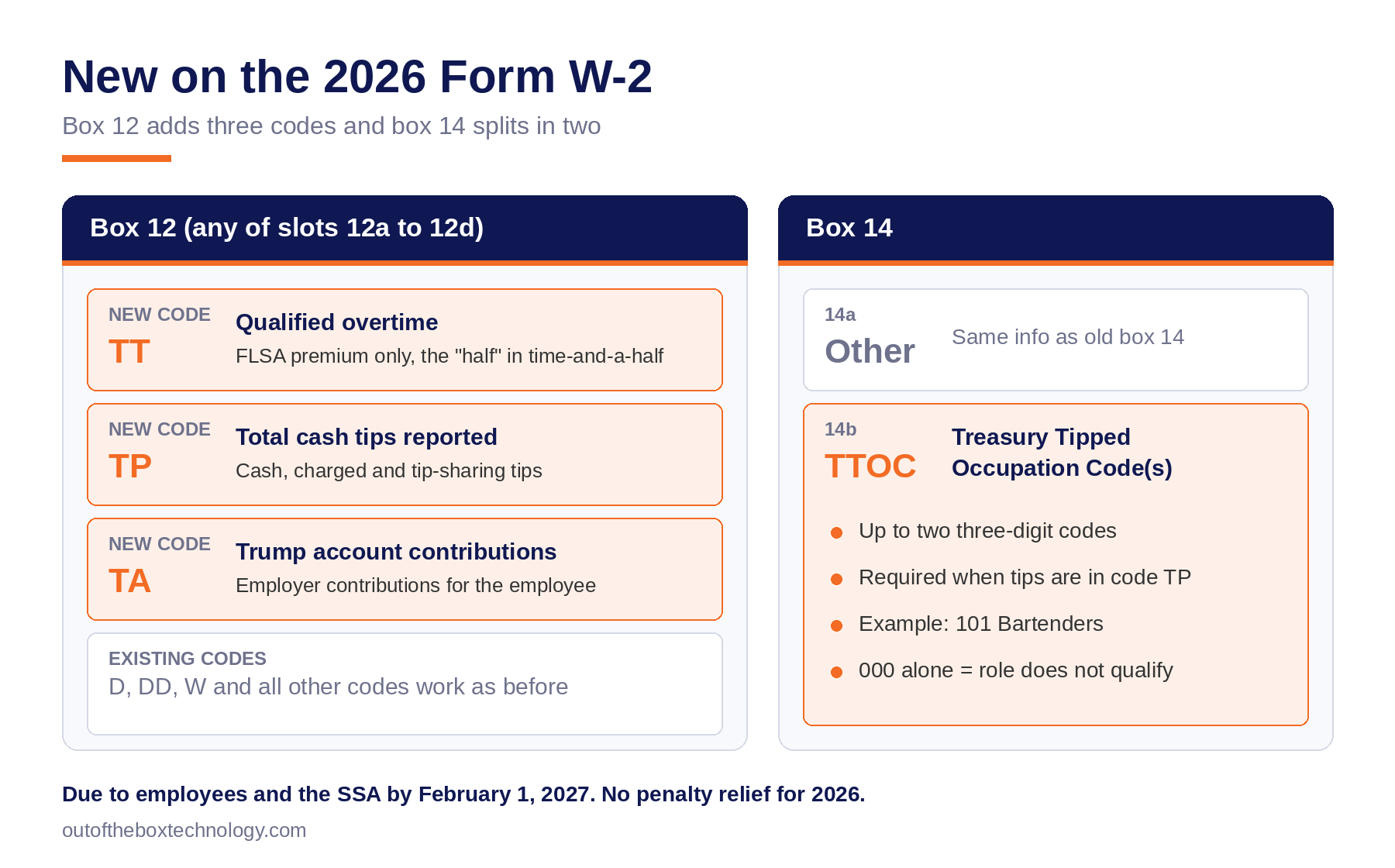
The IRS finalized the 2026 Form W-2 in January 2026. The 2026 W-2 changes carry out rules from the One Big Beautiful Bill Act (OBBBA). Box 14 is now split in two. Box 14a, labeled Other, holds the same optional information employers reported in box 14 in past years. Box 14b holds up to two Treasury Tipped Occupation Codes for employees who received tips.
The 2026 General Instructions for Forms W-2 and W-3 define each new entry. The rest of the form works as it did last year. Most of the new effort sits in how employers track overtime and tips.
Why 2026 Is Different From 2025
For 2025, the IRS treated the new reporting rules as a transition year. Notice 2025-62, issued in November 2025, waived penalties for employers that did not separately report overtime, tips or occupation codes. The rest of each W-2 still had to be complete and correct. Many employers took that option, and employees figured their 2025 deductions from their own records.
That relief applied to tax year 2025 only. In August 2026, the IRS replaced its overtime FAQs with Fact Sheet FS-2026-13, which states that no relief is available for tax years after 2025. The FAQs also set a strict rule for employees. Beginning with 2026, an employee can deduct only the qualified overtime reported in box 12, code TT. If that amount is missing or too low, the employee cannot fall back on personal records or a substitute W-2. The employee needs a corrected Form W-2c from the employer before claiming the larger amount.
| Tax year 2025 | Tax year 2026 | |
|---|---|---|
| Separate reporting of overtime and tips | Optional under Notice 2025-62 | Required |
| Penalty relief for missing amounts | Available | Not available |
| Overtime an employee can deduct | Figured from the employee’s own records | Only the amount in box 12, code TT |
| If the overtime amount is wrong | No correction needed for separate reporting | Form W-2c required |
In practice, an error in code TT now delays an employee’s tax return until you correct it. Employers whose numbers are off should expect those calls in February.
Box 12, Code TT: Qualified Overtime
Code TT reports the total qualified overtime compensation you paid an employee during the year. Qualified overtime is only the premium portion of overtime that the Fair Labor Standards Act (FLSA), the federal wage and hour law, requires. For most hourly employees, that premium is the “half” in time-and-a-half.
The IRS formula works one workweek at a time. Multiply the hours worked over 40 in that workweek by one-half, then by the employee’s regular rate of pay. You cannot average hours across two or more workweeks. The regular rate includes most pay for the week beyond the base hourly wage, such as shift differentials, nondiscretionary bonuses and many commissions. The Department of Labor’s regular rate fact sheet lists what can and cannot be left out.
Worked Example: Double Time
The FS-2026-13 FAQs include an example that shows why code TT is usually smaller than total overtime pay. An employee with a $20 regular rate works 50 hours in one workweek, and the employer pays the 10 overtime hours at double time.
| Item | Calculation | Amount |
|---|---|---|
| Overtime paid at double time | 10 hours x $40 | $400 |
| Overtime the FLSA requires | 10 hours x $30 | $300 |
| Straight-time portion | 10 hours x $20 | $200 |
| Qualified overtime for code TT | 10 hours x $10 | $100 |
Only the $100 FLSA premium goes in code TT. The extra $100 paid above time-and-a-half was the employer’s choice, so it does not count. All $400 is still taxable wages in box 1.
What Does Not Count as Qualified Overtime
Several common types of overtime pay stay out of code TT entirely:
- Overtime paid to employees who are exempt from FLSA overtime, such as salaried managers who meet the exemption tests
- Overtime that only state law requires, such as daily overtime after eight hours under some state rules
- Overtime required only by a union contract or company policy
- Any premium above what the FLSA requires, including the extra half in double time
- Compensatory time that an employee earns but you never pay out
- Overtime paid to an employee-owner who holds at least 20% of the business and actively manages it
Report the full qualified amount in code TT, even when it is more than the employee can deduct. The IRS FAQs give the example of an employer reporting $30,000 of qualified overtime for an employee whose deduction is capped at $12,500.
Box 12, Code TP and Box 14b: Tips and Occupation Codes
Code TP reports the total cash tips an employee reported to you during the year. Cash tips here include tips paid in cash, tips added to a card charge and tips received through a tip pool or other tip-sharing arrangement. Employees who receive $20 or more in tips in a month must report them to you by the 10th of the next month. Many use Form 4070 or an electronic tip report.
When you report tips with code TP, you also enter the employee’s Treasury Tipped Occupation Code (TTOC) in box 14b. A TTOC is a three-digit code from the IRS list of occupations that receive tips. Final regulations released in April 2026 (IR-2026-49) list more than 70 occupations in eight categories. Bartenders are code 101 and wait staff are code 102, for example. You can enter up to two codes for an employee who earned tips in more than one role. A code of 000 on its own tells the employee that the occupation does not qualify.
What Makes a Tip Qualified?
A qualified tip must be paid voluntarily, with the customer choosing the amount. Mandatory service charges and automatic gratuities do not meet that test, even when part of the charge goes to staff. Treat those amounts as service charge wages in payroll and keep them out of your tip totals.
Roles matter too. Some employees split time between a listed tipped occupation and a role that is not on the list. They can count only the tips earned in the qualifying occupation. Your payroll records need to show which role produced which tips.
What Employees Can Deduct, and Why Your Numbers Matter
Employees claim both deductions on Schedule 1-A of Form 1040 for tax years 2025 through 2028. The qualified overtime deduction is up to $12,500 per return, or $25,000 on a joint return. The qualified tips deduction is up to $25,000. Both phase down once modified adjusted gross income (MAGI) passes $150,000, or $300,000 for joint filers. Confirm current figures on IRS.gov before you share them with staff.
These are income tax deductions that employees take on their own returns. Tips and overtime remain wages for income tax withholding, Social Security, Medicare and federal unemployment tax, so your payroll tax calculations stay the same. For that reason, avoid describing the pay as tax-free in employee communications. Keep withholding unchanged unless an employee gives you a new 2026 Form W-4 that reflects the expected deduction.
Payroll Records You Need Before December 31
The 2026 W-2 changes pull every amount in code TT, code TP and box 14b straight from payroll data. Workweek hours and the premium owed are hard to rebuild in January. Bonuses and shift differentials that change the regular rate make it harder still. Use the remaining 2026 pay periods to close any gaps:
- FLSA classification audit: confirm the exempt or nonexempt status of every employee, and flag employee-owners who may be excluded.
- Separate pay codes: give FLSA overtime its own earnings code, apart from state-law overtime, union-contract overtime and any premium above time-and-a-half.
- Workweek detail: keep hours over 40 for each workweek, the regular rate for that week, the premium paid and the premium required.
- Regular rate inputs: record shift differentials, nondiscretionary bonuses and commissions against the workweeks they cover.
- Tips by employee: track cash tips, charged tips and tip-pool distributions, tied to each employee’s monthly tip reports.
- Service charges: record mandatory service charges and automatic gratuities separately from tips.
- Occupation codes: assign a TTOC to every tipped role in your payroll or HR system.
- Employees in more than one role: record hours and tips by role so qualifying and nonqualifying work stay apart.
- Form W-4 updates: process any new 2026 Form W-4 an employee submits.
- Year-to-date reconciliation: compare code TT and TP totals with time and attendance records and tip reports before W-2s are generated.
Payroll data that does not match your general ledger makes this reconciliation much harder. If your payroll and your books disagree today, our outsourced accounting services team can reconcile them before year-end, so the payroll provider or CPA who files your W-2s starts from accurate numbers. Companies reviewing their systems for 2027 can also look at the early access payroll updates in the Intuit Enterprise Suite Fall 2026 release.
What to Do If a W-2 Amount Is Wrong
Suppose you find an error in code TT, code TP or box 14b after W-2s go out. File Form W-2c with the Social Security Administration (SSA) and give the employee a copy as soon as possible. Incorrect W-2s can lead to information return penalties under Internal Revenue Code sections 6721 and 6722, and a quick correction can reduce them.
An overstated amount needs correcting as well, because an employee can deduct only the qualified overtime actually paid. An understated amount causes the most disruption, since the employee cannot claim the missing overtime until your W-2c arrives. Build a simple process now for reviewing employee questions and issuing corrections early in the filing season.
2026 W-2 Deadline and Year-End Steps
Forms W-2 for 2026 are due to employees and the SSA on Monday, February 1, 2027, because January 31 falls on a Sunday. For most employers, the last weeks of payroll decide how smoothly the 2026 W-2 changes go.
| Timing | Step |
|---|---|
| Before the final December payroll | Audit FLSA classifications and set up separate overtime, tip and service charge codes |
| Final 2026 pay periods | Check premium calculations and assign occupation codes to tipped roles |
| Early January 2027 | Reconcile year-to-date code TT and TP totals with time and tip records |
| February 1, 2027 | Furnish W-2s to employees and file them with the SSA |
| As errors surface | File Form W-2c and give the employee a copy promptly |
Our year-end close checklist walks through the rest of the close, including reconciling payroll to your filed returns before W-2s are generated.
Get Your Payroll Records Ready for the 2026 W-2 Changes
The 2026 W-2 changes reward employers who separate overtime and tips in payroll as the pay happens. Fixing pay codes and occupation codes in December takes hours, while issuing W-2c forms to frustrated employees in March can take weeks. Before you publish any figures to staff, check IRS.gov for guidance released after this article. Our team gets your books accurate and reconciled with payroll, so the provider who files your W-2s and the CPA who prepares your return are working from clean records. To get started before year-end, talk to an advisor on our team.
Related reading:
- Year-End Close Checklist: How to Close Your Books for 2026 and Start 2027 Clean
- Year-End Tax Planning for Businesses: What Changed for 2026 and What to Do Before December 31
- The 1099 Filing Guide for Small and Mid-Sized Businesses
This article is general information and is not tax or legal advice. Out of the Box Technology is not a public accounting firm and does not prepare or file W-2s or tax returns. Consult your CPA or payroll provider about how these rules apply to your business.