
All income is taxable unless the law specifically excludes it, but as you might have guessed, thers more to it than that. With that in mind, les take a closer look at taxable vs. nontaxable income.
Talk to An Advisor Today
You might also like these articles
Year-End Close Checklist: How to Close Your Books for 2026 and Start 2027 Clean
Read More
Last updated: October 26, 2026 If you are closing your books for 2026 with last year’s year-end close checklist, at least four items on it are now wrong. The 1099 threshold moved, the IRS changed the system you file through, the mileage rate changed halfway through the year, and one reporting requirement that appeared on…
Year-End Tax Planning for Businesses: 2026 Changes and December 31 Moves
Read More
Year-end tax planning gives a business owner a short window to lower the 2026 tax bill, and most of that window closes at midnight on December 31. This year the window matters more than usual. The One Big Beautiful Bill Act, signed in July 2025, changed how equipment, research costs, owner income, and charitable gifts…
QuickBooks Desktop to Intuit Enterprise Suite Migration: A Complete Walkthrough
Read More
If you have been running your business on QuickBooks Desktop for years, the idea of migrating to Intuit Enterprise Suite can feel like a significant lift. There are more moving parts than a standard software upgrade, and the stakes are high when your financial data is involved. But here is the reality: the QuickBooks Desktop…
5 Signs You’ve Outgrown QuickBooks for Intuit Enterprise Suite
Read More
You may have outgrown QuickBooks long before the software gives you any warning. The bank feeds still sync and the reports still run, so nothing looks broken. Meanwhile, your team spends more of each month working around the system than working in it. That gap widens one spreadsheet at a time. This post covers five…
Claim your complimentary bookeeping assesment today
Request your free bookkeeping quote today and let us simplify your financial management. Our expert team at QuickBooks is ready to tailor a solution to your needs.
October 20, 2026
Year-End Tax Planning for Businesses: 2026 Changes and December 31 Moves
Year-end tax planning gives a business owner a short window to lower the 2026 tax bill, and most of that window closes at midnight on December 31. This year the window matters more than usual. The One Big Beautiful Bill Act, signed in July 2025, changed how equipment, research costs, owner income, and charitable gifts are treated, and 2026 is the first full year many of those rules apply.
This guide covers what changed for 2026, which decisions have a December 31 deadline, and what your books need to show before you sit down with your CPA. Out of the Box Technology is not a public accounting firm, so every tax decision here is one to make with your tax advisor. What we can tell you, after years of preparing books for those meetings, is that the quality of the advice depends on the quality of the numbers you bring.
Why Year-End Tax Planning Starts With Your Books
A CPA handling your year-end tax planning needs to know three things: what you have earned so far, what you expect to earn by December 31, and what you have already spent. If your books are three months behind, every one of those answers is an estimate, and the advice built on them is an estimate too.
Consider a business deciding whether to buy a $150,000 piece of equipment in December. The purchase only makes sense if the business expects enough taxable income to use the deduction, and that projection comes straight from the profit and loss statement. A business that has not reconciled its accounts since summer may buy equipment it did not need to buy this year, or skip a purchase that would have saved real money.
Before you book your planning meeting, make sure your bank and credit card accounts are reconciled through at least October, uncategorized transactions are cleared, and your receivables and payables reflect what is owed. If that work is behind, our bookkeeping team can bring it current before the meeting.
What Changed for 2026
Several provisions of the One Big Beautiful Bill Act affect 2026 returns and change the year-end tax planning conversation. Some are permanent versions of rules that were set to expire, and others are new.
Full Expensing for Equipment Is Permanent
The law made 100% bonus depreciation permanent for qualifying property acquired after January 19, 2025. Before the change, bonus depreciation was scheduled to drop to 20% for 2026 and disappear after that. Equipment, vehicles, computers, and many building improvements can again be deducted in full in the year they are placed in service.
Section 179 expensing also grew. For 2026, the maximum Section 179 deduction is $2,560,000, and it begins to phase out once qualifying purchases exceed $4,090,000. Many states do not follow the federal bonus depreciation rules, so the same purchase can produce a different result on your state return.
Research and Software Costs Are Deductible Again
Since 2022, businesses had to spread domestic research and experimental costs over five years. New Section 174A restores the immediate deduction for domestic research costs, and software development is explicitly included. If your team builds software, develops products, or improves processes, ask your CPA how these costs should be tracked and whether any previously capitalized amounts are still being deducted on your 2026 return. Foreign research costs are still spread over 15 years.
The QBI Deduction Is Now Permanent
Owners of partnerships, S corporations, and sole proprietorships can continue to deduct up to 20% of qualified business income under Section 199A, which was set to expire after 2025. Starting in 2026, the income ranges where the deduction phases in are wider, and owners with at least $1,000 of qualified business income from a business they actively run receive a minimum deduction of $400.
A Higher SALT Cap for Owners
The cap on the state and local tax deduction rose to $40,400 for 2026. It begins to shrink once modified adjusted gross income passes $505,000 and cannot fall below $10,000. Owners of pass-through businesses should also ask whether a pass-through entity tax election still makes sense in their state, since the election and payment deadlines vary.
New Limits on Charitable Deductions
Beginning in 2026, corporations can deduct charitable contributions only to the extent they exceed 1% of taxable income. Owners who itemize personally face a new floor of 0.5% of their contribution base, while those who take the standard deduction can deduct up to $1,000 in cash gifts, or $2,000 for joint filers. If your business gives through the company, the timing and structure of those gifts deserve a conversation with your CPA.
A Larger Credit for Employer-Provided Childcare
For amounts paid after December 31, 2025, the employer-provided childcare credit rose from 25% to 40% of qualifying costs, with a maximum credit of $500,000. Smaller businesses that meet the gross receipts test can claim 50%, up to $600,000. Employers that already subsidize childcare should confirm that those costs are recorded separately so they can be claimed.
Reporting Changes for 1099s and W-2s
The federal threshold for Form 1099-NEC and most Form 1099-MISC payments rose from $600 to $2,000 for payments made in 2026. Our 1099 filing guide covers who needs a form and how the change affects your vendor records. The 2026 Form W-2 also requires employers to report qualified overtime separately, and employers with tipped staff must report tips and occupation codes, which depends on how payroll tracked those amounts all year.
Energy Incentives That Have Ended
Several clean energy incentives closed during 2025 and 2026. The commercial clean vehicle credit ended for vehicles acquired after September 30, 2025, and the energy efficient commercial building deduction under Section 179D ended for construction beginning after June 30, 2026. Builders and contractors with projects already underway should confirm with their CPA which projects still qualify.
Year-End Tax Planning Moves to Make Before December 31
The table below summarizes the moves most businesses should review. Each one depends on current numbers, and each should be decided with your CPA.
| Action | Why it matters for 2026 |
|---|---|
| Place planned equipment in service | Bonus depreciation and Section 179 apply when an asset is ready for use, not when it is ordered. Equipment delivered in January counts toward 2027. |
| Time invoices and bill payments | On a cash basis, income is taxed when received and expenses are deducted when paid, so December timing decides which year they land in. |
| Set year-end bonuses | Businesses on an accrual basis can generally deduct bonuses paid within two and a half months of year-end if the amount is set by December 31. |
| Review retirement contributions | The 2026 401(k) deferral limit is $24,500, with an $8,000 catch-up at age 50. Employees aged 60 to 63 can contribute an extra $11,250, and catch-ups for those who earned more than $150,000 in 2025 must go into a Roth account. Some plans must be set up before year-end. |
| Write off bad debt and obsolete stock | Uncollectible receivables and damaged or obsolete inventory can often be written off in the year you identify them. |
| Decide on charitable gifts | The new 1% floor for corporations and 0.5% floor for itemizers change how much of a gift is deductible. |
| Review opportunity zone investments | Gains deferred through a qualified opportunity fund before 2027 must be recognized by December 31, 2026. |
| Plan the fourth-quarter estimate | The final 2026 estimated tax payment is due January 15, 2027. |
Accurate Books Make Every Decision Easier
Every year-end tax planning decision in the table above starts with a number from your accounting system. The depreciation decision needs a reliable profit projection, the bonus decision needs accurate payroll accruals, and the bad debt decision needs a receivables aging report you can trust.
If your books are behind, our clean-up accounting team can reconcile the backlog so your CPA works from actual results. For businesses that want ongoing support with forecasting and planning, a fractional CFO can build the projections your tax advisor needs and review them through the year. Growing companies with several entities often find that consolidating their numbers takes longer than the planning itself, which is where Intuit Enterprise Suite can help by bringing every entity onto the same system.
Start 2027 With Books You Can Plan From
Year-end tax planning decisions expire on December 31, but the books behind them take time to get right. If you want a second set of eyes on where your numbers stand before your CPA meeting, book 30 minutes with Nick Aloisio on our team.
Related reading:
- The 1099 Filing Guide for Small and Mid-Sized Businesses
- 1099 Deadlines and Penalties for 2027: A Year-End Timeline for Business Owners
This article is general information, not tax or legal advice. Out of the Box Technology is not a public accounting firm. Consult your CPA about how these rules apply to your business.
Year-End Tax Planning: Frequently Asked Questions
When is the deadline for 2026 year-end tax planning moves?
Is bonus depreciation 100% in 2026?
What is the Section 179 limit for 2026?
Does buying equipment in December reduce my 2026 taxes?
Did the QBI deduction expire after 2025?
Can Out of the Box Technology give tax advice?
Talk to An Advisor Today
You might also like these articles
Year-End Close Checklist: How to Close Your Books for 2026 and Start 2027 Clean
Read More
Last updated: October 26, 2026 If you are closing your books for 2026 with last year’s year-end close checklist, at least four items on it are now wrong. The 1099 threshold moved, the IRS changed the system you file through, the mileage rate changed halfway through the year, and one reporting requirement that appeared on…
QuickBooks Desktop to Intuit Enterprise Suite Migration: A Complete Walkthrough
Read More
If you have been running your business on QuickBooks Desktop for years, the idea of migrating to Intuit Enterprise Suite can feel like a significant lift. There are more moving parts than a standard software upgrade, and the stakes are high when your financial data is involved. But here is the reality: the QuickBooks Desktop…
5 Signs You’ve Outgrown QuickBooks for Intuit Enterprise Suite
Read More
You may have outgrown QuickBooks long before the software gives you any warning. The bank feeds still sync and the reports still run, so nothing looks broken. Meanwhile, your team spends more of each month working around the system than working in it. That gap widens one spreadsheet at a time. This post covers five…
Intuit Enterprise Suite vs QuickBooks Enterprise and QuickBooks Online Advanced
Read More
Three Intuit products regularly appear on the same shortlist, and they are built for three different jobs. QuickBooks Desktop Enterprise is a mature on-premise system with deep inventory capability. QuickBooks Online Advanced is cloud accounting for a growing single company. Intuit Enterprise Suite is a cloud platform with ERP-level multi-entity and dimensional financial management. The…
Claim your complimentary bookeeping assesment today
Request your free bookkeeping quote today and let us simplify your financial management. Our expert team at QuickBooks is ready to tailor a solution to your needs.
September 28, 2026
5 Signs You’ve Outgrown QuickBooks for Intuit Enterprise Suite
You may have outgrown QuickBooks long before the software gives you any warning. The bank feeds still sync and the reports still run, so nothing looks broken. Meanwhile, your team spends more of each month working around the system than working in it. That gap widens one spreadsheet at a time.
This post covers five signs that you have outgrown QuickBooks and are ready for Intuit Enterprise Suite. Intuit built this cloud platform for multiple entities, deeper reporting, and larger teams. It sits one step above QuickBooks Online Advanced and keeps the QuickBooks look and feel your team already knows. That familiarity matters, because a traditional enterprise resource planning (ERP) system usually brings a long implementation and a retraining program.
How to Tell When You Have Outgrown QuickBooks
Complexity is the deciding factor, so start by counting the legal entities you run and the ways you need to slice your results. Then count the people who work in your books and the outside parties who expect answers from you. A company with six entities can trigger every sign below. A larger company with one entity and simple reporting may trigger none.
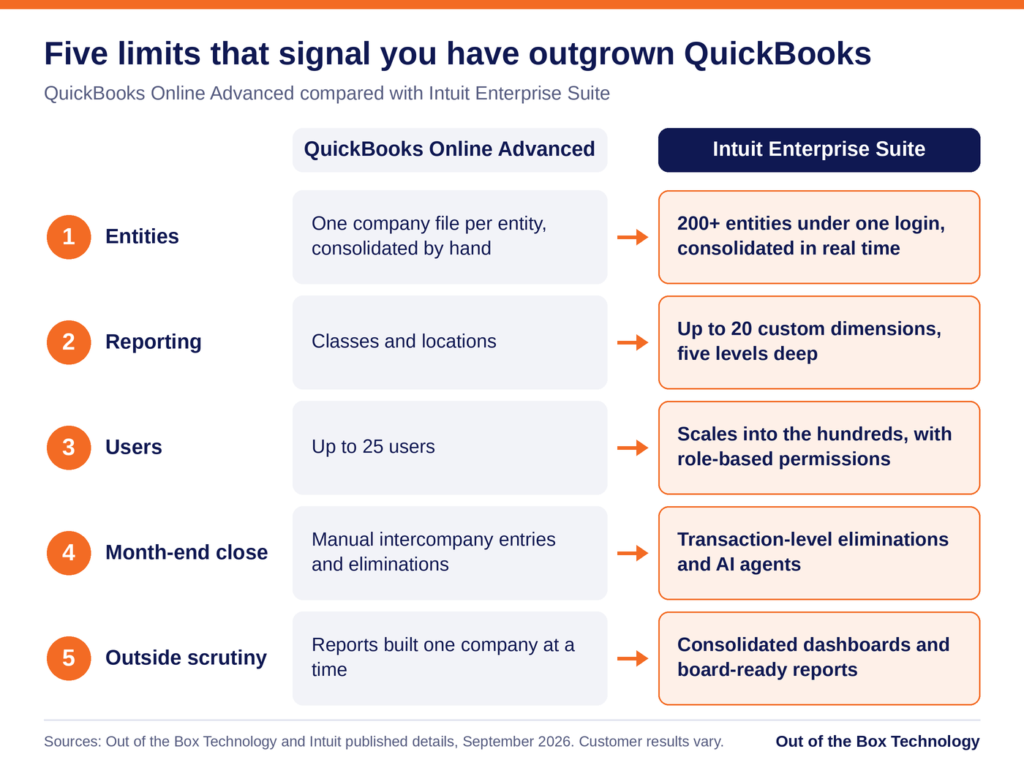
Read the five signs as a checklist against your own month-end. If you recognize two or more, the comparison below shows where each limit sits in QuickBooks Online Advanced. It also shows how Intuit Enterprise Suite raises those limits.
Sign 1: You Keep a Separate QuickBooks File for Every Entity
The clearest sign that you have outgrown QuickBooks is a collection of separate files. You keep one for each company you own or manage. Each file has its own chart of accounts and its own version of the numbers. Over time the charts drift apart, and the same expense lands in different accounts depending on who coded it. With six legal entities, you have six charts of accounts to keep aligned, and small differences add up quickly.
Month-end then becomes a manual exercise. When one entity pays a bill for another, you record the transaction twice, once in each file. Then you reconcile both sides by hand. Next, you export every file into a workbook and remove the intercompany activity. That step is called an elimination, and it keeps the group total from counting the same dollar twice. Frequently one person owns the workbook that performs it.
Intuit Enterprise Suite replaces that routine with native multi-entity accounting. A single login can manage more than 200 entities. You switch between the parent company and each subsidiary from a dropdown menu. Intercompany entries post to both sides, and eliminations run at the transaction level. Consolidated statements then assemble in real time.
Sign 2: Your Best Reporting Happens in Excel
Look at the reports your leadership team reads each month, and trace where they came from. If the numbers start in QuickBooks but end up in a spreadsheet, the system has stopped answering your questions. Common examples include profit by region and margin by service line.
QuickBooks Online Advanced gives you two ways to tag transactions, which are classes and locations. When you need a third view, you end up packing several meanings into one class name. Otherwise, you build the comparison tables by hand. Both workarounds are fragile, because one renamed class can quietly break a report.
Dimensions handle this differently. A dimension is a tag that lets you filter and group results, much like a class but far more structured. Intuit Enterprise Suite supports up to 20 custom dimensions. Each one can hold unlimited values and up to five levels of hierarchy. Dimensions also work across entities, so you can report on the whole group by region, sector, or program.
Sign 3: You Are Close to the 25-User Ceiling
QuickBooks Online Advanced is the highest QuickBooks Online tier, and it tops out at 25 users. That sounds generous until you count the bookkeeper, the controller, the project managers, and the payroll administrator. Your outside accountants need access as well. If you share logins to stay under the cap, you have reached the ceiling in practice. The same is true if you delay adding someone because every seat is taken.
Shared logins also create a control problem. When three people sign in as the same user, the audit trail cannot show who changed what. An auditor reviewing your controls is likely to ask about that. Removing someone’s access when they leave also becomes guesswork.
Once you have outgrown QuickBooks Online Advanced, Intuit Enterprise Suite gives you room. It scales into the hundreds of users and applies role-based permissions across entities. You can let a project manager see job costs in one entity and limit a bill approver to the approval queue. Payroll data stays limited to the people who need it. Approval workflows support up to five parallel approvers. The record of who approved what stays attached to the transaction.
Sign 4: The Month-End Close Takes Longer Every Quarter
A close that runs past the first week of the month often means you have outgrown QuickBooks. Much of that time goes to chasing reconciliations and waiting on the last entity to finish. Some of it goes to rebuilding the consolidation workbook and fixing errors that manual work introduces.
If your controller describes the close as a project, the process has outgrown the system underneath it. The same few people work late every month, and adding staff helps only for a while.
Intuit Enterprise Suite targets the slowest steps directly. Transaction-level eliminations remove the manual consolidation, and the Intuit Enterprise Suite Summer 2026 release added more depth to close tools across entities. Intuit’s AI agents, built-in assistants for tasks such as categorization and reconciliation, take on routine work. Intuit reports that Cornerstone Development Company cut its month-end close by 50 percent. It also reports that Lango closed 66 percent faster, although customer results vary. Your own results depend on how closely the setup follows your process. That is why implementation planning matters as much as the software.
Sign 5: Investors, Lenders, or Auditors Ask Questions Your Books Cannot Answer
When you have outgrown QuickBooks, outside parties often notice before you do. A private equity sponsor wants standardized reports across every holding. Lenders ask for results by entity to check loan requirements. During an audit, you have to explain how you eliminated intercompany balances. A buyer doing due diligence expects consolidated history that reconciles.
If the answer to each request is a week of work in Excel, your books were built for simpler questions. Growth through acquisition sharpens the problem, because every new company brings another file and another chart of accounts to reconcile. The same pressure reaches you if you run a franchise group or a construction firm with an entity per project.
Reporting that lives inside the accounting system answers many of these requests. You get consolidated dashboards and management reports built for board packages. Approval workflows and role-based permissions add a detailed audit trail, so auditors can follow each entry. You can also project profit and loss down to the dimension for up to three years. When you acquire a company, you add it as another entity instead of starting another file, and our First 100 Days support helps with the accounting integration.
Outgrown QuickBooks, or Just Due for a Cleanup?
If you feel cramped in QuickBooks, first check whether the cause is your setup. A cluttered chart of accounts, inconsistent coding, or a slow company file can make a healthy system feel undersized. A cleanup often fixes those problems, and our QuickBooks clean-up service exists for that reason. For a wider look at software limits, read our post on 5 signs you have outgrown your accounting software.
A simple test can separate the two. If your pain comes from messy data inside one entity, fix the data first. If it comes from the structure itself, cleaning alone will not remove it. Structure means multiple entities, more reporting views than classes and locations can carry, or more users than your plan allows. If you run one entity with well under 25 users and simple reporting needs, QuickBooks Online Advanced is likely still the right tool.
The same five signs apply if you use QuickBooks Desktop. Moving from Desktop follows a different path, which our QuickBooks Desktop to Intuit Enterprise Suite migration walkthrough explains.
What to Do After You Have Outgrown QuickBooks
If two or more of these signs sound familiar, a short assessment is a sensible next step. Once you have outgrown QuickBooks, the path forward is shorter than you might expect. Intuit says data from QuickBooks Online upgrades into Intuit Enterprise Suite automatically, and the interface stays familiar.
That data arrives with any clutter attached. The upgrade is therefore usually the least disruptive moment to redesign your chart of accounts and your class structure. Intuit also lets you choose how much history comes across, from a clean slate to a full data conversion. Our guide to migrating historical financial data helps you decide, and our step-by-step migration guide covers the preparation.
Cost is usually the next question, and Intuit does not publish a list price for Intuit Enterprise Suite. Quotes depend on your entity count, your user count, and the capabilities you turn on. Our guide to return on investment and total cost of ownership shows how to weigh a quote, and our comparison of Intuit Enterprise Suite with QuickBooks Enterprise and QuickBooks Online Advanced shows which product fits your situation.
Ready to See How Many of These Signs Apply to You?
Schedule a 30-minute Intuit Enterprise Suite Upgrade Assessment with our team. We will review your current setup and send a written proposal within one week.
Related reading:
- Intuit Enterprise Suite vs QuickBooks Enterprise and QuickBooks Online Advanced
- Intuit Enterprise Suite Multi-Entity Accounting: Why It Is Not Just a Single Entity Upgrade
- Migrating from QuickBooks Online Advanced to Intuit Enterprise Suite: What Changes and What Stays
- Is Intuit Enterprise Suite Worth It? ROI and Total Cost of Ownership Explained
- 5 Signs You’ve Outgrown Your Accounting Software
Outgrown QuickBooks? Frequently Asked Questions
How do I know if I have outgrown QuickBooks?
You have likely outgrown QuickBooks when the limits of the system itself cause your problems. Those limits include how many entities, dimensions, and users it supports. The most common signs are separate files for each entity, reporting that lives in spreadsheets, and a user count near 25. A month-end close that keeps getting longer is another sign. So are questions from investors, lenders, or auditors that your books cannot answer. If two or more sound familiar, an assessment is worth your time.
What is the difference between QuickBooks Online Advanced and Intuit Enterprise Suite?
QuickBooks Online Advanced is built for a single company with up to 25 users. It gives you classes and locations for tracking. Intuit Enterprise Suite adds native multi-entity accounting with more than 200 entities under one login. It also adds up to 20 custom dimensions and role-based permissions for hundreds of users. AI agents handle tasks across accounting, payments, finance, and project management. The QuickBooks design language carries over, so the day-to-day experience feels familiar. Our full comparison covers the details.
Have I outgrown QuickBooks if I am close to the 25-user limit?
QuickBooks Online Advanced allows up to 25 users, the highest limit in the QuickBooks Online line. Intuit Enterprise Suite scales into the hundreds of users. It also lets you set role-based permissions by entity. If you share logins to stay under the cap, you may have outgrown QuickBooks Online Advanced and should review your options.
Is Intuit Enterprise Suite an ERP?
Yes. Intuit describes Intuit Enterprise Suite as an AI-native ERP, and ERP stands for enterprise resource planning. It combines accounting, reporting, payments, payroll, and workforce tools in one connected platform. It also keeps the QuickBooks foundation your team already knows. As a result, implementation usually runs shorter than it does for a traditional ERP. Our implementation guide walks through what the work involves.
Can I move from QuickBooks Desktop straight to Intuit Enterprise Suite?
Yes. Intuit Enterprise Suite is a cloud platform, so the move from QuickBooks Desktop involves a data migration. That migration gives you a chance to redesign your chart of accounts and reporting structure. Our QuickBooks Desktop to Intuit Enterprise Suite migration walkthrough covers the steps.
How long does it take to move from QuickBooks to Intuit Enterprise Suite?
The mechanical data upgrade from QuickBooks Online typically takes hours to a couple of days. A complete implementation for a single entity generally runs 40 to 80 hours of professional services. That time covers system design, testing, and any redesign of your chart of accounts. A multi-entity rollout usually takes six to twelve weeks of elapsed time. Our step-by-step migration guide breaks down each stage.
Do I need more than one entity to justify Intuit Enterprise Suite?
No. Multi-entity accounting is the headline feature. Even so, a single company with several locations, service lines, and project-based revenue can carry more reporting complexity than a small group of companies. Dimensions, role-based permissions, approval workflows, and AI agents all apply inside one legal entity. If you run one entity with well under 25 users and simple reporting needs, QuickBooks Online Advanced is likely still the right fit.
Talk to An Advisor Today
You might also like these articles
Year-End Close Checklist: How to Close Your Books for 2026 and Start 2027 Clean
Read More
Last updated: October 26, 2026 If you are closing your books for 2026 with last year’s year-end close checklist, at least four items on it are now wrong. The 1099 threshold moved, the IRS changed the system you file through, the mileage rate changed halfway through the year, and one reporting requirement that appeared on…
Year-End Tax Planning for Businesses: 2026 Changes and December 31 Moves
Read More
Year-end tax planning gives a business owner a short window to lower the 2026 tax bill, and most of that window closes at midnight on December 31. This year the window matters more than usual. The One Big Beautiful Bill Act, signed in July 2025, changed how equipment, research costs, owner income, and charitable gifts…
QuickBooks Desktop to Intuit Enterprise Suite Migration: A Complete Walkthrough
Read More
If you have been running your business on QuickBooks Desktop for years, the idea of migrating to Intuit Enterprise Suite can feel like a significant lift. There are more moving parts than a standard software upgrade, and the stakes are high when your financial data is involved. But here is the reality: the QuickBooks Desktop…
Intuit Enterprise Suite vs QuickBooks Enterprise and QuickBooks Online Advanced
Read More
Three Intuit products regularly appear on the same shortlist, and they are built for three different jobs. QuickBooks Desktop Enterprise is a mature on-premise system with deep inventory capability. QuickBooks Online Advanced is cloud accounting for a growing single company. Intuit Enterprise Suite is a cloud platform with ERP-level multi-entity and dimensional financial management. The…
Claim your complimentary bookeeping assesment today
Request your free bookkeeping quote today and let us simplify your financial management. Our expert team at QuickBooks is ready to tailor a solution to your needs.
September 23, 2026
Intuit Enterprise Suite vs QuickBooks Enterprise and QuickBooks Online Advanced
Three Intuit products regularly appear on the same shortlist, and they are built for three different jobs. QuickBooks Desktop Enterprise is a mature on-premise system with deep inventory capability. QuickBooks Online Advanced is cloud accounting for a growing single company. Intuit Enterprise Suite is a cloud platform with ERP-level multi-entity and dimensional financial management.
The difficulty in an Intuit Enterprise Suite vs QuickBooks comparison is that all three share an interface family and a brand, so the differences look smaller on a screen than they are in practice. What separates them is how much complexity each one can carry before your team starts building workarounds.
The Short Answer
Stay on QuickBooks Online Advanced if you run one company, need one reporting dimension, and close without heavy spreadsheet work. Stay on QuickBooks Desktop Enterprise if serialized or assembly inventory sits at the center of your operation. Move to Intuit Enterprise Suite when you need multiple entities, multiple reporting dimensions, or consolidated visibility that does not depend on a monthly spreadsheet.
That framing holds for most businesses. The complication is that companies rarely sit cleanly in one box, and the cost of staying in the wrong one accumulates quietly rather than announcing itself.
The rest of this piece covers how to tell which of those describes you.
Intuit Enterprise Suite vs QuickBooks: The Comparison Table
QuickBooks Desktop Enterprise |
QuickBooks Online Advanced |
Intuit Enterprise Suite |
|
|---|---|---|---|
Deployment |
On-premise or hosted | Cloud | Cloud |
Entities |
One company file per entity | One company file per entity | More than 200 entities, one login |
Users |
Up to 40 simultaneous | Up to 25 | Scales into the hundreds |
Reporting dimensions |
Classes and locations | One dimension | Up to 20, five levels of hierarchy |
Consolidation |
Manual, outside the system | Manual, outside the system | Real time, in the system |
Intercompany eliminations |
Manual worksheet | Manual worksheet | Automatic at transaction level |
Inventory |
Deepest of the three, Advanced Inventory on Platinum | Basic | Standard, no warehouse management |
AI capability |
None | Rule-based automation and assistive tools | Finance, Accounting, Payments and Project Management agents |
Approval workflows |
Predefined approval rules | Basic | Up to five parallel approvers, dimension-triggered |
Payroll and HR |
Add-on, per-employee fees on Gold and Platinum | Add-on | Included in the platform |
Product direction |
Supported, no new non-Enterprise Desktop versions | Actively developed | Where Intuit ships new capability first |
Where QuickBooks Desktop Enterprise Still Wins
Desktop Enterprise remains the strongest inventory product Intuit sells. Advanced Inventory on the Platinum tier handles serialized tracking, bin locations, and assemblies at a depth neither cloud product matches. It supports up to 40 simultaneous users. Role-based permissions are detailed, built from a long list of individual work activities that can be assigned per user. For a manufacturer or distributor whose core constraint is stock, that capability is difficult to replace anywhere in the cloud.
The ground underneath it has been shifting, though. Intuit stopped selling new Pro Plus, Premier Plus, and Mac Plus subscriptions to United States customers after September 2024. Enterprise is now the only Desktop product open to new buyers. Desktop versions also follow a three-year support lifecycle, and support for the 2023 versions ended on 31 May 2026. When support ends the software still opens, but payroll updates, bank feeds, and payment processing stop working.
Pricing has moved as well. Enterprise tiers rose at the start of 2026, and Gold and Platinum customers now carry a per-employee payroll fee charged monthly. That fee applies per company file. For a group running several Desktop files, the structure compounds quickly.
Where QuickBooks Online Advanced Still Wins
Advanced is the right answer for a large number of businesses, and the comparison should say so plainly. It is cloud native, quick to deploy, and familiar to almost any bookkeeper you hire. It supports up to 25 users, automated workflows, and custom role permissions. For a single company with clean reporting requirements, nothing here needs replacing, and moving would add cost without adding capability you would use.
The ceiling is structural rather than a matter of features. Advanced supports one company file per entity and one reporting dimension. A business that needs to see the same revenue by region, by service line, and by customer segment has run out of room. The usual response is an export to a spreadsheet, and that spreadsheet tends to become permanent.
Cost has become part of this conversation too. Intuit has raised QuickBooks Online pricing several times in the past two years, and the Advanced tier absorbed the steepest of those increases in 2026. The price applies per company file. A group running three entities pays it three times over and still consolidates by hand.
What You Are Actually Buying With Intuit Enterprise Suite
Intuit Enterprise Suite is a different category of product rather than a larger version of the other two. A single login covers more than 200 entities with a standardized chart of accounts. Intercompany entries post to both sides and import in bulk, eliminations run automatically at the transaction level, and consolidated financial statements assemble in real time.
Reporting is the other half of the difference. The platform supports up to 20 custom dimensions, each with unlimited values and five levels of hierarchy. Dimensions apply at the transaction line level, including accounts payable and receivable. They also work across entities, so a group can report by region or program across every company at once. Forecasting runs down to the dimension, projecting as far as three years out.
The platform also carries four AI agents covering finance, accounting, payments, and project management, along with approval workflows that can be triggered by dimension. Payroll, HR, payments, bill pay, and project profitability sit inside the same system rather than alongside it.
Why Intuit Enterprise Suite Usually Wins This Comparison
Both QuickBooks products raise a ceiling. They give you more users, more features, and more reporting depth inside the same basic model, where your team still assembles the answers by hand at the end of every month. Intuit Enterprise Suite changes what the system produces on its own, and that difference compounds with every close.
The adoption risk is also lower than the capability level suggests. Moving to NetSuite or Sage Intacct asks your controller to learn an unfamiliar system while still closing the books each month. Moving to Intuit Enterprise Suite asks that same person to learn new capability inside an interface they already know. That is the main reason these implementations run in weeks while traditional ERP projects run in quarters.
Product direction matters more than most comparisons allow for. Intuit now ships new capability into Intuit Enterprise Suite first, including agentic AI, dimensional reporting, consolidated dashboards, and the industry editions. The distance between this platform and the other two widens with each release whether or not you do anything. Payroll, HR, payments, bill pay, and project profitability also sit inside the platform, which usually reduces the number of finance vendors your team manages and the number of integrations somebody has to maintain.
What the Return Data Suggests
There is supporting evidence, with a caveat attached. Forrester Consulting, in a study commissioned by Intuit, projected a 299% three-year return for a composite ten-entity organization, with a range of 128% to 467% across scenarios. Vendor-commissioned research deserves scrutiny, and the width of that range is the useful part. It shows that the return tracks how much manual work your current setup requires rather than how impressive the software is.
The asymmetry is worth naming before you decide. Moving a year early costs you capability you will not fully use yet. Moving a year late usually means re-platforming during an acquisition, an audit, or a support deadline, at the point when your team has the least capacity to absorb it.
The Triggers That Decide It
Most businesses do not choose a new system because of a feature comparison. They choose one because something specific broke.
The most common trigger is a second entity. A company acquires one, opens one in a new state, or creates one for a new service line. The spreadsheet consolidation begins that month, and it never gets smaller.
The second trigger is a reporting request leadership cannot get answered. It usually sounds like a request for margin by region and by service line, delivered in a meeting where nobody can produce it. The third is a Desktop support date arriving, which converts a strategic decision into an urgent one and removes your ability to plan the timing.
If none of those has happened, staying put is a reasonable choice. If two of them have, the cost of waiting is already showing up in your close.
What the Move Involves
Moving from either QuickBooks product to Intuit Enterprise Suite is a design project before it is a data project. The chart of accounts and dimension architecture you build during implementation decide whether the reporting holds up for years. Get that wrong and you rebuild it within eighteen months, usually while the system is live. Migration from Desktop carries its own considerations around inventory valuation and transaction history, which our Desktop migration walkthrough covers in detail.
The adoption curve is the part that surprises people. Because the platform sits on a QuickBooks foundation, teams are learning new capability rather than a new system, which is why implementations here are usually measured in weeks rather than quarters.
How We Can Help
Not sure which of the three fits? Out of the Box works across all three products and will tell you when staying put is the right call. Our guide to choosing an Intuit Enterprise Suite implementation partner covers what happens once the decision is made.
If your team is weighing a move to Intuit Enterprise Suite or wants help putting these new features to work, reach out to the OOTB team to talk through next steps.
Related reading:
- Is Intuit Enterprise Suite Worth It? ROI and Total Cost of Ownership Explained
- Intuit Enterprise Suite Multi-Entity Accounting Explained
- What Is Intuit Enterprise Suite? A Guide for Growing Businesses
- QuickBooks Desktop to Intuit Enterprise Suite Migration: A Complete Walkthrough
Frequently Asked Questions
What is the difference between Intuit Enterprise Suite and QuickBooks Online Advanced?
Should I move from QuickBooks Desktop Enterprise to Intuit Enterprise Suite?
Is QuickBooks Desktop being discontinued?
How many users does each product support?
Can QuickBooks handle multiple entities without Intuit Enterprise Suite?
What usually triggers a move to Intuit Enterprise Suite?
Does OOTB support all three QuickBooks products?
Talk to An Advisor Today
You might also like these articles
Year-End Close Checklist: How to Close Your Books for 2026 and Start 2027 Clean
Read More
Last updated: October 26, 2026 If you are closing your books for 2026 with last year’s year-end close checklist, at least four items on it are now wrong. The 1099 threshold moved, the IRS changed the system you file through, the mileage rate changed halfway through the year, and one reporting requirement that appeared on…
Year-End Tax Planning for Businesses: 2026 Changes and December 31 Moves
Read More
Year-end tax planning gives a business owner a short window to lower the 2026 tax bill, and most of that window closes at midnight on December 31. This year the window matters more than usual. The One Big Beautiful Bill Act, signed in July 2025, changed how equipment, research costs, owner income, and charitable gifts…
QuickBooks Desktop to Intuit Enterprise Suite Migration: A Complete Walkthrough
Read More
If you have been running your business on QuickBooks Desktop for years, the idea of migrating to Intuit Enterprise Suite can feel like a significant lift. There are more moving parts than a standard software upgrade, and the stakes are high when your financial data is involved. But here is the reality: the QuickBooks Desktop…
5 Signs You’ve Outgrown QuickBooks for Intuit Enterprise Suite
Read More
You may have outgrown QuickBooks long before the software gives you any warning. The bank feeds still sync and the reports still run, so nothing looks broken. Meanwhile, your team spends more of each month working around the system than working in it. That gap widens one spreadsheet at a time. This post covers five…
Claim your complimentary bookeeping assesment today
Request your free bookkeeping quote today and let us simplify your financial management. Our expert team at QuickBooks is ready to tailor a solution to your needs.
Talk to An Advisor Today
You might also like these articles
Year-End Close Checklist: How to Close Your Books for 2026 and Start 2027 Clean
Read More
Last updated: October 26, 2026 If you are closing your books for 2026 with last year’s year-end close checklist, at least four items on it are now wrong. The 1099 threshold moved, the IRS changed the system you file through, the mileage rate changed halfway through the year, and one reporting requirement that appeared on…
Year-End Tax Planning for Businesses: 2026 Changes and December 31 Moves
Read More
Year-end tax planning gives a business owner a short window to lower the 2026 tax bill, and most of that window closes at midnight on December 31. This year the window matters more than usual. The One Big Beautiful Bill Act, signed in July 2025, changed how equipment, research costs, owner income, and charitable gifts…
QuickBooks Desktop to Intuit Enterprise Suite Migration: A Complete Walkthrough
Read More
If you have been running your business on QuickBooks Desktop for years, the idea of migrating to Intuit Enterprise Suite can feel like a significant lift. There are more moving parts than a standard software upgrade, and the stakes are high when your financial data is involved. But here is the reality: the QuickBooks Desktop…
5 Signs You’ve Outgrown QuickBooks for Intuit Enterprise Suite
Read More
You may have outgrown QuickBooks long before the software gives you any warning. The bank feeds still sync and the reports still run, so nothing looks broken. Meanwhile, your team spends more of each month working around the system than working in it. That gap widens one spreadsheet at a time. This post covers five…
Claim your complimentary bookeeping assesment today
Request your free bookkeeping quote today and let us simplify your financial management. Our expert team at QuickBooks is ready to tailor a solution to your needs.
Talk to An Advisor Today
You might also like these articles
Year-End Close Checklist: How to Close Your Books for 2026 and Start 2027 Clean
Read More
Last updated: October 26, 2026 If you are closing your books for 2026 with last year’s year-end close checklist, at least four items on it are now wrong. The 1099 threshold moved, the IRS changed the system you file through, the mileage rate changed halfway through the year, and one reporting requirement that appeared on…
Year-End Tax Planning for Businesses: 2026 Changes and December 31 Moves
Read More
Year-end tax planning gives a business owner a short window to lower the 2026 tax bill, and most of that window closes at midnight on December 31. This year the window matters more than usual. The One Big Beautiful Bill Act, signed in July 2025, changed how equipment, research costs, owner income, and charitable gifts…
QuickBooks Desktop to Intuit Enterprise Suite Migration: A Complete Walkthrough
Read More
If you have been running your business on QuickBooks Desktop for years, the idea of migrating to Intuit Enterprise Suite can feel like a significant lift. There are more moving parts than a standard software upgrade, and the stakes are high when your financial data is involved. But here is the reality: the QuickBooks Desktop…
5 Signs You’ve Outgrown QuickBooks for Intuit Enterprise Suite
Read More
You may have outgrown QuickBooks long before the software gives you any warning. The bank feeds still sync and the reports still run, so nothing looks broken. Meanwhile, your team spends more of each month working around the system than working in it. That gap widens one spreadsheet at a time. This post covers five…
Claim your complimentary bookeeping assesment today
Request your free bookkeeping quote today and let us simplify your financial management. Our expert team at QuickBooks is ready to tailor a solution to your needs.
Talk to An Advisor Today
You might also like these articles
Year-End Close Checklist: How to Close Your Books for 2026 and Start 2027 Clean
Read More
Last updated: October 26, 2026 If you are closing your books for 2026 with last year’s year-end close checklist, at least four items on it are now wrong. The 1099 threshold moved, the IRS changed the system you file through, the mileage rate changed halfway through the year, and one reporting requirement that appeared on…
Year-End Tax Planning for Businesses: 2026 Changes and December 31 Moves
Read More
Year-end tax planning gives a business owner a short window to lower the 2026 tax bill, and most of that window closes at midnight on December 31. This year the window matters more than usual. The One Big Beautiful Bill Act, signed in July 2025, changed how equipment, research costs, owner income, and charitable gifts…
QuickBooks Desktop to Intuit Enterprise Suite Migration: A Complete Walkthrough
Read More
If you have been running your business on QuickBooks Desktop for years, the idea of migrating to Intuit Enterprise Suite can feel like a significant lift. There are more moving parts than a standard software upgrade, and the stakes are high when your financial data is involved. But here is the reality: the QuickBooks Desktop…
5 Signs You’ve Outgrown QuickBooks for Intuit Enterprise Suite
Read More
You may have outgrown QuickBooks long before the software gives you any warning. The bank feeds still sync and the reports still run, so nothing looks broken. Meanwhile, your team spends more of each month working around the system than working in it. That gap widens one spreadsheet at a time. This post covers five…
Claim your complimentary bookeeping assesment today
Request your free bookkeeping quote today and let us simplify your financial management. Our expert team at QuickBooks is ready to tailor a solution to your needs.
Talk to An Advisor Today
You might also like these articles
Year-End Close Checklist: How to Close Your Books for 2026 and Start 2027 Clean
Read More
Last updated: October 26, 2026 If you are closing your books for 2026 with last year’s year-end close checklist, at least four items on it are now wrong. The 1099 threshold moved, the IRS changed the system you file through, the mileage rate changed halfway through the year, and one reporting requirement that appeared on…
Year-End Tax Planning for Businesses: 2026 Changes and December 31 Moves
Read More
Year-end tax planning gives a business owner a short window to lower the 2026 tax bill, and most of that window closes at midnight on December 31. This year the window matters more than usual. The One Big Beautiful Bill Act, signed in July 2025, changed how equipment, research costs, owner income, and charitable gifts…
QuickBooks Desktop to Intuit Enterprise Suite Migration: A Complete Walkthrough
Read More
If you have been running your business on QuickBooks Desktop for years, the idea of migrating to Intuit Enterprise Suite can feel like a significant lift. There are more moving parts than a standard software upgrade, and the stakes are high when your financial data is involved. But here is the reality: the QuickBooks Desktop…
5 Signs You’ve Outgrown QuickBooks for Intuit Enterprise Suite
Read More
You may have outgrown QuickBooks long before the software gives you any warning. The bank feeds still sync and the reports still run, so nothing looks broken. Meanwhile, your team spends more of each month working around the system than working in it. That gap widens one spreadsheet at a time. This post covers five…
Claim your complimentary bookeeping assesment today
Request your free bookkeeping quote today and let us simplify your financial management. Our expert team at QuickBooks is ready to tailor a solution to your needs.
Talk to An Advisor Today
You might also like these articles
Year-End Close Checklist: How to Close Your Books for 2026 and Start 2027 Clean
Read More
Last updated: October 26, 2026 If you are closing your books for 2026 with last year’s year-end close checklist, at least four items on it are now wrong. The 1099 threshold moved, the IRS changed the system you file through, the mileage rate changed halfway through the year, and one reporting requirement that appeared on…
Year-End Tax Planning for Businesses: 2026 Changes and December 31 Moves
Read More
Year-end tax planning gives a business owner a short window to lower the 2026 tax bill, and most of that window closes at midnight on December 31. This year the window matters more than usual. The One Big Beautiful Bill Act, signed in July 2025, changed how equipment, research costs, owner income, and charitable gifts…
QuickBooks Desktop to Intuit Enterprise Suite Migration: A Complete Walkthrough
Read More
If you have been running your business on QuickBooks Desktop for years, the idea of migrating to Intuit Enterprise Suite can feel like a significant lift. There are more moving parts than a standard software upgrade, and the stakes are high when your financial data is involved. But here is the reality: the QuickBooks Desktop…
5 Signs You’ve Outgrown QuickBooks for Intuit Enterprise Suite
Read More
You may have outgrown QuickBooks long before the software gives you any warning. The bank feeds still sync and the reports still run, so nothing looks broken. Meanwhile, your team spends more of each month working around the system than working in it. That gap widens one spreadsheet at a time. This post covers five…
Claim your complimentary bookeeping assesment today
Request your free bookkeeping quote today and let us simplify your financial management. Our expert team at QuickBooks is ready to tailor a solution to your needs.
Talk to An Advisor Today
You might also like these articles
Year-End Close Checklist: How to Close Your Books for 2026 and Start 2027 Clean
Read More
Last updated: October 26, 2026 If you are closing your books for 2026 with last year’s year-end close checklist, at least four items on it are now wrong. The 1099 threshold moved, the IRS changed the system you file through, the mileage rate changed halfway through the year, and one reporting requirement that appeared on…
Year-End Tax Planning for Businesses: 2026 Changes and December 31 Moves
Read More
Year-end tax planning gives a business owner a short window to lower the 2026 tax bill, and most of that window closes at midnight on December 31. This year the window matters more than usual. The One Big Beautiful Bill Act, signed in July 2025, changed how equipment, research costs, owner income, and charitable gifts…
QuickBooks Desktop to Intuit Enterprise Suite Migration: A Complete Walkthrough
Read More
If you have been running your business on QuickBooks Desktop for years, the idea of migrating to Intuit Enterprise Suite can feel like a significant lift. There are more moving parts than a standard software upgrade, and the stakes are high when your financial data is involved. But here is the reality: the QuickBooks Desktop…
5 Signs You’ve Outgrown QuickBooks for Intuit Enterprise Suite
Read More
You may have outgrown QuickBooks long before the software gives you any warning. The bank feeds still sync and the reports still run, so nothing looks broken. Meanwhile, your team spends more of each month working around the system than working in it. That gap widens one spreadsheet at a time. This post covers five…
Claim your complimentary bookeeping assesment today
Request your free bookkeeping quote today and let us simplify your financial management. Our expert team at QuickBooks is ready to tailor a solution to your needs.