
QuickBook standard reports are critical to understanding your company’s past, present, and future. But the program also offers innovative tools that can make them significantly more insightful and comprehensive. QuickBooks offers two simple conventions that let you identify related data: classes and types.
Talk to An Advisor Today
You might also like these articles

Are All Your Bank Deposits Really Protected? Understanding FDIC Insurance Limits
Read More
Are All Your Bank Deposits Really Protected? Understanding FDIC Insurance Limits by Allyson Moore Everyone recognizes that small, comforting FDIC sign displayed at their local bank — it’s the government’s promise that your money is safe. But what many don’t realize is that FDIC insurance comes with limits. And for individuals or businesses holding…
How to Plan a Data Migration in 6 Easy Steps
Read More
If you’re preparing to switch systems, upgrade software, or clean up years of financial history, you may be facing one of the most crucial IT processes: data migration. For QuickBooks users, this often means replacing a company data file to fix performance issues, eliminate errors, or transition to a newer version of QuickBooks. Whether you’re…
6 Key Reasons Why Keeping Your Bookkeeping Updated Matters
In today’s fast-paced business world, maintaining accurate and up-to-date financial records is crucial for long-term success. Whether you're a small business owner, a franchise operator, or managing a growing enterprise, bookkeeping updates should never be overlooked. Outdated bookkeeping can lead to cash flow issues, tax penalties, and even legal troubles. On the other hand, businesses...
Read More
Controller vs. Comptroller: Key Differences Explained for Home Service Business Owners
Understanding the Differences Between a Controller and a Comptroller When running a home service business—whether it’s plumbing, HVAC, roofing, or landscaping—financial management plays a crucial role in your success. As your business grows, you may need to hire a financial professional to oversee your finances and ensure financial stability. But should you hire a Controller...
Read More
Claim your complimentary bookeeping assesment today
Request your free bookkeeping quote today and let us simplify your financial management. Our expert team at QuickBooks is ready to tailor a solution to your needs.
February 24, 2025
How to Plan a Data Migration in 6 Easy Steps
If you’re preparing to switch systems, upgrade software, or clean up years of financial history, you may be facing one of the most crucial IT processes: data migration. For QuickBooks users, this often means replacing a company data file to fix performance issues, eliminate errors, or transition to a newer version of QuickBooks.
Whether you’re migrating full transaction histories or just lists and opening balances, following a clear migration plan can save you time, reduce errors, and ensure your accounting integrity remains intact.
In this guide, we break down how to plan a data migration in six easy steps, tailored for QuickBooks but applicable across platforms. Let’s get started.
Step 1: Reorganize and Clean Up Lists
Before beginning your data migration, make sure your lists—like customers, vendors, chart of accounts, and items—are in order. Re-sorting lists ensures QuickBooks’ internal indexing is correct, which helps prevent import errors in the new file.
Action Items:
-
Use QuickBooks’ “Re-sort List” function for all major lists.
-
Merge duplicates (e.g., two customer records for the same company).
-
Inactivate obsolete items, accounts, or vendors.
According to TechRepublic, “dirty data” can cost companies up to $15 million annually in operational inefficiencies. (Source)
Step 2: Verify and Repair File Damage
Before migrating data, run QuickBooks’ Verify and Rebuild utilities to detect and fix file corruption. Data issues that go unresolved pre-migration can cause serious problems in the new file, including inaccurate reports and failed imports.
How to Run Verify:
-
Log in as Admin in single-user mode.
-
Go to File > Utilities > Verify Data.
If errors are found, proceed to File > Utilities > Rebuild Data. Always back up your file before performing a rebuild.
Tip: Run a second Verify after rebuilding to ensure all issues are resolved.
Step 3: Close or Reconcile Transactions
Next, ensure that only real-world open transactions remain in the file. You don’t want to migrate unpaid invoices or bills that have already been settled.
Reports to Review:
-
Open Invoices
-
Unpaid Bills Detail
-
A/R and A/P Aging Summaries
If you find duplicate or unlinked transactions, correct them using:
-
Receive Payments for invoices
-
Pay Bills for bill payments
A 2021 study by Forrester found that companies with clean financial data reduced monthly reconciliation time by up to 30%. (Source)
Step 4: Review Inventory for Errors
Inventory tracking in QuickBooks can be especially sensitive during a data migration. Negative inventory values are a common source of trouble, often causing inflated or erratic average costs.
Run the Inventory Valuation Detail Report:
-
Go to Reports > Inventory > Inventory Valuation Detail
-
Set the date range to “All”
-
Look for negative values in the “On Hand” column
Fixes May Include:
-
Adjusting transaction dates
-
Correcting quantities received or sold
-
Running a physical count and reconciling in QuickBooks
⚠️ According to Aberdeen Research, inventory inaccuracies lead to $1.1 trillion in losses globally each year. (Source)
Step 5: Reconcile Reports to Real-World Balances
You’ll want your new file to reflect accurate balances, not just structurally correct data.
Reports to Analyze:
-
Balance Sheet
-
Profit & Loss Statement
-
Sales Tax Payable
-
Uncategorized Expenses
If your books don’t align with your bank statements, credit card accounts, or sales tax filings, fix those issues now. Migrating flawed financials only compounds errors in your new system.
Step 6: Audit Your Workflow and Dependencies
Before finalizing your data migration, take stock of how your team uses QuickBooks. This includes custom fields, memorized transactions, and third-party apps like payroll services or inventory tools.
Key Questions:
-
Are non-posting transactions like Estimates or Sales Orders essential?
-
Do you sync QuickBooks with outside apps (e.g., Shopify, Gusto)?
-
What fields or reports are mission-critical?
Knowing what matters to your workflow ensures nothing essential is lost in the transition.
FAQs About Data Migration
What is data migration?
Data migration is the process of transferring data from one system to another—whether it’s a software upgrade, platform change, or a file cleanup. For QuickBooks users, this might mean migrating data between company files or to/from cloud versions like QuickBooks Online.
How long does a data migration take?
Simple migrations (lists only) may take a few hours. Full transaction history migrations can take several days depending on file size, data complexity, and testing. Working with a professional provider can cut this timeline in half.
What types of data can be migrated in QuickBooks?
You can migrate:
-
Chart of Accounts
-
Customer & Vendor Lists
-
Items & Inventory
-
Transactions (invoices, bills, payments)
-
Payroll data (with limitations)
Non-posting entries like Sales Orders often need manual handling.
Can I migrate from QuickBooks Desktop to QuickBooks Online?
Yes, but it requires a structured process. Not all data types migrate automatically, and some custom fields or third-party app integrations may need to be rebuilt post-migration. Always perform a backup before initiating.
Final Thoughts
A successful data migration hinges on preparation. By cleaning up your lists, verifying your file, closing out old transactions, checking inventory, reviewing financials, and auditing your workflow, you’ll set the stage for a seamless transition to a new QuickBooks file—or any other accounting platform.
Need help with your QuickBooks data migration? Let our experts guide the way. With 20+ years of experience, we make migrations smooth, accurate, and stress-free.
Talk to An Advisor Today
You might also like these articles
Year-End Tax Planning for Businesses: 2026 Changes and December 31 Moves
Read More
Year-end tax planning gives a business owner a short window to lower the 2026 tax bill, and most of that window closes at midnight on December 31. This year the window matters more than usual. The One Big Beautiful Bill Act, signed in July 2025, changed how equipment, research costs, owner income, and charitable gifts…
QuickBooks Desktop to Intuit Enterprise Suite Migration: A Complete Walkthrough
Read More
If you have been running your business on QuickBooks Desktop for years, the idea of migrating to Intuit Enterprise Suite can feel like a significant lift. There are more moving parts than a standard software upgrade, and the stakes are high when your financial data is involved. But here is the reality: the QuickBooks Desktop…
5 Signs You’ve Outgrown QuickBooks for Intuit Enterprise Suite
Read More
You may have outgrown QuickBooks long before the software gives you any warning. The bank feeds still sync and the reports still run, so nothing looks broken. Meanwhile, your team spends more of each month working around the system than working in it. That gap widens one spreadsheet at a time. This post covers five…
Intuit Enterprise Suite vs QuickBooks Enterprise and QuickBooks Online Advanced
Read More
Three Intuit products regularly appear on the same shortlist, and they are built for three different jobs. QuickBooks Desktop Enterprise is a mature on-premise system with deep inventory capability. QuickBooks Online Advanced is cloud accounting for a growing single company. Intuit Enterprise Suite is a cloud platform with ERP-level multi-entity and dimensional financial management. The…
Claim your complimentary bookeeping assesment today
Request your free bookkeeping quote today and let us simplify your financial management. Our expert team at QuickBooks is ready to tailor a solution to your needs.
September 28, 2026
5 Signs You’ve Outgrown QuickBooks for Intuit Enterprise Suite
You may have outgrown QuickBooks long before the software gives you any warning. The bank feeds still sync and the reports still run, so nothing looks broken. Meanwhile, your team spends more of each month working around the system than working in it. That gap widens one spreadsheet at a time.
This post covers five signs that you have outgrown QuickBooks and are ready for Intuit Enterprise Suite. Intuit built this cloud platform for multiple entities, deeper reporting, and larger teams. It sits one step above QuickBooks Online Advanced and keeps the QuickBooks look and feel your team already knows. That familiarity matters, because a traditional enterprise resource planning (ERP) system usually brings a long implementation and a retraining program.
How to Tell When You Have Outgrown QuickBooks
Complexity is the deciding factor, so start by counting the legal entities you run and the ways you need to slice your results. Then count the people who work in your books and the outside parties who expect answers from you. A company with six entities can trigger every sign below. A larger company with one entity and simple reporting may trigger none.
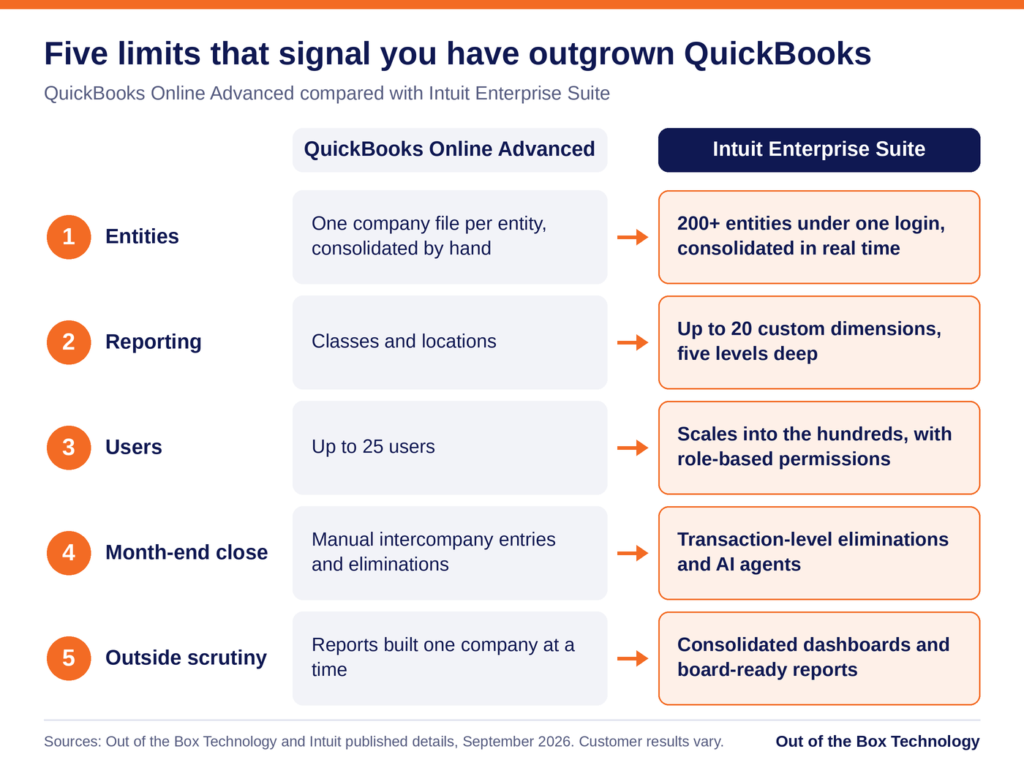
Read the five signs as a checklist against your own month-end. If you recognize two or more, the comparison below shows where each limit sits in QuickBooks Online Advanced. It also shows how Intuit Enterprise Suite raises those limits.
Sign 1: You Keep a Separate QuickBooks File for Every Entity
The clearest sign that you have outgrown QuickBooks is a collection of separate files. You keep one for each company you own or manage. Each file has its own chart of accounts and its own version of the numbers. Over time the charts drift apart, and the same expense lands in different accounts depending on who coded it. With six legal entities, you have six charts of accounts to keep aligned, and small differences add up quickly.
Month-end then becomes a manual exercise. When one entity pays a bill for another, you record the transaction twice, once in each file. Then you reconcile both sides by hand. Next, you export every file into a workbook and remove the intercompany activity. That step is called an elimination, and it keeps the group total from counting the same dollar twice. Frequently one person owns the workbook that performs it.
Intuit Enterprise Suite replaces that routine with native multi-entity accounting. A single login can manage more than 200 entities. You switch between the parent company and each subsidiary from a dropdown menu. Intercompany entries post to both sides, and eliminations run at the transaction level. Consolidated statements then assemble in real time.
Sign 2: Your Best Reporting Happens in Excel
Look at the reports your leadership team reads each month, and trace where they came from. If the numbers start in QuickBooks but end up in a spreadsheet, the system has stopped answering your questions. Common examples include profit by region and margin by service line.
QuickBooks Online Advanced gives you two ways to tag transactions, which are classes and locations. When you need a third view, you end up packing several meanings into one class name. Otherwise, you build the comparison tables by hand. Both workarounds are fragile, because one renamed class can quietly break a report.
Dimensions handle this differently. A dimension is a tag that lets you filter and group results, much like a class but far more structured. Intuit Enterprise Suite supports up to 20 custom dimensions. Each one can hold unlimited values and up to five levels of hierarchy. Dimensions also work across entities, so you can report on the whole group by region, sector, or program.
Sign 3: You Are Close to the 25-User Ceiling
QuickBooks Online Advanced is the highest QuickBooks Online tier, and it tops out at 25 users. That sounds generous until you count the bookkeeper, the controller, the project managers, and the payroll administrator. Your outside accountants need access as well. If you share logins to stay under the cap, you have reached the ceiling in practice. The same is true if you delay adding someone because every seat is taken.
Shared logins also create a control problem. When three people sign in as the same user, the audit trail cannot show who changed what. An auditor reviewing your controls is likely to ask about that. Removing someone’s access when they leave also becomes guesswork.
Once you have outgrown QuickBooks Online Advanced, Intuit Enterprise Suite gives you room. It scales into the hundreds of users and applies role-based permissions across entities. You can let a project manager see job costs in one entity and limit a bill approver to the approval queue. Payroll data stays limited to the people who need it. Approval workflows support up to five parallel approvers. The record of who approved what stays attached to the transaction.
Sign 4: The Month-End Close Takes Longer Every Quarter
A close that runs past the first week of the month often means you have outgrown QuickBooks. Much of that time goes to chasing reconciliations and waiting on the last entity to finish. Some of it goes to rebuilding the consolidation workbook and fixing errors that manual work introduces.
If your controller describes the close as a project, the process has outgrown the system underneath it. The same few people work late every month, and adding staff helps only for a while.
Intuit Enterprise Suite targets the slowest steps directly. Transaction-level eliminations remove the manual consolidation, and the Intuit Enterprise Suite Summer 2026 release added more depth to close tools across entities. Intuit’s AI agents, built-in assistants for tasks such as categorization and reconciliation, take on routine work. Intuit reports that Cornerstone Development Company cut its month-end close by 50 percent. It also reports that Lango closed 66 percent faster, although customer results vary. Your own results depend on how closely the setup follows your process. That is why implementation planning matters as much as the software.
Sign 5: Investors, Lenders, or Auditors Ask Questions Your Books Cannot Answer
When you have outgrown QuickBooks, outside parties often notice before you do. A private equity sponsor wants standardized reports across every holding. Lenders ask for results by entity to check loan requirements. During an audit, you have to explain how you eliminated intercompany balances. A buyer doing due diligence expects consolidated history that reconciles.
If the answer to each request is a week of work in Excel, your books were built for simpler questions. Growth through acquisition sharpens the problem, because every new company brings another file and another chart of accounts to reconcile. The same pressure reaches you if you run a franchise group or a construction firm with an entity per project.
Reporting that lives inside the accounting system answers many of these requests. You get consolidated dashboards and management reports built for board packages. Approval workflows and role-based permissions add a detailed audit trail, so auditors can follow each entry. You can also project profit and loss down to the dimension for up to three years. When you acquire a company, you add it as another entity instead of starting another file, and our First 100 Days support helps with the accounting integration.
Outgrown QuickBooks, or Just Due for a Cleanup?
If you feel cramped in QuickBooks, first check whether the cause is your setup. A cluttered chart of accounts, inconsistent coding, or a slow company file can make a healthy system feel undersized. A cleanup often fixes those problems, and our QuickBooks clean-up service exists for that reason. For a wider look at software limits, read our post on 5 signs you have outgrown your accounting software.
A simple test can separate the two. If your pain comes from messy data inside one entity, fix the data first. If it comes from the structure itself, cleaning alone will not remove it. Structure means multiple entities, more reporting views than classes and locations can carry, or more users than your plan allows. If you run one entity with well under 25 users and simple reporting needs, QuickBooks Online Advanced is likely still the right tool.
The same five signs apply if you use QuickBooks Desktop. Moving from Desktop follows a different path, which our QuickBooks Desktop to Intuit Enterprise Suite migration walkthrough explains.
What to Do After You Have Outgrown QuickBooks
If two or more of these signs sound familiar, a short assessment is a sensible next step. Once you have outgrown QuickBooks, the path forward is shorter than you might expect. Intuit says data from QuickBooks Online upgrades into Intuit Enterprise Suite automatically, and the interface stays familiar.
That data arrives with any clutter attached. The upgrade is therefore usually the least disruptive moment to redesign your chart of accounts and your class structure. Intuit also lets you choose how much history comes across, from a clean slate to a full data conversion. Our guide to migrating historical financial data helps you decide, and our step-by-step migration guide covers the preparation.
Cost is usually the next question, and Intuit does not publish a list price for Intuit Enterprise Suite. Quotes depend on your entity count, your user count, and the capabilities you turn on. Our guide to return on investment and total cost of ownership shows how to weigh a quote, and our comparison of Intuit Enterprise Suite with QuickBooks Enterprise and QuickBooks Online Advanced shows which product fits your situation.
Ready to See How Many of These Signs Apply to You?
Schedule a 30-minute Intuit Enterprise Suite Upgrade Assessment with our team. We will review your current setup and send a written proposal within one week.
Related reading:
- Intuit Enterprise Suite vs QuickBooks Enterprise and QuickBooks Online Advanced
- Intuit Enterprise Suite Multi-Entity Accounting: Why It Is Not Just a Single Entity Upgrade
- Migrating from QuickBooks Online Advanced to Intuit Enterprise Suite: What Changes and What Stays
- Is Intuit Enterprise Suite Worth It? ROI and Total Cost of Ownership Explained
- 5 Signs You’ve Outgrown Your Accounting Software
Outgrown QuickBooks? Frequently Asked Questions
How do I know if I have outgrown QuickBooks?
You have likely outgrown QuickBooks when the limits of the system itself cause your problems. Those limits include how many entities, dimensions, and users it supports. The most common signs are separate files for each entity, reporting that lives in spreadsheets, and a user count near 25. A month-end close that keeps getting longer is another sign. So are questions from investors, lenders, or auditors that your books cannot answer. If two or more sound familiar, an assessment is worth your time.
What is the difference between QuickBooks Online Advanced and Intuit Enterprise Suite?
QuickBooks Online Advanced is built for a single company with up to 25 users. It gives you classes and locations for tracking. Intuit Enterprise Suite adds native multi-entity accounting with more than 200 entities under one login. It also adds up to 20 custom dimensions and role-based permissions for hundreds of users. AI agents handle tasks across accounting, payments, finance, and project management. The QuickBooks design language carries over, so the day-to-day experience feels familiar. Our full comparison covers the details.
Have I outgrown QuickBooks if I am close to the 25-user limit?
QuickBooks Online Advanced allows up to 25 users, the highest limit in the QuickBooks Online line. Intuit Enterprise Suite scales into the hundreds of users. It also lets you set role-based permissions by entity. If you share logins to stay under the cap, you may have outgrown QuickBooks Online Advanced and should review your options.
Is Intuit Enterprise Suite an ERP?
Yes. Intuit describes Intuit Enterprise Suite as an AI-native ERP, and ERP stands for enterprise resource planning. It combines accounting, reporting, payments, payroll, and workforce tools in one connected platform. It also keeps the QuickBooks foundation your team already knows. As a result, implementation usually runs shorter than it does for a traditional ERP. Our implementation guide walks through what the work involves.
Can I move from QuickBooks Desktop straight to Intuit Enterprise Suite?
Yes. Intuit Enterprise Suite is a cloud platform, so the move from QuickBooks Desktop involves a data migration. That migration gives you a chance to redesign your chart of accounts and reporting structure. Our QuickBooks Desktop to Intuit Enterprise Suite migration walkthrough covers the steps.
How long does it take to move from QuickBooks to Intuit Enterprise Suite?
The mechanical data upgrade from QuickBooks Online typically takes hours to a couple of days. A complete implementation for a single entity generally runs 40 to 80 hours of professional services. That time covers system design, testing, and any redesign of your chart of accounts. A multi-entity rollout usually takes six to twelve weeks of elapsed time. Our step-by-step migration guide breaks down each stage.
Do I need more than one entity to justify Intuit Enterprise Suite?
No. Multi-entity accounting is the headline feature. Even so, a single company with several locations, service lines, and project-based revenue can carry more reporting complexity than a small group of companies. Dimensions, role-based permissions, approval workflows, and AI agents all apply inside one legal entity. If you run one entity with well under 25 users and simple reporting needs, QuickBooks Online Advanced is likely still the right fit.
Talk to An Advisor Today
You might also like these articles
Year-End Tax Planning for Businesses: 2026 Changes and December 31 Moves
Read More
Year-end tax planning gives a business owner a short window to lower the 2026 tax bill, and most of that window closes at midnight on December 31. This year the window matters more than usual. The One Big Beautiful Bill Act, signed in July 2025, changed how equipment, research costs, owner income, and charitable gifts…
QuickBooks Desktop to Intuit Enterprise Suite Migration: A Complete Walkthrough
Read More
If you have been running your business on QuickBooks Desktop for years, the idea of migrating to Intuit Enterprise Suite can feel like a significant lift. There are more moving parts than a standard software upgrade, and the stakes are high when your financial data is involved. But here is the reality: the QuickBooks Desktop…
Intuit Enterprise Suite vs QuickBooks Enterprise and QuickBooks Online Advanced
Read More
Three Intuit products regularly appear on the same shortlist, and they are built for three different jobs. QuickBooks Desktop Enterprise is a mature on-premise system with deep inventory capability. QuickBooks Online Advanced is cloud accounting for a growing single company. Intuit Enterprise Suite is a cloud platform with ERP-level multi-entity and dimensional financial management. The…
Is Intuit Enterprise Suite Worth It? ROI and Total Cost of Ownership Explained
Read More
Intuit does not publish a list price for Intuit Enterprise Suite. Every quote is built around your entity count, user count, and the capabilities you turn on, which means you cannot answer the worth-it question from a pricing page the way you can with QuickBooks Online. That makes the evaluation harder than it needs to…
Claim your complimentary bookeeping assesment today
Request your free bookkeeping quote today and let us simplify your financial management. Our expert team at QuickBooks is ready to tailor a solution to your needs.
September 15, 2026
Is Intuit Enterprise Suite Worth It? ROI and Total Cost of Ownership Explained
Intuit does not publish a list price for Intuit Enterprise Suite. Every quote is built around your entity count, user count, and the capabilities you turn on, which means you cannot answer the worth-it question from a pricing page the way you can with QuickBooks Online.
That makes the evaluation harder than it needs to be. Finance leaders end up comparing a custom quote against a number they already know, which is usually their current subscription. The new figure looks large next to the old one. But the comparison is incomplete, because it weighs the full cost of the new system against only the visible cost of the current one. The hours your team spends bridging the gaps in your existing setup never appear on an invoice, so they rarely appear in the business case either.
This piece lays out what Intuit Enterprise Suite tends to cost, what belongs on both sides of a real total cost of ownership calculation, and what the available Intuit Enterprise Suite ROI research actually says.
What Intuit Enterprise Suite Costs
Pricing is contract-based and sold through Intuit’s sales organization, so there is no published rate card to work from. What you can plan around is the shape of the quote rather than the figure. It scales with the number of entities you consolidate and the number of users who need access. It also scales with the capabilities you switch on, including payroll, project management, and the deeper reporting tools.
What that means in practice is a product positioned well above QuickBooks Online Advanced and well below a traditional mid-market ERP. Intuit’s own Intuit Enterprise Suite pricing page directs buyers to a tailored consultation. The only reliable number is the one on your quote. Third-party estimates circulate freely, and the spread between them is wide enough that planning against one is a mistake.
The Comparison That Changes the Answer
Most businesses evaluating Intuit Enterprise Suite are weighing it against one of two things. Either they are looking up from QuickBooks Online Advanced, or they are looking down from a traditional ERP quote. Both comparisons shifted in 2026.
QuickBooks Online Advanced has increased in price several times over the past two years, with the steepest of those increases landing in 2026. That price applies per company file. A group running three entities on Advanced pays it three times over. That group still has no consolidation, no intercompany automation, and one reporting dimension. Add the tools bridging those gaps and the totals move closer together than most finance leaders expect. In some configurations they converge, which changes the Intuit Enterprise Suite ROI question from whether you can afford the move to what you are already paying for the workarounds.
The view from the other direction has always favored Intuit. NetSuite, Sage Intacct, and Dynamics 365 Business Central deliver comparable multi-entity capability at a materially higher annual cost. Their implementation timelines are measured in quarters rather than weeks. Pull current figures for whichever products sit on your shortlist, because pricing across this category has moved repeatedly and any number older than a quarter is unreliable.
The Cost Side Most Quotes Leave Out
A subscription figure is not a total cost of ownership. The number that belongs in your model includes the work required to make the system produce the reports you need.
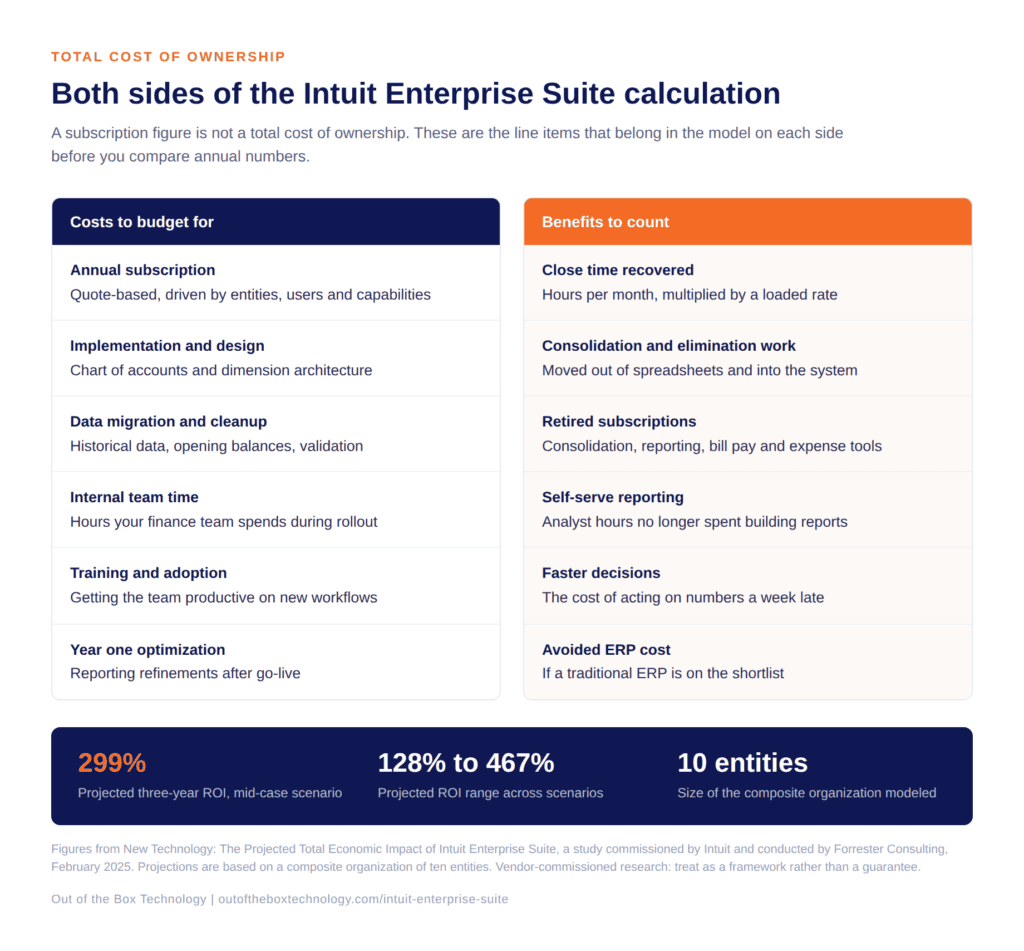 On the cost side, budget for implementation and system design, data migration and cleanup, and internal team time during the rollout. Add training and whatever ongoing optimization you expect in year one. Design work is the line item most often underestimated. Your chart of accounts and dimension architecture determine whether the reporting still works in five years, or whether it needs rebuilding in eighteen months.
The credit side of the same ledger gets forgotten just as often. Many groups arrive at Intuit Enterprise Suite carrying a consolidation tool, a separate reporting or dashboard subscription, a bill pay platform, an expense tool, and a payroll add-on. Several of those become redundant. Subtract them before you compare annual figures. The fair comparison is against your whole finance technology stack rather than against your accounting subscription alone.
There is one more line worth adding, and it is the least comfortable one. If your close currently depends on a spreadsheet that only one person understands, that dependency is a cost. It shows up as key person risk, as audit friction, and eventually as a rebuild when that person changes roles.
What the Intuit Enterprise Suite ROI Data Shows
Forrester Consulting produced a projected Total Economic Impact study on Intuit Enterprise Suite, commissioned by Intuit in February 2025. Vendor-commissioned research deserves appropriate skepticism, and the value here is the framework rather than the headline.
The study modeled a composite parent company made up of ten entities across North America. It projected a 299% return on investment over three years in the mid-case scenario. The reported range across scenarios ran from 128% to 467%. That spread is wide, which is the point. Intuit Enterprise Suite ROI depends heavily on how much manual work your current setup requires. A business with a clean close will land toward the bottom of that range. Forrester published a second study focused on accounting firms in September 2025.
What matters for your own model is where those benefits came from. Consolidation work moved out of spreadsheets and into the system. Close cycles shortened, which shortened the delay between an operational problem occurring and leadership seeing it. Redundant technology subscriptions came off the books. Reporting that previously required an analyst became self-serve.
Turning That Into Your Own Number
Start with hours. Count the days your team spends on consolidation, eliminations, intercompany reconciliation, and report building each month, then apply a loaded hourly rate. Multiply by twelve. That figure alone often covers a meaningful share of the annual subscription.
Next, count the subscriptions you would retire and add their annual cost to the benefit side. Then estimate the cost of decisions made late because the numbers arrived late. That one is harder to quantify, and it is usually the largest item on the list. Finally, if a traditional ERP sits on your shortlist, the avoided implementation cost belongs in the model as well.
One caution on the exercise. Build the model on your current volumes rather than your projected ones. A business case that only works at next year’s revenue is a forecast rather than a justification, and it tends to fall apart at the first quarter that misses plan.
When the Answer Is No
Some businesses should stay where they are. Picture a company with one entity, one reporting dimension, fewer than twenty-five users, and a three-day close that requires no spreadsheet gymnastics. QuickBooks Online Advanced is doing its job there, and the return on a move would be thin.
Timing matters too. A group in the middle of an acquisition, a system consolidation, or a finance leadership change has limited capacity for a platform project. The return does not disappear in those situations, but it arrives later than the model suggests, and the implementation carries more risk.
The same applies if your complexity sits in manufacturing or warehouse operations. Intuit Enterprise Suite does not carry deep manufacturing or warehouse management functionality. A business whose main constraint lives there will get better value from a platform built for that work, and the Intuit Enterprise Suite ROI case will be hard to make.
The Question Worth Asking Your Team
Ask your controller how many hours the last close consumed, and how many of those hours produced a number that a system could have produced instead. That figure, multiplied across a year, is the real comparison point for any Intuit Enterprise Suite ROI calculation.
How We Can Help
Want that number for your business? Out of the Box builds the cost and benefit picture with you before anyone talks about implementation, including the honest version where staying put is the right call. Our guide to choosing an Intuit Enterprise Suite implementation partner covers what the work involves once the numbers make sense.
If your team is weighing a move to Intuit Enterprise Suite or wants help putting these new features to work, reach out to the OOTB team to talk through next steps.
Related reading:
- What Is Intuit Enterprise Suite? A Guide for Growing Businesses
- Intuit Enterprise Suite Multi-Entity Accounting Explained
- QuickBooks Desktop to Intuit Enterprise Suite Migration: A Complete Walkthrough
- Streamlining Multi-Entity Accounting with Intuit Enterprise Suite
Frequently Asked Questions
Is Intuit Enterprise Suite worth the cost?
How is Intuit Enterprise Suite priced?
What is the total cost of ownership for Intuit Enterprise Suite?
Is Intuit Enterprise Suite cheaper than QuickBooks Online Advanced?
Is the Forrester ROI study on Intuit Enterprise Suite independent?
How do I calculate Intuit Enterprise Suite ROI for my own business?
When is Intuit Enterprise Suite not worth it?
Talk to An Advisor Today
You might also like these articles
Year-End Tax Planning for Businesses: 2026 Changes and December 31 Moves
Read More
Year-end tax planning gives a business owner a short window to lower the 2026 tax bill, and most of that window closes at midnight on December 31. This year the window matters more than usual. The One Big Beautiful Bill Act, signed in July 2025, changed how equipment, research costs, owner income, and charitable gifts…
QuickBooks Desktop to Intuit Enterprise Suite Migration: A Complete Walkthrough
Read More
If you have been running your business on QuickBooks Desktop for years, the idea of migrating to Intuit Enterprise Suite can feel like a significant lift. There are more moving parts than a standard software upgrade, and the stakes are high when your financial data is involved. But here is the reality: the QuickBooks Desktop…
5 Signs You’ve Outgrown QuickBooks for Intuit Enterprise Suite
Read More
You may have outgrown QuickBooks long before the software gives you any warning. The bank feeds still sync and the reports still run, so nothing looks broken. Meanwhile, your team spends more of each month working around the system than working in it. That gap widens one spreadsheet at a time. This post covers five…
Intuit Enterprise Suite vs QuickBooks Enterprise and QuickBooks Online Advanced
Read More
Three Intuit products regularly appear on the same shortlist, and they are built for three different jobs. QuickBooks Desktop Enterprise is a mature on-premise system with deep inventory capability. QuickBooks Online Advanced is cloud accounting for a growing single company. Intuit Enterprise Suite is a cloud platform with ERP-level multi-entity and dimensional financial management. The…
Claim your complimentary bookeeping assesment today
Request your free bookkeeping quote today and let us simplify your financial management. Our expert team at QuickBooks is ready to tailor a solution to your needs.
Talk to An Advisor Today
You might also like these articles
Year-End Tax Planning for Businesses: 2026 Changes and December 31 Moves
Read More
Year-end tax planning gives a business owner a short window to lower the 2026 tax bill, and most of that window closes at midnight on December 31. This year the window matters more than usual. The One Big Beautiful Bill Act, signed in July 2025, changed how equipment, research costs, owner income, and charitable gifts…
QuickBooks Desktop to Intuit Enterprise Suite Migration: A Complete Walkthrough
Read More
If you have been running your business on QuickBooks Desktop for years, the idea of migrating to Intuit Enterprise Suite can feel like a significant lift. There are more moving parts than a standard software upgrade, and the stakes are high when your financial data is involved. But here is the reality: the QuickBooks Desktop…
5 Signs You’ve Outgrown QuickBooks for Intuit Enterprise Suite
Read More
You may have outgrown QuickBooks long before the software gives you any warning. The bank feeds still sync and the reports still run, so nothing looks broken. Meanwhile, your team spends more of each month working around the system than working in it. That gap widens one spreadsheet at a time. This post covers five…
Intuit Enterprise Suite vs QuickBooks Enterprise and QuickBooks Online Advanced
Read More
Three Intuit products regularly appear on the same shortlist, and they are built for three different jobs. QuickBooks Desktop Enterprise is a mature on-premise system with deep inventory capability. QuickBooks Online Advanced is cloud accounting for a growing single company. Intuit Enterprise Suite is a cloud platform with ERP-level multi-entity and dimensional financial management. The…
Claim your complimentary bookeeping assesment today
Request your free bookkeeping quote today and let us simplify your financial management. Our expert team at QuickBooks is ready to tailor a solution to your needs.
Talk to An Advisor Today
You might also like these articles
Year-End Tax Planning for Businesses: 2026 Changes and December 31 Moves
Read More
Year-end tax planning gives a business owner a short window to lower the 2026 tax bill, and most of that window closes at midnight on December 31. This year the window matters more than usual. The One Big Beautiful Bill Act, signed in July 2025, changed how equipment, research costs, owner income, and charitable gifts…
QuickBooks Desktop to Intuit Enterprise Suite Migration: A Complete Walkthrough
Read More
If you have been running your business on QuickBooks Desktop for years, the idea of migrating to Intuit Enterprise Suite can feel like a significant lift. There are more moving parts than a standard software upgrade, and the stakes are high when your financial data is involved. But here is the reality: the QuickBooks Desktop…
5 Signs You’ve Outgrown QuickBooks for Intuit Enterprise Suite
Read More
You may have outgrown QuickBooks long before the software gives you any warning. The bank feeds still sync and the reports still run, so nothing looks broken. Meanwhile, your team spends more of each month working around the system than working in it. That gap widens one spreadsheet at a time. This post covers five…
Intuit Enterprise Suite vs QuickBooks Enterprise and QuickBooks Online Advanced
Read More
Three Intuit products regularly appear on the same shortlist, and they are built for three different jobs. QuickBooks Desktop Enterprise is a mature on-premise system with deep inventory capability. QuickBooks Online Advanced is cloud accounting for a growing single company. Intuit Enterprise Suite is a cloud platform with ERP-level multi-entity and dimensional financial management. The…
Claim your complimentary bookeeping assesment today
Request your free bookkeeping quote today and let us simplify your financial management. Our expert team at QuickBooks is ready to tailor a solution to your needs.
Talk to An Advisor Today
You might also like these articles
Year-End Tax Planning for Businesses: 2026 Changes and December 31 Moves
Read More
Year-end tax planning gives a business owner a short window to lower the 2026 tax bill, and most of that window closes at midnight on December 31. This year the window matters more than usual. The One Big Beautiful Bill Act, signed in July 2025, changed how equipment, research costs, owner income, and charitable gifts…
QuickBooks Desktop to Intuit Enterprise Suite Migration: A Complete Walkthrough
Read More
If you have been running your business on QuickBooks Desktop for years, the idea of migrating to Intuit Enterprise Suite can feel like a significant lift. There are more moving parts than a standard software upgrade, and the stakes are high when your financial data is involved. But here is the reality: the QuickBooks Desktop…
5 Signs You’ve Outgrown QuickBooks for Intuit Enterprise Suite
Read More
You may have outgrown QuickBooks long before the software gives you any warning. The bank feeds still sync and the reports still run, so nothing looks broken. Meanwhile, your team spends more of each month working around the system than working in it. That gap widens one spreadsheet at a time. This post covers five…
Intuit Enterprise Suite vs QuickBooks Enterprise and QuickBooks Online Advanced
Read More
Three Intuit products regularly appear on the same shortlist, and they are built for three different jobs. QuickBooks Desktop Enterprise is a mature on-premise system with deep inventory capability. QuickBooks Online Advanced is cloud accounting for a growing single company. Intuit Enterprise Suite is a cloud platform with ERP-level multi-entity and dimensional financial management. The…
Claim your complimentary bookeeping assesment today
Request your free bookkeeping quote today and let us simplify your financial management. Our expert team at QuickBooks is ready to tailor a solution to your needs.
Talk to An Advisor Today
You might also like these articles
Year-End Tax Planning for Businesses: 2026 Changes and December 31 Moves
Read More
Year-end tax planning gives a business owner a short window to lower the 2026 tax bill, and most of that window closes at midnight on December 31. This year the window matters more than usual. The One Big Beautiful Bill Act, signed in July 2025, changed how equipment, research costs, owner income, and charitable gifts…
QuickBooks Desktop to Intuit Enterprise Suite Migration: A Complete Walkthrough
Read More
If you have been running your business on QuickBooks Desktop for years, the idea of migrating to Intuit Enterprise Suite can feel like a significant lift. There are more moving parts than a standard software upgrade, and the stakes are high when your financial data is involved. But here is the reality: the QuickBooks Desktop…
5 Signs You’ve Outgrown QuickBooks for Intuit Enterprise Suite
Read More
You may have outgrown QuickBooks long before the software gives you any warning. The bank feeds still sync and the reports still run, so nothing looks broken. Meanwhile, your team spends more of each month working around the system than working in it. That gap widens one spreadsheet at a time. This post covers five…
Intuit Enterprise Suite vs QuickBooks Enterprise and QuickBooks Online Advanced
Read More
Three Intuit products regularly appear on the same shortlist, and they are built for three different jobs. QuickBooks Desktop Enterprise is a mature on-premise system with deep inventory capability. QuickBooks Online Advanced is cloud accounting for a growing single company. Intuit Enterprise Suite is a cloud platform with ERP-level multi-entity and dimensional financial management. The…
Claim your complimentary bookeeping assesment today
Request your free bookkeeping quote today and let us simplify your financial management. Our expert team at QuickBooks is ready to tailor a solution to your needs.
Talk to An Advisor Today
You might also like these articles
Year-End Tax Planning for Businesses: 2026 Changes and December 31 Moves
Read More
Year-end tax planning gives a business owner a short window to lower the 2026 tax bill, and most of that window closes at midnight on December 31. This year the window matters more than usual. The One Big Beautiful Bill Act, signed in July 2025, changed how equipment, research costs, owner income, and charitable gifts…
QuickBooks Desktop to Intuit Enterprise Suite Migration: A Complete Walkthrough
Read More
If you have been running your business on QuickBooks Desktop for years, the idea of migrating to Intuit Enterprise Suite can feel like a significant lift. There are more moving parts than a standard software upgrade, and the stakes are high when your financial data is involved. But here is the reality: the QuickBooks Desktop…
5 Signs You’ve Outgrown QuickBooks for Intuit Enterprise Suite
Read More
You may have outgrown QuickBooks long before the software gives you any warning. The bank feeds still sync and the reports still run, so nothing looks broken. Meanwhile, your team spends more of each month working around the system than working in it. That gap widens one spreadsheet at a time. This post covers five…
Intuit Enterprise Suite vs QuickBooks Enterprise and QuickBooks Online Advanced
Read More
Three Intuit products regularly appear on the same shortlist, and they are built for three different jobs. QuickBooks Desktop Enterprise is a mature on-premise system with deep inventory capability. QuickBooks Online Advanced is cloud accounting for a growing single company. Intuit Enterprise Suite is a cloud platform with ERP-level multi-entity and dimensional financial management. The…
Claim your complimentary bookeeping assesment today
Request your free bookkeeping quote today and let us simplify your financial management. Our expert team at QuickBooks is ready to tailor a solution to your needs.
Talk to An Advisor Today
You might also like these articles
Year-End Tax Planning for Businesses: 2026 Changes and December 31 Moves
Read More
Year-end tax planning gives a business owner a short window to lower the 2026 tax bill, and most of that window closes at midnight on December 31. This year the window matters more than usual. The One Big Beautiful Bill Act, signed in July 2025, changed how equipment, research costs, owner income, and charitable gifts…
QuickBooks Desktop to Intuit Enterprise Suite Migration: A Complete Walkthrough
Read More
If you have been running your business on QuickBooks Desktop for years, the idea of migrating to Intuit Enterprise Suite can feel like a significant lift. There are more moving parts than a standard software upgrade, and the stakes are high when your financial data is involved. But here is the reality: the QuickBooks Desktop…
5 Signs You’ve Outgrown QuickBooks for Intuit Enterprise Suite
Read More
You may have outgrown QuickBooks long before the software gives you any warning. The bank feeds still sync and the reports still run, so nothing looks broken. Meanwhile, your team spends more of each month working around the system than working in it. That gap widens one spreadsheet at a time. This post covers five…
Intuit Enterprise Suite vs QuickBooks Enterprise and QuickBooks Online Advanced
Read More
Three Intuit products regularly appear on the same shortlist, and they are built for three different jobs. QuickBooks Desktop Enterprise is a mature on-premise system with deep inventory capability. QuickBooks Online Advanced is cloud accounting for a growing single company. Intuit Enterprise Suite is a cloud platform with ERP-level multi-entity and dimensional financial management. The…
Claim your complimentary bookeeping assesment today
Request your free bookkeeping quote today and let us simplify your financial management. Our expert team at QuickBooks is ready to tailor a solution to your needs.