
Bills in QuickBooks are a transaction reflecting what you owe to a vendor, sometimes referred to outside QuickBooks as vendor invoices. Ensuring complete and accurate entry of bills into QuickBooks can be a huge help in understanding and managing your business’ expenses. Let’s look at some of the basics of entering bills in QuickBooks, and the tools you can use for this process to make your work simpler.
Talk to An Advisor Today
You might also like these articles
Year-End Tax Planning for Businesses: 2026 Changes and December 31 Moves
Read More
Year-end tax planning gives a business owner a short window to lower the 2026 tax bill, and most of that window closes at midnight on December 31. This year the window matters more than usual. The One Big Beautiful Bill Act, signed in July 2025, changed how equipment, research costs, owner income, and charitable gifts…
QuickBooks Desktop to Intuit Enterprise Suite Migration: A Complete Walkthrough
Read More
If you have been running your business on QuickBooks Desktop for years, the idea of migrating to Intuit Enterprise Suite can feel like a significant lift. There are more moving parts than a standard software upgrade, and the stakes are high when your financial data is involved. But here is the reality: the QuickBooks Desktop…
5 Signs You’ve Outgrown QuickBooks for Intuit Enterprise Suite
Read More
You may have outgrown QuickBooks long before the software gives you any warning. The bank feeds still sync and the reports still run, so nothing looks broken. Meanwhile, your team spends more of each month working around the system than working in it. That gap widens one spreadsheet at a time. This post covers five…
Intuit Enterprise Suite vs QuickBooks Enterprise and QuickBooks Online Advanced
Read More
Three Intuit products regularly appear on the same shortlist, and they are built for three different jobs. QuickBooks Desktop Enterprise is a mature on-premise system with deep inventory capability. QuickBooks Online Advanced is cloud accounting for a growing single company. Intuit Enterprise Suite is a cloud platform with ERP-level multi-entity and dimensional financial management. The…
Claim your complimentary bookeeping assesment today
Request your free bookkeeping quote today and let us simplify your financial management. Our expert team at QuickBooks is ready to tailor a solution to your needs.
October 12, 2026
QuickBooks Desktop to Intuit Enterprise Suite Migration: A Complete Walkthrough
If you have been running your business on QuickBooks Desktop for years, the idea of migrating to Intuit Enterprise Suite can feel like a significant lift. There are more moving parts than a standard software upgrade, and the stakes are high when your financial data is involved.
But here is the reality: the QuickBooks Desktop to Intuit Enterprise Suite migration is the most common upgrade path for businesses that have outgrown Desktop. When it is planned correctly, it tends to go smoothly. The challenges almost always come from poor preparation, not from the platform itself.
This guide walks you through the full process. You will learn what your migration path options are, what data transfers automatically, what you will need to redesign, how long it takes, and what to do at each stage to protect your data and set your new system up for long-term success.
Why QuickBooks Desktop Users Are Moving to Intuit Enterprise Suite
Intuit has been signaling for years that the future of its product line is in the cloud. Desktop versions are receiving fewer feature updates, and support for older versions ends on a rolling basis. For many businesses, staying on Desktop means falling behind on functionality, security patches, and integrations with modern tools.
But the bigger driver is usually growth. Businesses that started on Desktop Pro or Premier often hit a ceiling, especially when they are managing multiple locations, multiple entities, or a team that needs reliable concurrent access and cleaner reporting.
Intuit Enterprise Suite is designed for exactly this moment. It brings multi-entity management, up to 20 custom reporting dimensions, AI-powered financial automation, and a fully cloud-based infrastructure, all built on the QuickBooks foundation your team already knows. The learning curve is meaningfully lower than a traditional ERP, and a commissioned Forrester study projects up to 299% ROI over three years for Intuit Enterprise Suite customers.
Signs That You Are Ready to Move
- Your Desktop file is slowing down or approaching transaction limits
- You are managing multiple entities and reconciling manually across files
- Reporting requires too many exports and spreadsheet workarounds
- Remote or hybrid teams need concurrent access you cannot reliably provide in Desktop
- Your integrations are fragile or require workarounds that cloud tools would eliminate
- Intuit has sunset the Desktop version you are on, or will do so in the near term
If several of those apply, the question is not whether to migrate. It is how to do it right. Our overview of what Intuit Enterprise Suite is and who it is built for is a useful starting point if you are still evaluating the platform.
Your Two Migration Path Options
This is the decision that shapes everything else in a QuickBooks Desktop to Intuit Enterprise Suite migration. You have two primary paths, and they are not equivalent. Understanding the difference before you start will save you significant rework later.
Path A: Direct Migration (Intuit-Assisted Conversion)
Intuit provides a migration tool that converts your QuickBooks Desktop company file into an Intuit Enterprise Suite environment. This is the faster path and, for many businesses, the right one.
Best when: Your data is reasonably clean, your structure is straightforward, and you are not planning a major restructure of your chart of accounts or entity setup.
One important note: If your Desktop file exceeds 350,000 targets, you will need to condense your data before the conversion can run. OOTB handles this as part of the pre-migration process.
Path B: Clean-Start Migration
In a clean-start migration, you set up Intuit Enterprise Suite from scratch and bring over a defined set of historical data, rather than converting the entire Desktop file. This takes more time upfront but is often the better long-term choice.
Best when: Your Desktop file has years of accumulated workarounds. Your chart of accounts needs a rebuild. You are restructuring your entity setup as part of the move. Or you want to implement dimensions correctly from day one rather than retrofit them later.
With a clean-start migration, historical data is typically imported as summary journal entries or retained in a read-only Desktop file for reference. You start fresh in Intuit Enterprise Suite while keeping full access to your history.
Not sure which path fits your situation? Our data migration team reviews your Desktop file and gives you a clear recommendation before anything moves.
What Transfers and What Does Not
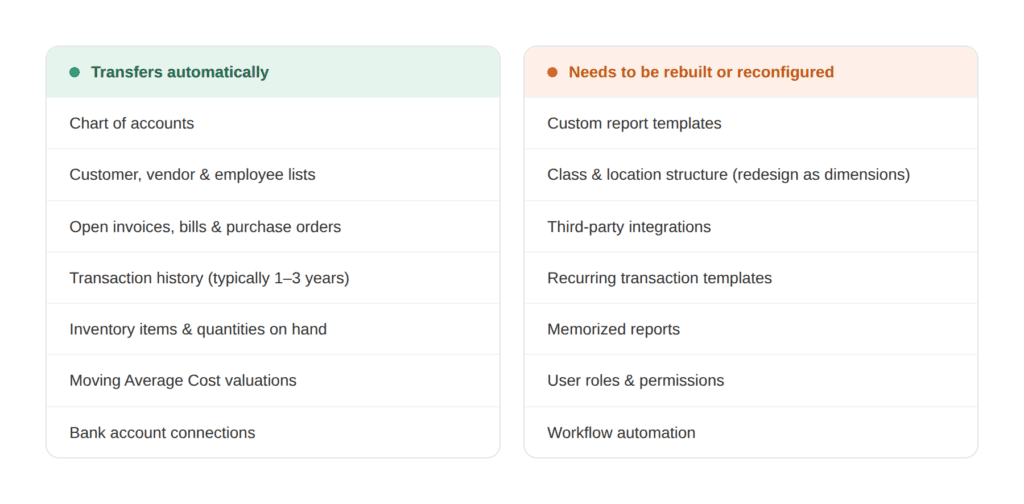
Understanding this distinction upfront helps you plan your timeline accurately and avoid surprises mid-project.
The Six-Step Migration Process
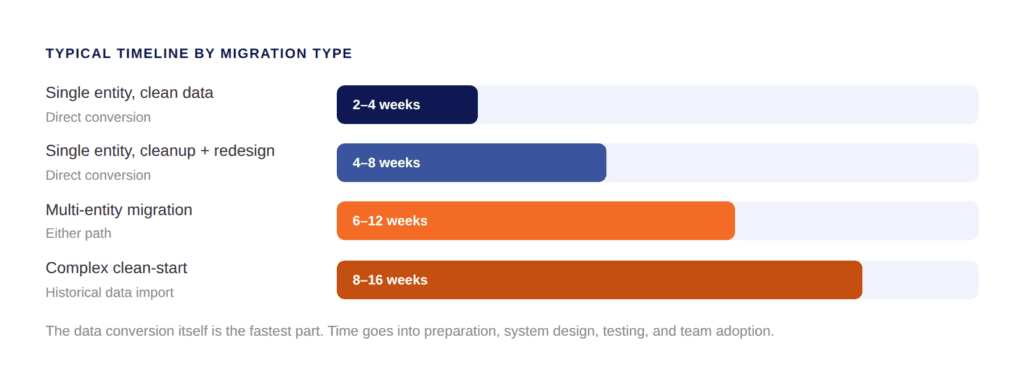
Whether you go with a direct conversion or a clean start, the migration follows the same core sequence. Skipping steps, especially the early ones, is where most problems originate.
 Step 1: Pre-Migration Assessment
Before any data moves, you need a clear picture of what you are working with. This means auditing your Desktop file for data integrity issues, duplicate records, and stale balances. You will also want to review your chart of accounts to determine whether to migrate it as-is or redesign it, document your current integrations and confirm cloud equivalents are available in Intuit Enterprise Suite, map your entity structure so the new system reflects how your business actually operates, and set a realistic go-live date with milestones worked backward from it.
This stage produces the blueprint for everything that follows. Businesses that rush past it almost always pay for it later.
Step 2: Data Cleanup
An Intuit Enterprise Suite migration will not fix bad data. It will carry bad data forward faster. Before migration begins, reconcile all bank and credit card accounts through your cutoff date, identify and merge duplicate customers, vendors, and items, clear out stale open transactions, close completed transactions, and run and save key reports from your Desktop file for post-migration comparison.
Clean data shortens your implementation timeline, reduces post-migration errors, and makes your Intuit Enterprise Suite reports trustworthy from day one. Our six-step data migration planning guide goes deeper on exactly what to clean and how to prioritize it.
Step 3: System Design
This is the step that separates a good migration from a great one, and it is where most self-managed migrations fall short.
Intuit Enterprise Suite replaces QuickBooks Desktop class tracking with a multi-dimensional reporting model. Instead of two tracking categories, you can configure up to 20 custom dimensions: department, project, location, cost center, funding source, or anything else that is meaningful to your business. This is a significant upgrade in reporting capability, but it requires intentional design. For a detailed look at how dimensions work and how to structure them, Intuit’s own multi-dimensional accounting explainer is worth reading before your design session.
System design decisions at this stage include your dimension architecture, chart of accounts structure, entity hierarchy for consolidation reporting, user roles and permissions per entity, and workflow automation for approvals, recurring transactions, and bank feeds. Decisions made during system design are difficult to reverse after go-live. For a deeper look at account structure specifically, our chart of accounts migration guide walks through the full redesign process.
Step 4: Data Migration
With clean data and a clear system design in place, the actual data migration can proceed. For a direct conversion, Intuit’s migration tool handles the conversion, and your OOTB team reviews the output and corrects any mapping errors. For a clean start, historical data is imported as structured journal entries, lists are loaded, and open transactions are entered as of your go-live date.
Either way, this step includes a full review of migrated data against your Desktop records. No discrepancy is too small to investigate at this stage.
Step 5: Testing and Validation
Before anyone in your organization starts working in the new system, the migrated data needs to be verified. Testing should cover your balance sheet comparison between Desktop and Intuit Enterprise Suite as of your cutover date, a profit and loss comparison for the current period, accounts receivable and accounts payable aging, bank reconciliation confirmation, open transaction verification, and user access testing.
Do not skip this step because the go-live date is approaching. A known discrepancy is always easier to fix before go-live than after your team has started entering new transactions.
Step 6: Go-Live and Post-Migration Support
Go-live is not the end of the migration. It is the beginning of adoption. The first few weeks in a new system are critical, and your team will need support as they build new habits and workflows.
Plan for role-specific training before go-live rather than a single all-hands session, a defined process for flagging and resolving questions in the first 30 days, a parallel period where Desktop is available in read-only mode for reference, and a post-migration review at 30 and 60 days to assess adoption and address any configuration adjustments. Our Intuit Enterprise Suite training page covers how OOTB structures post-go-live training so adoption actually sticks.
For a broader view of implementation as a whole, our Intuit Enterprise Suite implementation best practices guide covers the full process from readiness assessment through ongoing optimization.
What Makes the Desktop-to-IES Migration Different
Most migration guides treat all QuickBooks migrations the same way. The QuickBooks Desktop to Intuit Enterprise Suite migration has a few characteristics that make it genuinely distinct.
It Is Not a Simple Upgrade
When you upgrade from Desktop Pro to Desktop Enterprise, the file format is compatible and most of your setup carries over. Moving to Intuit Enterprise Suite is a platform change. QuickBooks Desktop is a local, file-based system. Intuit Enterprise Suite is a cloud-native platform with a fundamentally different architecture. The data converts, but the structure needs to be reconsidered rather than simply replicated.
Your Reporting Model Changes
If you have been using classes and locations in Desktop, you will move to dimensions in Intuit Enterprise Suite. Dimensions are more powerful and more flexible, but they need to be configured deliberately. Importing your existing class structure directly is possible, but it is rarely the best outcome. The migration is the right moment to design your reporting model for where your business is going, not where it has been. If you manage multiple entities, our post on multi-entity accounting with Intuit Enterprise Suite explains how the consolidation model works in practice.
Your Integrations Need to Be Reconnected
Any third-party integrations connected to your Desktop file will need to be evaluated for cloud compatibility and reconnected or replaced. Most major business tools have cloud-native integrations with Intuit Enterprise Suite, including payroll, payments, CRM, and project management platforms. If you are relying on integrations that do not have cloud equivalents, this needs to be scoped before your migration date.
Moving Average Cost Inventory Can Be Preserved
This is a detail that matters significantly for businesses managing inventory. Historically, migrating from Desktop meant accepting a switch to FIFO costing. Intuit Enterprise Suite now supports the preservation of Moving Average Cost valuations from Desktop, which avoids disrupting your inventory cost history and maintains financial continuity. If this applies to your business, confirm it is configured correctly during the data migration step.
Common Mistakes That Derail Desktop-to-IES Migrations
Most migration problems are preventable. These are the patterns that show up consistently when migrations run into trouble.
According to Panorama Consulting’s annual ERP research, the three most consistent causes of implementation failure are poor data quality, inadequate change management, and inexperienced implementation teams. All three are fully within your control to address before migration begins.
Starting without a data audit. The single most common cause of post-migration problems is migrating a messy Desktop file. Duplicate records, stale balances, and unreconciled accounts create reporting errors that are much harder to trace after migration than before.
Treating the migration as a direct copy. The goal of a QuickBooks Desktop to Intuit Enterprise Suite migration is not to recreate Desktop in a cloud environment. It is to build a better system on a stronger foundation. Teams that carry over every class and workaround from Desktop often end up with an Intuit Enterprise Suite setup that does not take advantage of what the platform can actually do.
Underestimating training time. Intuit Enterprise Suite has a familiar interface, and many Desktop users adapt quickly. But dimensions, multi-entity reporting, and workflow automation are genuinely new concepts. Training should happen before go-live, not after the team is already in the system.
Skipping the validation period. The temptation to compress timelines is real, especially when a go-live date has been communicated internally. Post-migration discrepancies are harder to diagnose once new transactions have been entered.
Businesses that invest in the preparation and design phase tend to have much shorter adoption curves and fewer corrective engagements in the first six months post-go-live.
How OOTB Supports QuickBooks Desktop to Intuit Enterprise Suite Migrations
Out of the Box Technology has completed thousands of QuickBooks migrations across Desktop, QuickBooks Online Advanced, NetSuite, Sage, and other platforms. Our Intuit Enterprise Suite implementation partner engagements are led by accounting professionals, not just systems implementers.
On a typical Desktop-to-IES engagement, our team handles the pre-migration Desktop file audit and data cleanup, migration path recommendation, chart of accounts design and dimension architecture, entity structure mapping and configuration, data migration and post-migration validation, integration setup and reconnection, user role configuration and access controls, team training before and after go-live, and post-migration support and optimization.
Migration from QuickBooks Desktop is often available at no additional cost for eligible customers when paired with an Intuit Enterprise Suite subscription and a required consultation.
Ready to find out what your upgrade should actually look like?
Schedule a 30-minute Intuit Enterprise Suite Upgrade Assessment with our team. We’ll review your current setup and have a written proposal back to you within one week.
Related Reading
-
- Step-by-Step Guide to Preparing for an Intuit Enterprise Suite Migration
- Migrating from QuickBooks Online Advanced to Intuit Enterprise Suite
- Intuit Enterprise Suite Implementation Best Practices
- What Is Intuit Enterprise Suite? A Guide for Growing Businesses
- Intuit Enterprise Suite Spring 2026: What Is New
Frequently Asked Questions
Can I migrate from any version of QuickBooks Desktop to Intuit Enterprise Suite?
Will I lose my transaction history when I migrate from QuickBooks Desktop to Intuit Enterprise Suite?
How long does a QuickBooks Desktop to Intuit Enterprise Suite migration take?
What is the difference between a direct conversion and a clean-start migration?
What happens to my QuickBooks Desktop classes and locations when I migrate?
Can I keep my Moving Average Cost inventory valuations when migrating from QuickBooks Desktop?
Does OOTB manage the full QuickBooks Desktop to Intuit Enterprise Suite migration process?
Talk to An Advisor Today
You might also like these articles
Year-End Tax Planning for Businesses: 2026 Changes and December 31 Moves
Read More
Year-end tax planning gives a business owner a short window to lower the 2026 tax bill, and most of that window closes at midnight on December 31. This year the window matters more than usual. The One Big Beautiful Bill Act, signed in July 2025, changed how equipment, research costs, owner income, and charitable gifts…
5 Signs You’ve Outgrown QuickBooks for Intuit Enterprise Suite
Read More
You may have outgrown QuickBooks long before the software gives you any warning. The bank feeds still sync and the reports still run, so nothing looks broken. Meanwhile, your team spends more of each month working around the system than working in it. That gap widens one spreadsheet at a time. This post covers five…
Intuit Enterprise Suite vs QuickBooks Enterprise and QuickBooks Online Advanced
Read More
Three Intuit products regularly appear on the same shortlist, and they are built for three different jobs. QuickBooks Desktop Enterprise is a mature on-premise system with deep inventory capability. QuickBooks Online Advanced is cloud accounting for a growing single company. Intuit Enterprise Suite is a cloud platform with ERP-level multi-entity and dimensional financial management. The…
Is Intuit Enterprise Suite Worth It? ROI and Total Cost of Ownership Explained
Read More
Intuit does not publish a list price for Intuit Enterprise Suite. Every quote is built around your entity count, user count, and the capabilities you turn on, which means you cannot answer the worth-it question from a pricing page the way you can with QuickBooks Online. That makes the evaluation harder than it needs to…
Claim your complimentary bookeeping assesment today
Request your free bookkeeping quote today and let us simplify your financial management. Our expert team at QuickBooks is ready to tailor a solution to your needs.
September 23, 2026
Intuit Enterprise Suite vs QuickBooks Enterprise and QuickBooks Online Advanced
Three Intuit products regularly appear on the same shortlist, and they are built for three different jobs. QuickBooks Desktop Enterprise is a mature on-premise system with deep inventory capability. QuickBooks Online Advanced is cloud accounting for a growing single company. Intuit Enterprise Suite is a cloud platform with ERP-level multi-entity and dimensional financial management.
The difficulty in an Intuit Enterprise Suite vs QuickBooks comparison is that all three share an interface family and a brand, so the differences look smaller on a screen than they are in practice. What separates them is how much complexity each one can carry before your team starts building workarounds.
The Short Answer
Stay on QuickBooks Online Advanced if you run one company, need one reporting dimension, and close without heavy spreadsheet work. Stay on QuickBooks Desktop Enterprise if serialized or assembly inventory sits at the center of your operation. Move to Intuit Enterprise Suite when you need multiple entities, multiple reporting dimensions, or consolidated visibility that does not depend on a monthly spreadsheet.
That framing holds for most businesses. The complication is that companies rarely sit cleanly in one box, and the cost of staying in the wrong one accumulates quietly rather than announcing itself.
The rest of this piece covers how to tell which of those describes you.
Intuit Enterprise Suite vs QuickBooks: The Comparison Table
QuickBooks Desktop Enterprise |
QuickBooks Online Advanced |
Intuit Enterprise Suite |
|
|---|---|---|---|
Deployment |
On-premise or hosted | Cloud | Cloud |
Entities |
One company file per entity | One company file per entity | More than 200 entities, one login |
Users |
Up to 40 simultaneous | Up to 25 | Scales into the hundreds |
Reporting dimensions |
Classes and locations | One dimension | Up to 20, five levels of hierarchy |
Consolidation |
Manual, outside the system | Manual, outside the system | Real time, in the system |
Intercompany eliminations |
Manual worksheet | Manual worksheet | Automatic at transaction level |
Inventory |
Deepest of the three, Advanced Inventory on Platinum | Basic | Standard, no warehouse management |
AI capability |
None | Rule-based automation and assistive tools | Finance, Accounting, Payments and Project Management agents |
Approval workflows |
Predefined approval rules | Basic | Up to five parallel approvers, dimension-triggered |
Payroll and HR |
Add-on, per-employee fees on Gold and Platinum | Add-on | Included in the platform |
Product direction |
Supported, no new non-Enterprise Desktop versions | Actively developed | Where Intuit ships new capability first |
Where QuickBooks Desktop Enterprise Still Wins
Desktop Enterprise remains the strongest inventory product Intuit sells. Advanced Inventory on the Platinum tier handles serialized tracking, bin locations, and assemblies at a depth neither cloud product matches. It supports up to 40 simultaneous users. Role-based permissions are detailed, built from a long list of individual work activities that can be assigned per user. For a manufacturer or distributor whose core constraint is stock, that capability is difficult to replace anywhere in the cloud.
The ground underneath it has been shifting, though. Intuit stopped selling new Pro Plus, Premier Plus, and Mac Plus subscriptions to United States customers after September 2024. Enterprise is now the only Desktop product open to new buyers. Desktop versions also follow a three-year support lifecycle, and support for the 2023 versions ended on 31 May 2026. When support ends the software still opens, but payroll updates, bank feeds, and payment processing stop working.
Pricing has moved as well. Enterprise tiers rose at the start of 2026, and Gold and Platinum customers now carry a per-employee payroll fee charged monthly. That fee applies per company file. For a group running several Desktop files, the structure compounds quickly.
Where QuickBooks Online Advanced Still Wins
Advanced is the right answer for a large number of businesses, and the comparison should say so plainly. It is cloud native, quick to deploy, and familiar to almost any bookkeeper you hire. It supports up to 25 users, automated workflows, and custom role permissions. For a single company with clean reporting requirements, nothing here needs replacing, and moving would add cost without adding capability you would use.
The ceiling is structural rather than a matter of features. Advanced supports one company file per entity and one reporting dimension. A business that needs to see the same revenue by region, by service line, and by customer segment has run out of room. The usual response is an export to a spreadsheet, and that spreadsheet tends to become permanent.
Cost has become part of this conversation too. Intuit has raised QuickBooks Online pricing several times in the past two years, and the Advanced tier absorbed the steepest of those increases in 2026. The price applies per company file. A group running three entities pays it three times over and still consolidates by hand.
What You Are Actually Buying With Intuit Enterprise Suite
Intuit Enterprise Suite is a different category of product rather than a larger version of the other two. A single login covers more than 200 entities with a standardized chart of accounts. Intercompany entries post to both sides and import in bulk, eliminations run automatically at the transaction level, and consolidated financial statements assemble in real time.
Reporting is the other half of the difference. The platform supports up to 20 custom dimensions, each with unlimited values and five levels of hierarchy. Dimensions apply at the transaction line level, including accounts payable and receivable. They also work across entities, so a group can report by region or program across every company at once. Forecasting runs down to the dimension, projecting as far as three years out.
The platform also carries four AI agents covering finance, accounting, payments, and project management, along with approval workflows that can be triggered by dimension. Payroll, HR, payments, bill pay, and project profitability sit inside the same system rather than alongside it.
Why Intuit Enterprise Suite Usually Wins This Comparison
Both QuickBooks products raise a ceiling. They give you more users, more features, and more reporting depth inside the same basic model, where your team still assembles the answers by hand at the end of every month. Intuit Enterprise Suite changes what the system produces on its own, and that difference compounds with every close.
The adoption risk is also lower than the capability level suggests. Moving to NetSuite or Sage Intacct asks your controller to learn an unfamiliar system while still closing the books each month. Moving to Intuit Enterprise Suite asks that same person to learn new capability inside an interface they already know. That is the main reason these implementations run in weeks while traditional ERP projects run in quarters.
Product direction matters more than most comparisons allow for. Intuit now ships new capability into Intuit Enterprise Suite first, including agentic AI, dimensional reporting, consolidated dashboards, and the industry editions. The distance between this platform and the other two widens with each release whether or not you do anything. Payroll, HR, payments, bill pay, and project profitability also sit inside the platform, which usually reduces the number of finance vendors your team manages and the number of integrations somebody has to maintain.
What the Return Data Suggests
There is supporting evidence, with a caveat attached. Forrester Consulting, in a study commissioned by Intuit, projected a 299% three-year return for a composite ten-entity organization, with a range of 128% to 467% across scenarios. Vendor-commissioned research deserves scrutiny, and the width of that range is the useful part. It shows that the return tracks how much manual work your current setup requires rather than how impressive the software is.
The asymmetry is worth naming before you decide. Moving a year early costs you capability you will not fully use yet. Moving a year late usually means re-platforming during an acquisition, an audit, or a support deadline, at the point when your team has the least capacity to absorb it.
The Triggers That Decide It
Most businesses do not choose a new system because of a feature comparison. They choose one because something specific broke.
The most common trigger is a second entity. A company acquires one, opens one in a new state, or creates one for a new service line. The spreadsheet consolidation begins that month, and it never gets smaller.
The second trigger is a reporting request leadership cannot get answered. It usually sounds like a request for margin by region and by service line, delivered in a meeting where nobody can produce it. The third is a Desktop support date arriving, which converts a strategic decision into an urgent one and removes your ability to plan the timing.
If none of those has happened, staying put is a reasonable choice. If two of them have, the cost of waiting is already showing up in your close.
What the Move Involves
Moving from either QuickBooks product to Intuit Enterprise Suite is a design project before it is a data project. The chart of accounts and dimension architecture you build during implementation decide whether the reporting holds up for years. Get that wrong and you rebuild it within eighteen months, usually while the system is live. Migration from Desktop carries its own considerations around inventory valuation and transaction history, which our Desktop migration walkthrough covers in detail.
The adoption curve is the part that surprises people. Because the platform sits on a QuickBooks foundation, teams are learning new capability rather than a new system, which is why implementations here are usually measured in weeks rather than quarters.
How We Can Help
Not sure which of the three fits? Out of the Box works across all three products and will tell you when staying put is the right call. Our guide to choosing an Intuit Enterprise Suite implementation partner covers what happens once the decision is made.
If your team is weighing a move to Intuit Enterprise Suite or wants help putting these new features to work, reach out to the OOTB team to talk through next steps.
Related reading:
- Is Intuit Enterprise Suite Worth It? ROI and Total Cost of Ownership Explained
- Intuit Enterprise Suite Multi-Entity Accounting Explained
- What Is Intuit Enterprise Suite? A Guide for Growing Businesses
- QuickBooks Desktop to Intuit Enterprise Suite Migration: A Complete Walkthrough
Frequently Asked Questions
What is the difference between Intuit Enterprise Suite and QuickBooks Online Advanced?
Should I move from QuickBooks Desktop Enterprise to Intuit Enterprise Suite?
Is QuickBooks Desktop being discontinued?
How many users does each product support?
Can QuickBooks handle multiple entities without Intuit Enterprise Suite?
What usually triggers a move to Intuit Enterprise Suite?
Does OOTB support all three QuickBooks products?
Talk to An Advisor Today
You might also like these articles
Year-End Tax Planning for Businesses: 2026 Changes and December 31 Moves
Read More
Year-end tax planning gives a business owner a short window to lower the 2026 tax bill, and most of that window closes at midnight on December 31. This year the window matters more than usual. The One Big Beautiful Bill Act, signed in July 2025, changed how equipment, research costs, owner income, and charitable gifts…
QuickBooks Desktop to Intuit Enterprise Suite Migration: A Complete Walkthrough
Read More
If you have been running your business on QuickBooks Desktop for years, the idea of migrating to Intuit Enterprise Suite can feel like a significant lift. There are more moving parts than a standard software upgrade, and the stakes are high when your financial data is involved. But here is the reality: the QuickBooks Desktop…
5 Signs You’ve Outgrown QuickBooks for Intuit Enterprise Suite
Read More
You may have outgrown QuickBooks long before the software gives you any warning. The bank feeds still sync and the reports still run, so nothing looks broken. Meanwhile, your team spends more of each month working around the system than working in it. That gap widens one spreadsheet at a time. This post covers five…
Is Intuit Enterprise Suite Worth It? ROI and Total Cost of Ownership Explained
Read More
Intuit does not publish a list price for Intuit Enterprise Suite. Every quote is built around your entity count, user count, and the capabilities you turn on, which means you cannot answer the worth-it question from a pricing page the way you can with QuickBooks Online. That makes the evaluation harder than it needs to…
Claim your complimentary bookeeping assesment today
Request your free bookkeeping quote today and let us simplify your financial management. Our expert team at QuickBooks is ready to tailor a solution to your needs.
September 15, 2026
Is Intuit Enterprise Suite Worth It? ROI and Total Cost of Ownership Explained
Intuit does not publish a list price for Intuit Enterprise Suite. Every quote is built around your entity count, user count, and the capabilities you turn on, which means you cannot answer the worth-it question from a pricing page the way you can with QuickBooks Online.
That makes the evaluation harder than it needs to be. Finance leaders end up comparing a custom quote against a number they already know, which is usually their current subscription. The new figure looks large next to the old one. But the comparison is incomplete, because it weighs the full cost of the new system against only the visible cost of the current one. The hours your team spends bridging the gaps in your existing setup never appear on an invoice, so they rarely appear in the business case either.
This piece lays out what Intuit Enterprise Suite tends to cost, what belongs on both sides of a real total cost of ownership calculation, and what the available Intuit Enterprise Suite ROI research actually says.
What Intuit Enterprise Suite Costs
Pricing is contract-based and sold through Intuit’s sales organization, so there is no published rate card to work from. What you can plan around is the shape of the quote rather than the figure. It scales with the number of entities you consolidate and the number of users who need access. It also scales with the capabilities you switch on, including payroll, project management, and the deeper reporting tools.
What that means in practice is a product positioned well above QuickBooks Online Advanced and well below a traditional mid-market ERP. Intuit’s own Intuit Enterprise Suite pricing page directs buyers to a tailored consultation. The only reliable number is the one on your quote. Third-party estimates circulate freely, and the spread between them is wide enough that planning against one is a mistake.
The Comparison That Changes the Answer
Most businesses evaluating Intuit Enterprise Suite are weighing it against one of two things. Either they are looking up from QuickBooks Online Advanced, or they are looking down from a traditional ERP quote. Both comparisons shifted in 2026.
QuickBooks Online Advanced has increased in price several times over the past two years, with the steepest of those increases landing in 2026. That price applies per company file. A group running three entities on Advanced pays it three times over. That group still has no consolidation, no intercompany automation, and one reporting dimension. Add the tools bridging those gaps and the totals move closer together than most finance leaders expect. In some configurations they converge, which changes the Intuit Enterprise Suite ROI question from whether you can afford the move to what you are already paying for the workarounds.
The view from the other direction has always favored Intuit. NetSuite, Sage Intacct, and Dynamics 365 Business Central deliver comparable multi-entity capability at a materially higher annual cost. Their implementation timelines are measured in quarters rather than weeks. Pull current figures for whichever products sit on your shortlist, because pricing across this category has moved repeatedly and any number older than a quarter is unreliable.
The Cost Side Most Quotes Leave Out
A subscription figure is not a total cost of ownership. The number that belongs in your model includes the work required to make the system produce the reports you need.
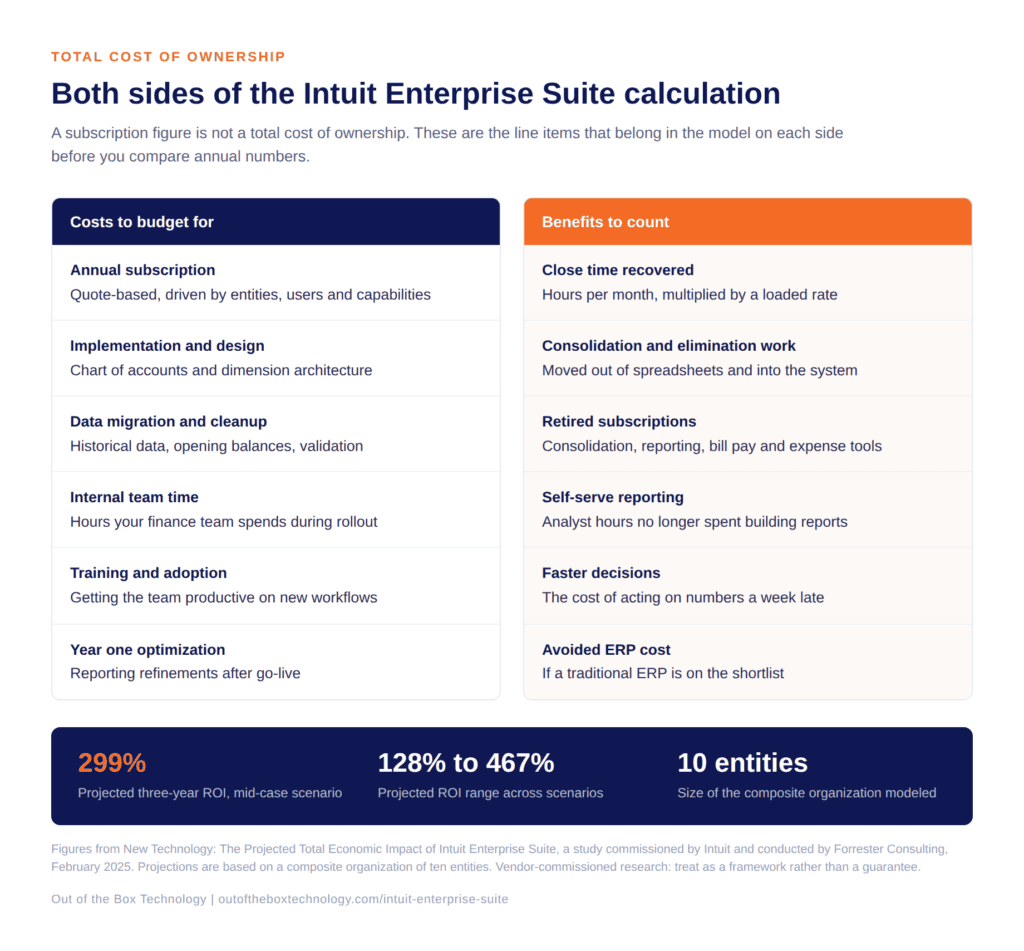 On the cost side, budget for implementation and system design, data migration and cleanup, and internal team time during the rollout. Add training and whatever ongoing optimization you expect in year one. Design work is the line item most often underestimated. Your chart of accounts and dimension architecture determine whether the reporting still works in five years, or whether it needs rebuilding in eighteen months.
The credit side of the same ledger gets forgotten just as often. Many groups arrive at Intuit Enterprise Suite carrying a consolidation tool, a separate reporting or dashboard subscription, a bill pay platform, an expense tool, and a payroll add-on. Several of those become redundant. Subtract them before you compare annual figures. The fair comparison is against your whole finance technology stack rather than against your accounting subscription alone.
There is one more line worth adding, and it is the least comfortable one. If your close currently depends on a spreadsheet that only one person understands, that dependency is a cost. It shows up as key person risk, as audit friction, and eventually as a rebuild when that person changes roles.
What the Intuit Enterprise Suite ROI Data Shows
Forrester Consulting produced a projected Total Economic Impact study on Intuit Enterprise Suite, commissioned by Intuit in February 2025. Vendor-commissioned research deserves appropriate skepticism, and the value here is the framework rather than the headline.
The study modeled a composite parent company made up of ten entities across North America. It projected a 299% return on investment over three years in the mid-case scenario. The reported range across scenarios ran from 128% to 467%. That spread is wide, which is the point. Intuit Enterprise Suite ROI depends heavily on how much manual work your current setup requires. A business with a clean close will land toward the bottom of that range. Forrester published a second study focused on accounting firms in September 2025.
What matters for your own model is where those benefits came from. Consolidation work moved out of spreadsheets and into the system. Close cycles shortened, which shortened the delay between an operational problem occurring and leadership seeing it. Redundant technology subscriptions came off the books. Reporting that previously required an analyst became self-serve.
Turning That Into Your Own Number
Start with hours. Count the days your team spends on consolidation, eliminations, intercompany reconciliation, and report building each month, then apply a loaded hourly rate. Multiply by twelve. That figure alone often covers a meaningful share of the annual subscription.
Next, count the subscriptions you would retire and add their annual cost to the benefit side. Then estimate the cost of decisions made late because the numbers arrived late. That one is harder to quantify, and it is usually the largest item on the list. Finally, if a traditional ERP sits on your shortlist, the avoided implementation cost belongs in the model as well.
One caution on the exercise. Build the model on your current volumes rather than your projected ones. A business case that only works at next year’s revenue is a forecast rather than a justification, and it tends to fall apart at the first quarter that misses plan.
When the Answer Is No
Some businesses should stay where they are. Picture a company with one entity, one reporting dimension, fewer than twenty-five users, and a three-day close that requires no spreadsheet gymnastics. QuickBooks Online Advanced is doing its job there, and the return on a move would be thin.
Timing matters too. A group in the middle of an acquisition, a system consolidation, or a finance leadership change has limited capacity for a platform project. The return does not disappear in those situations, but it arrives later than the model suggests, and the implementation carries more risk.
The same applies if your complexity sits in manufacturing or warehouse operations. Intuit Enterprise Suite does not carry deep manufacturing or warehouse management functionality. A business whose main constraint lives there will get better value from a platform built for that work, and the Intuit Enterprise Suite ROI case will be hard to make.
The Question Worth Asking Your Team
Ask your controller how many hours the last close consumed, and how many of those hours produced a number that a system could have produced instead. That figure, multiplied across a year, is the real comparison point for any Intuit Enterprise Suite ROI calculation.
How We Can Help
Want that number for your business? Out of the Box builds the cost and benefit picture with you before anyone talks about implementation, including the honest version where staying put is the right call. Our guide to choosing an Intuit Enterprise Suite implementation partner covers what the work involves once the numbers make sense.
If your team is weighing a move to Intuit Enterprise Suite or wants help putting these new features to work, reach out to the OOTB team to talk through next steps.
Related reading:
- What Is Intuit Enterprise Suite? A Guide for Growing Businesses
- Intuit Enterprise Suite Multi-Entity Accounting Explained
- QuickBooks Desktop to Intuit Enterprise Suite Migration: A Complete Walkthrough
- Streamlining Multi-Entity Accounting with Intuit Enterprise Suite
Frequently Asked Questions
Is Intuit Enterprise Suite worth the cost?
How is Intuit Enterprise Suite priced?
What is the total cost of ownership for Intuit Enterprise Suite?
Is Intuit Enterprise Suite cheaper than QuickBooks Online Advanced?
Is the Forrester ROI study on Intuit Enterprise Suite independent?
How do I calculate Intuit Enterprise Suite ROI for my own business?
When is Intuit Enterprise Suite not worth it?
Talk to An Advisor Today
You might also like these articles
Year-End Tax Planning for Businesses: 2026 Changes and December 31 Moves
Read More
Year-end tax planning gives a business owner a short window to lower the 2026 tax bill, and most of that window closes at midnight on December 31. This year the window matters more than usual. The One Big Beautiful Bill Act, signed in July 2025, changed how equipment, research costs, owner income, and charitable gifts…
QuickBooks Desktop to Intuit Enterprise Suite Migration: A Complete Walkthrough
Read More
If you have been running your business on QuickBooks Desktop for years, the idea of migrating to Intuit Enterprise Suite can feel like a significant lift. There are more moving parts than a standard software upgrade, and the stakes are high when your financial data is involved. But here is the reality: the QuickBooks Desktop…
5 Signs You’ve Outgrown QuickBooks for Intuit Enterprise Suite
Read More
You may have outgrown QuickBooks long before the software gives you any warning. The bank feeds still sync and the reports still run, so nothing looks broken. Meanwhile, your team spends more of each month working around the system than working in it. That gap widens one spreadsheet at a time. This post covers five…
Intuit Enterprise Suite vs QuickBooks Enterprise and QuickBooks Online Advanced
Read More
Three Intuit products regularly appear on the same shortlist, and they are built for three different jobs. QuickBooks Desktop Enterprise is a mature on-premise system with deep inventory capability. QuickBooks Online Advanced is cloud accounting for a growing single company. Intuit Enterprise Suite is a cloud platform with ERP-level multi-entity and dimensional financial management. The…
Claim your complimentary bookeeping assesment today
Request your free bookkeeping quote today and let us simplify your financial management. Our expert team at QuickBooks is ready to tailor a solution to your needs.
Talk to An Advisor Today
You might also like these articles
Year-End Tax Planning for Businesses: 2026 Changes and December 31 Moves
Read More
Year-end tax planning gives a business owner a short window to lower the 2026 tax bill, and most of that window closes at midnight on December 31. This year the window matters more than usual. The One Big Beautiful Bill Act, signed in July 2025, changed how equipment, research costs, owner income, and charitable gifts…
QuickBooks Desktop to Intuit Enterprise Suite Migration: A Complete Walkthrough
Read More
If you have been running your business on QuickBooks Desktop for years, the idea of migrating to Intuit Enterprise Suite can feel like a significant lift. There are more moving parts than a standard software upgrade, and the stakes are high when your financial data is involved. But here is the reality: the QuickBooks Desktop…
5 Signs You’ve Outgrown QuickBooks for Intuit Enterprise Suite
Read More
You may have outgrown QuickBooks long before the software gives you any warning. The bank feeds still sync and the reports still run, so nothing looks broken. Meanwhile, your team spends more of each month working around the system than working in it. That gap widens one spreadsheet at a time. This post covers five…
Intuit Enterprise Suite vs QuickBooks Enterprise and QuickBooks Online Advanced
Read More
Three Intuit products regularly appear on the same shortlist, and they are built for three different jobs. QuickBooks Desktop Enterprise is a mature on-premise system with deep inventory capability. QuickBooks Online Advanced is cloud accounting for a growing single company. Intuit Enterprise Suite is a cloud platform with ERP-level multi-entity and dimensional financial management. The…
Claim your complimentary bookeeping assesment today
Request your free bookkeeping quote today and let us simplify your financial management. Our expert team at QuickBooks is ready to tailor a solution to your needs.
Talk to An Advisor Today
You might also like these articles
Year-End Tax Planning for Businesses: 2026 Changes and December 31 Moves
Read More
Year-end tax planning gives a business owner a short window to lower the 2026 tax bill, and most of that window closes at midnight on December 31. This year the window matters more than usual. The One Big Beautiful Bill Act, signed in July 2025, changed how equipment, research costs, owner income, and charitable gifts…
QuickBooks Desktop to Intuit Enterprise Suite Migration: A Complete Walkthrough
Read More
If you have been running your business on QuickBooks Desktop for years, the idea of migrating to Intuit Enterprise Suite can feel like a significant lift. There are more moving parts than a standard software upgrade, and the stakes are high when your financial data is involved. But here is the reality: the QuickBooks Desktop…
5 Signs You’ve Outgrown QuickBooks for Intuit Enterprise Suite
Read More
You may have outgrown QuickBooks long before the software gives you any warning. The bank feeds still sync and the reports still run, so nothing looks broken. Meanwhile, your team spends more of each month working around the system than working in it. That gap widens one spreadsheet at a time. This post covers five…
Intuit Enterprise Suite vs QuickBooks Enterprise and QuickBooks Online Advanced
Read More
Three Intuit products regularly appear on the same shortlist, and they are built for three different jobs. QuickBooks Desktop Enterprise is a mature on-premise system with deep inventory capability. QuickBooks Online Advanced is cloud accounting for a growing single company. Intuit Enterprise Suite is a cloud platform with ERP-level multi-entity and dimensional financial management. The…
Claim your complimentary bookeeping assesment today
Request your free bookkeeping quote today and let us simplify your financial management. Our expert team at QuickBooks is ready to tailor a solution to your needs.
Talk to An Advisor Today
You might also like these articles
Year-End Tax Planning for Businesses: 2026 Changes and December 31 Moves
Read More
Year-end tax planning gives a business owner a short window to lower the 2026 tax bill, and most of that window closes at midnight on December 31. This year the window matters more than usual. The One Big Beautiful Bill Act, signed in July 2025, changed how equipment, research costs, owner income, and charitable gifts…
QuickBooks Desktop to Intuit Enterprise Suite Migration: A Complete Walkthrough
Read More
If you have been running your business on QuickBooks Desktop for years, the idea of migrating to Intuit Enterprise Suite can feel like a significant lift. There are more moving parts than a standard software upgrade, and the stakes are high when your financial data is involved. But here is the reality: the QuickBooks Desktop…
5 Signs You’ve Outgrown QuickBooks for Intuit Enterprise Suite
Read More
You may have outgrown QuickBooks long before the software gives you any warning. The bank feeds still sync and the reports still run, so nothing looks broken. Meanwhile, your team spends more of each month working around the system than working in it. That gap widens one spreadsheet at a time. This post covers five…
Intuit Enterprise Suite vs QuickBooks Enterprise and QuickBooks Online Advanced
Read More
Three Intuit products regularly appear on the same shortlist, and they are built for three different jobs. QuickBooks Desktop Enterprise is a mature on-premise system with deep inventory capability. QuickBooks Online Advanced is cloud accounting for a growing single company. Intuit Enterprise Suite is a cloud platform with ERP-level multi-entity and dimensional financial management. The…
Claim your complimentary bookeeping assesment today
Request your free bookkeeping quote today and let us simplify your financial management. Our expert team at QuickBooks is ready to tailor a solution to your needs.
Talk to An Advisor Today
You might also like these articles
Year-End Tax Planning for Businesses: 2026 Changes and December 31 Moves
Read More
Year-end tax planning gives a business owner a short window to lower the 2026 tax bill, and most of that window closes at midnight on December 31. This year the window matters more than usual. The One Big Beautiful Bill Act, signed in July 2025, changed how equipment, research costs, owner income, and charitable gifts…
QuickBooks Desktop to Intuit Enterprise Suite Migration: A Complete Walkthrough
Read More
If you have been running your business on QuickBooks Desktop for years, the idea of migrating to Intuit Enterprise Suite can feel like a significant lift. There are more moving parts than a standard software upgrade, and the stakes are high when your financial data is involved. But here is the reality: the QuickBooks Desktop…
5 Signs You’ve Outgrown QuickBooks for Intuit Enterprise Suite
Read More
You may have outgrown QuickBooks long before the software gives you any warning. The bank feeds still sync and the reports still run, so nothing looks broken. Meanwhile, your team spends more of each month working around the system than working in it. That gap widens one spreadsheet at a time. This post covers five…
Intuit Enterprise Suite vs QuickBooks Enterprise and QuickBooks Online Advanced
Read More
Three Intuit products regularly appear on the same shortlist, and they are built for three different jobs. QuickBooks Desktop Enterprise is a mature on-premise system with deep inventory capability. QuickBooks Online Advanced is cloud accounting for a growing single company. Intuit Enterprise Suite is a cloud platform with ERP-level multi-entity and dimensional financial management. The…
Claim your complimentary bookeeping assesment today
Request your free bookkeeping quote today and let us simplify your financial management. Our expert team at QuickBooks is ready to tailor a solution to your needs.
Talk to An Advisor Today
You might also like these articles
Year-End Tax Planning for Businesses: 2026 Changes and December 31 Moves
Read More
Year-end tax planning gives a business owner a short window to lower the 2026 tax bill, and most of that window closes at midnight on December 31. This year the window matters more than usual. The One Big Beautiful Bill Act, signed in July 2025, changed how equipment, research costs, owner income, and charitable gifts…
QuickBooks Desktop to Intuit Enterprise Suite Migration: A Complete Walkthrough
Read More
If you have been running your business on QuickBooks Desktop for years, the idea of migrating to Intuit Enterprise Suite can feel like a significant lift. There are more moving parts than a standard software upgrade, and the stakes are high when your financial data is involved. But here is the reality: the QuickBooks Desktop…
5 Signs You’ve Outgrown QuickBooks for Intuit Enterprise Suite
Read More
You may have outgrown QuickBooks long before the software gives you any warning. The bank feeds still sync and the reports still run, so nothing looks broken. Meanwhile, your team spends more of each month working around the system than working in it. That gap widens one spreadsheet at a time. This post covers five…
Intuit Enterprise Suite vs QuickBooks Enterprise and QuickBooks Online Advanced
Read More
Three Intuit products regularly appear on the same shortlist, and they are built for three different jobs. QuickBooks Desktop Enterprise is a mature on-premise system with deep inventory capability. QuickBooks Online Advanced is cloud accounting for a growing single company. Intuit Enterprise Suite is a cloud platform with ERP-level multi-entity and dimensional financial management. The…
Claim your complimentary bookeeping assesment today
Request your free bookkeeping quote today and let us simplify your financial management. Our expert team at QuickBooks is ready to tailor a solution to your needs.
Talk to An Advisor Today
You might also like these articles
Year-End Tax Planning for Businesses: 2026 Changes and December 31 Moves
Read More
Year-end tax planning gives a business owner a short window to lower the 2026 tax bill, and most of that window closes at midnight on December 31. This year the window matters more than usual. The One Big Beautiful Bill Act, signed in July 2025, changed how equipment, research costs, owner income, and charitable gifts…
QuickBooks Desktop to Intuit Enterprise Suite Migration: A Complete Walkthrough
Read More
If you have been running your business on QuickBooks Desktop for years, the idea of migrating to Intuit Enterprise Suite can feel like a significant lift. There are more moving parts than a standard software upgrade, and the stakes are high when your financial data is involved. But here is the reality: the QuickBooks Desktop…
5 Signs You’ve Outgrown QuickBooks for Intuit Enterprise Suite
Read More
You may have outgrown QuickBooks long before the software gives you any warning. The bank feeds still sync and the reports still run, so nothing looks broken. Meanwhile, your team spends more of each month working around the system than working in it. That gap widens one spreadsheet at a time. This post covers five…
Intuit Enterprise Suite vs QuickBooks Enterprise and QuickBooks Online Advanced
Read More
Three Intuit products regularly appear on the same shortlist, and they are built for three different jobs. QuickBooks Desktop Enterprise is a mature on-premise system with deep inventory capability. QuickBooks Online Advanced is cloud accounting for a growing single company. Intuit Enterprise Suite is a cloud platform with ERP-level multi-entity and dimensional financial management. The…
Claim your complimentary bookeeping assesment today
Request your free bookkeeping quote today and let us simplify your financial management. Our expert team at QuickBooks is ready to tailor a solution to your needs.